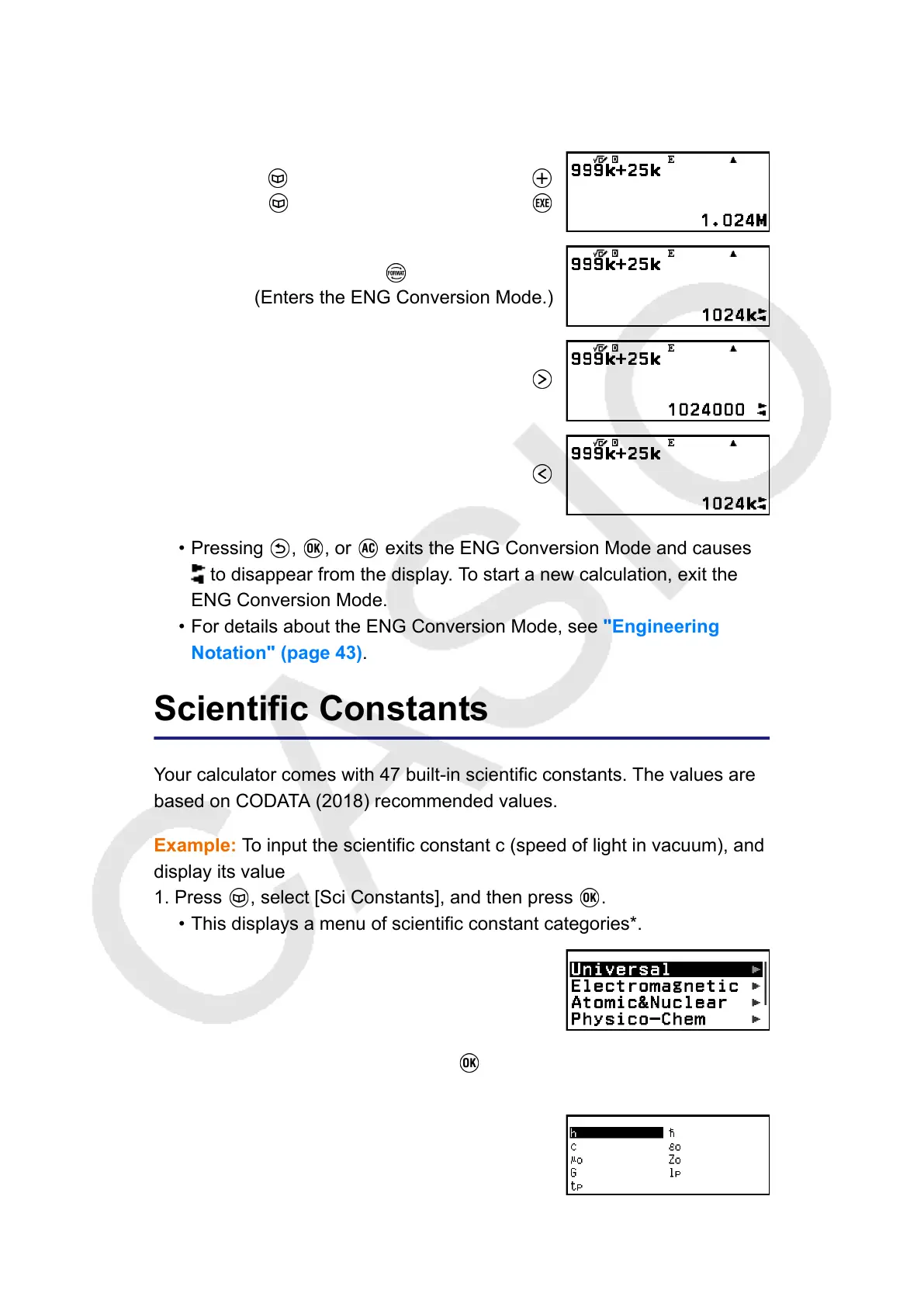
Example 2: To calculate 999k (kilo) + 25k (kilo) = 1.024M (Mega) = 1024k
(kilo) = 1024000
(Engineer Symbol: On)
999 – [Engineer Symbol] > [Kilo]
25 – [Engineer Symbol] > [Kilo]
– [ENG Notation]
(Enters the ENG Conversion Mode.)
• Pressing , , or exits the ENG Conversion Mode and causes
to disappear from the display. To start a new calculation, exit the
ENG Conversion Mode.
•
For details about the ENG Conversion Mode, see "Engineering
Notation" (page 43).
Scientific Constants
Your calculator comes with 47 built-in scientific constants. The values are
based on CODATA (2018) recommended values.
Example: To input the scientific constant c (speed of light in vacuum), and
display its value
1. Press , select [Sci Constants], and then press .
•
This displays a menu of scientific constant categories*.
2. Select [Universal], and then press .
• This displays a menu of scientific constants in the Universal category.
57



 To Next Page