Vector Calculations
Use the Vector app to perform two-dimensional and three-dimensional
vector calculations.
General Procedure for Performing a Vector
Calculation
To perform a vector calculation, use the special vector variables (VctA,
VctB, VctC, VctD) as shown in the example below.
Example 1: To calculate (1, 2) + (3, 4)
• When performing addition or subtraction of two vectors, they both must
have the same dimensions.
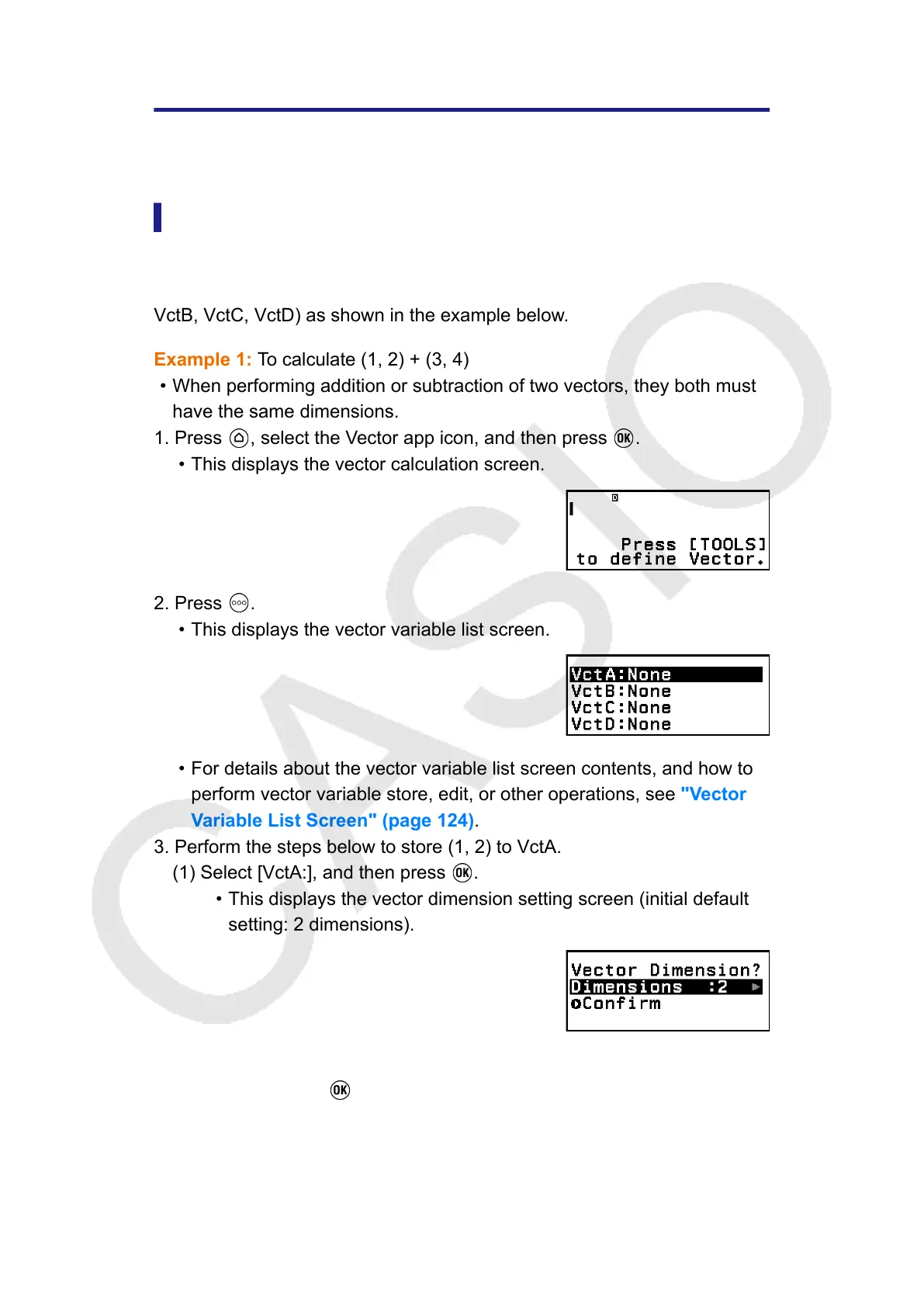
1. Press , select the Vector app icon, and then press .
• This displays the vector calculation screen.
2. Press .
• This displays the vector variable list screen.
• For details about the vector variable list screen contents, and how to
perform vector variable store, edit, or other operations, see "Vector
Variable List Screen" (page 124).
3. Perform the steps below to store (1, 2) to VctA.
(1) Select [VctA:], and then press .
• This displays the vector dimension setting screen (initial default
setting: 2 dimensions).
(2) Here, we want to store a two-dimensional vector, so select [Confirm]
and then press .
• This displays the Vector Editor for input of the two-dimensional
vector for VctA.
122



 To Next Page