7Instrument Overview
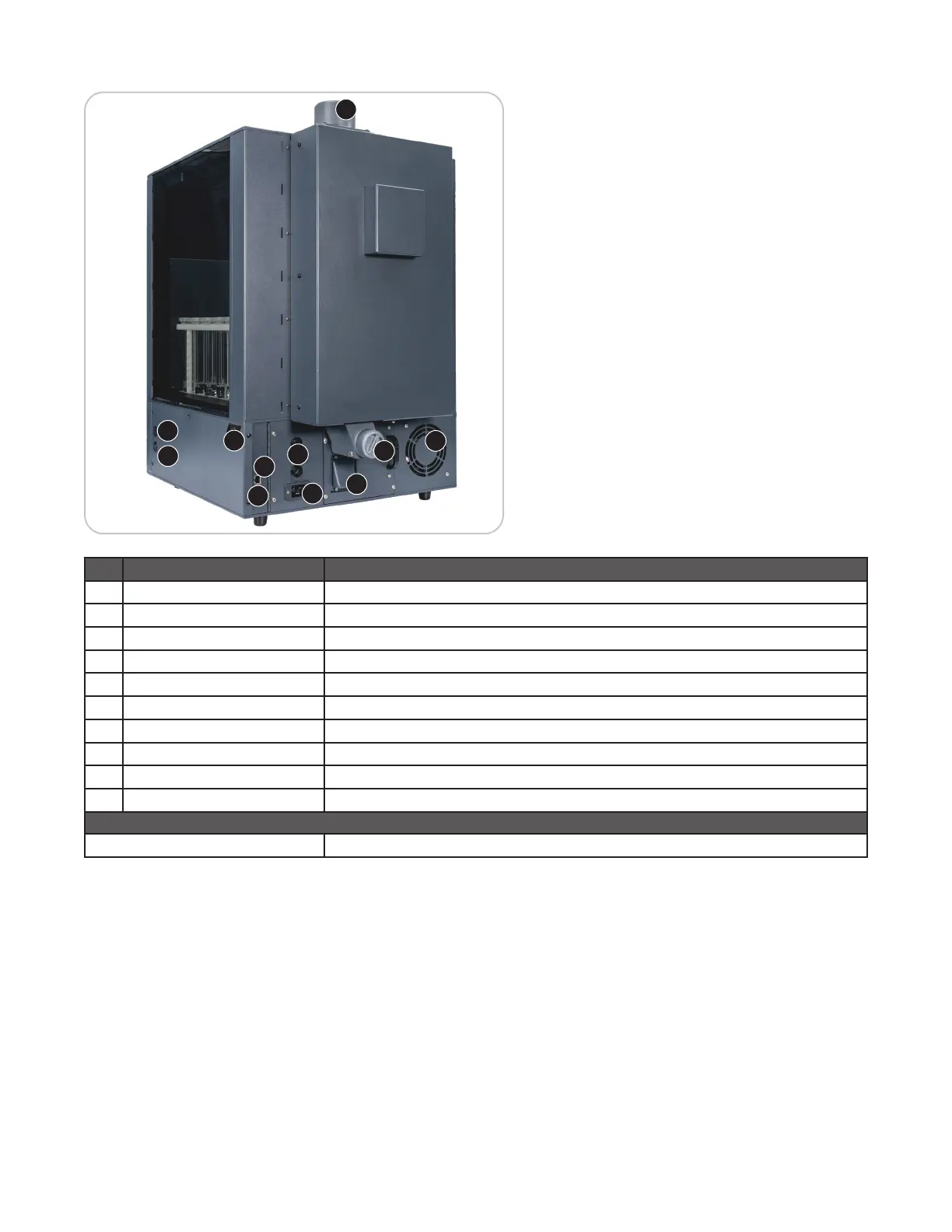
Back and Side View
1
2
3
4
5
6
7
8
9
8
10
Item Description
1 Power Cord Receptacle Receives the female end of the power cord
2 Fuses Prevent electrical power overload
3 Power Switch Turns AC power on and off to the instrument
4 Exhaust Outlet Exhausts fumes from the fume cabinet and vented vessels
5 Air Intaker Air intake for vessel vent blower and vessel cooling blower
6 Cooling Fan Draws room air past the electronics
7 Trap Collects debris or excess liquid
8 USB Ports Allows for data transfer, software/rmware updates, and connection to the barcode scanner
9 HDMI Port Used as a presentation tool for demo purposes
10 Ethernet Port Service port
Not Pictured
Nameplate Lists model, serial number, operating voltage, frequency, and current draw


 To Next Page