42
Troubleshooting
Troubleshooting
Problems and Possible Solutions
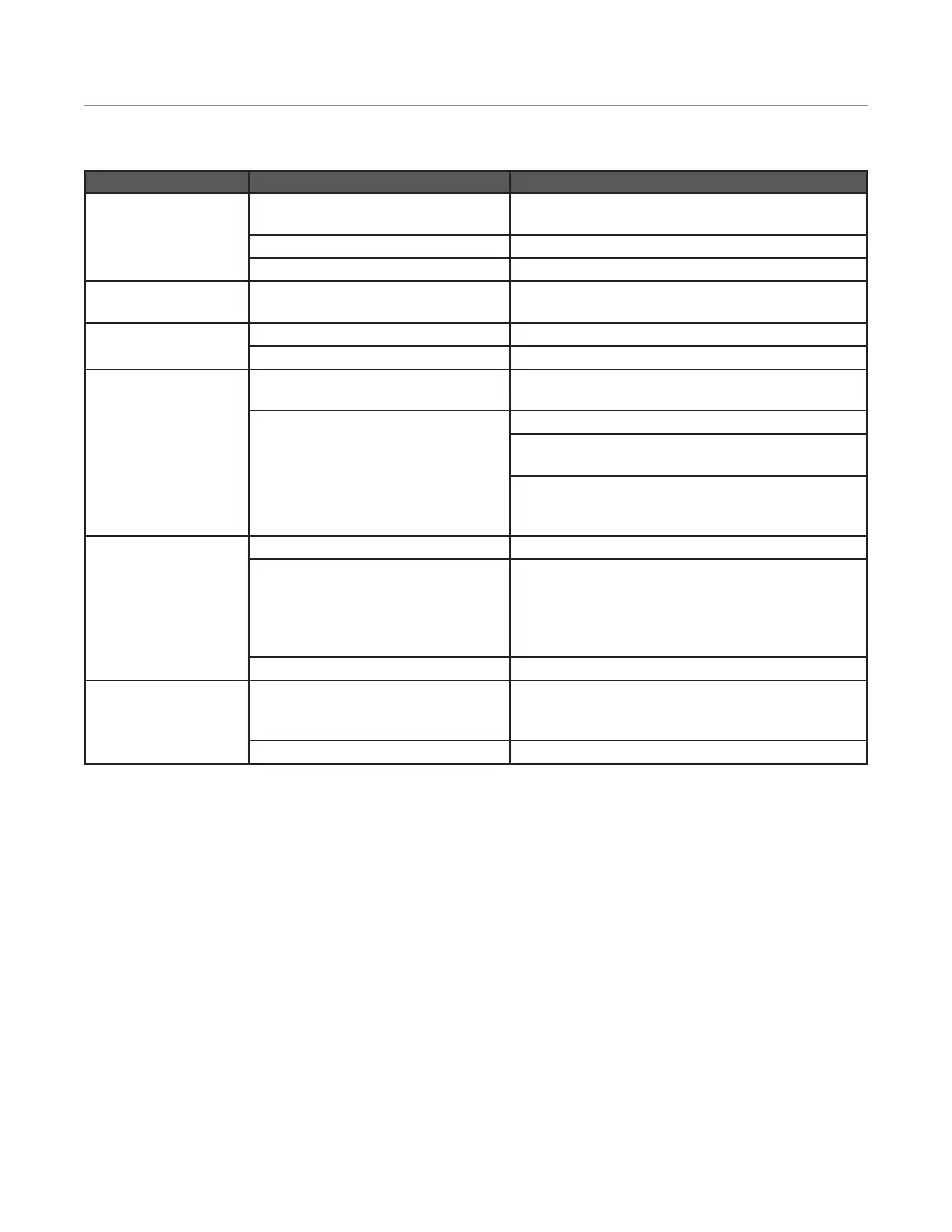
Problems Possible Cause Possible Solutions
Instrument Inoperative Instrument not plugged into electrical outlet Plug power cord into system and a dedicated, grounded
outlet. Adequately rated power cord may be used.
Fuses not installed Install fuses as outlined in “System Installation” section.
Power switch not in “on” position Position power switch to “on”
Caps not available Caps not scanned in Use the barcode scanner to scan the barcode on the cap
and septa box
Pressure Drop Error Caps leaking from reuse Use a new cap and septa for every run.
Vessel Failure See “Recovery From Vessel Failure” section outlined below
Temperature uctuation/
inconsistent
Temperature spikes and drops align with
the power prole
Instrument is operating as designed. No action needed.
Temperature not reading correctly Stir bar not in place or incorrect stirring speed.
Wrong vessel type selected: QV (Quartz Vessel) or QVL
(Quartz Vessel with Liner)
Temperature needs to be calibrated. Calibrate using AutoCal
device. If AutoCal not available, contact CEM Corporation or
its Authorized Dealer.
Play icon grayed out on
Run screen
Instrument door is open Ensure door is closed and Run Status=Idle
Insufcient exhaust/airow Verify exhaust blower icon is not present in upper corner of
screen.
If exhaust icon is located at top of screen and the
instrument door is closed, verify trap is tightly secured in
place and system specications are met
Method not in queue Ensure methods are active by verifying in the queue.
Cooling time has
increased
Insufcient exhaust/airow Perform an “Exhaust Validation” test as outlined in the
“Validations” section of this manual to determine if
adequate exhaust is achievable.
The plenum has been damaged See “Recovery From Vessel Failure” section outlined below


 To Next Page