26
Methods
Methods
Pre-installed CEM Methods take the guesswork out of method creation and sample preparation. If there is not a
current CEM Method to digest a sample, visit our website at www.cem.com for Method and Application Notes.
CEM methods will appear in blue, whereas user created methods will appear in gray.
Create Method
If there is not a current CEM Method to digest a sample, a method can be programmed as outlined below.
The operating parameters are included in the “Perform a Digestion” section of this manual. Only users with
administrator or standard privileges can create methods.
1. From the Home screen, press the Methods icon.
2. Press the “+” icon at the top of the screen.
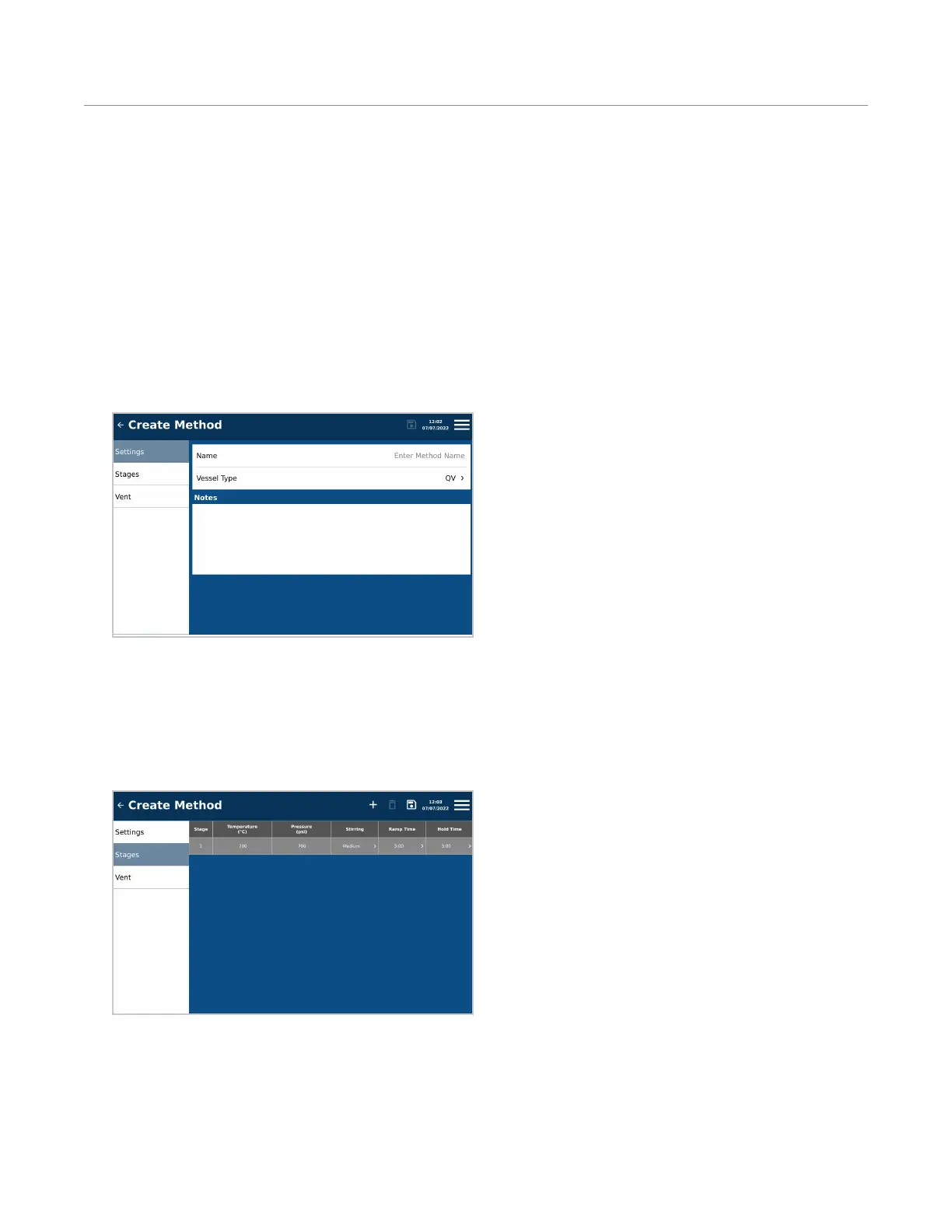
3. Press “Settings” on the left side of the screen.
4. Enter the Name, Vessel Type, and Notes.
• Name: Input a name for the method.
• Vessel Type: QV (Quartz Vessel) or QVL (Quartz Vessel with Liner).
• Notes: Any notes entered in this box will appear in the Method and Method Report, but will not affect the
run.
5. Press “Stages” on the left side of the screen.
Add up to ve (5) stages, entering the appropriate parameters for each stage.
• Stage: A minimum of one (1) and up to ve (5) stages can be added.
• Temperature (°C)
Quartz vessel: 50 - 300
Quartz vessel with TFM Liner: 50 -260


 To Next Page