19System Installation
Software Setup
1. With the instrument facing forward, position the power switch to ON. Make sure the power switch can easily be
accessed. DO NOT REMOVE any packing material until instructed to do so.
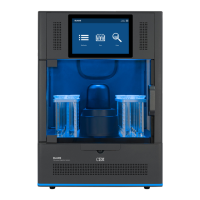
2. Remove the blue tape from the door and interlock cover.
3. Follow the instructions on the BLADE display once the system is powered on to remove the packing foam with-
in the fume cabinet. DO NOT REMOVE any packing material until instructed to do so. Retain all packing materi-
al for use if returning the instrument.
4. Remove the blue tape from the exhaust cover.
5. Perform an “Exhaust Validation” test to determine if adequate exhaust is achievable. The Exhaust validation
test determines if adequate exhaust ow is achievable at the 3 different stages during a run: idle, ramping/
holding with the vent blower on, and cooling with the vent blower and cooling fan on.
5.1. Press the System Menu icon located in the top right corner of the screen.
5.2. Press “Tools” and the “Utilities” tab.
5.3. Locate “Exhaust Validation” and press “Start.”
5.4. Follow instructions located on the screen to complete verication.
5.5. If any of the validation points fail, a red “X” will appear. Verify that the exhaust requirements have been
met as outlined in the “System Specications” section of this manual. If the exhaust requirements
have been met, contact CEM Service.


 To Next Page