18
Install Pedestal Covers
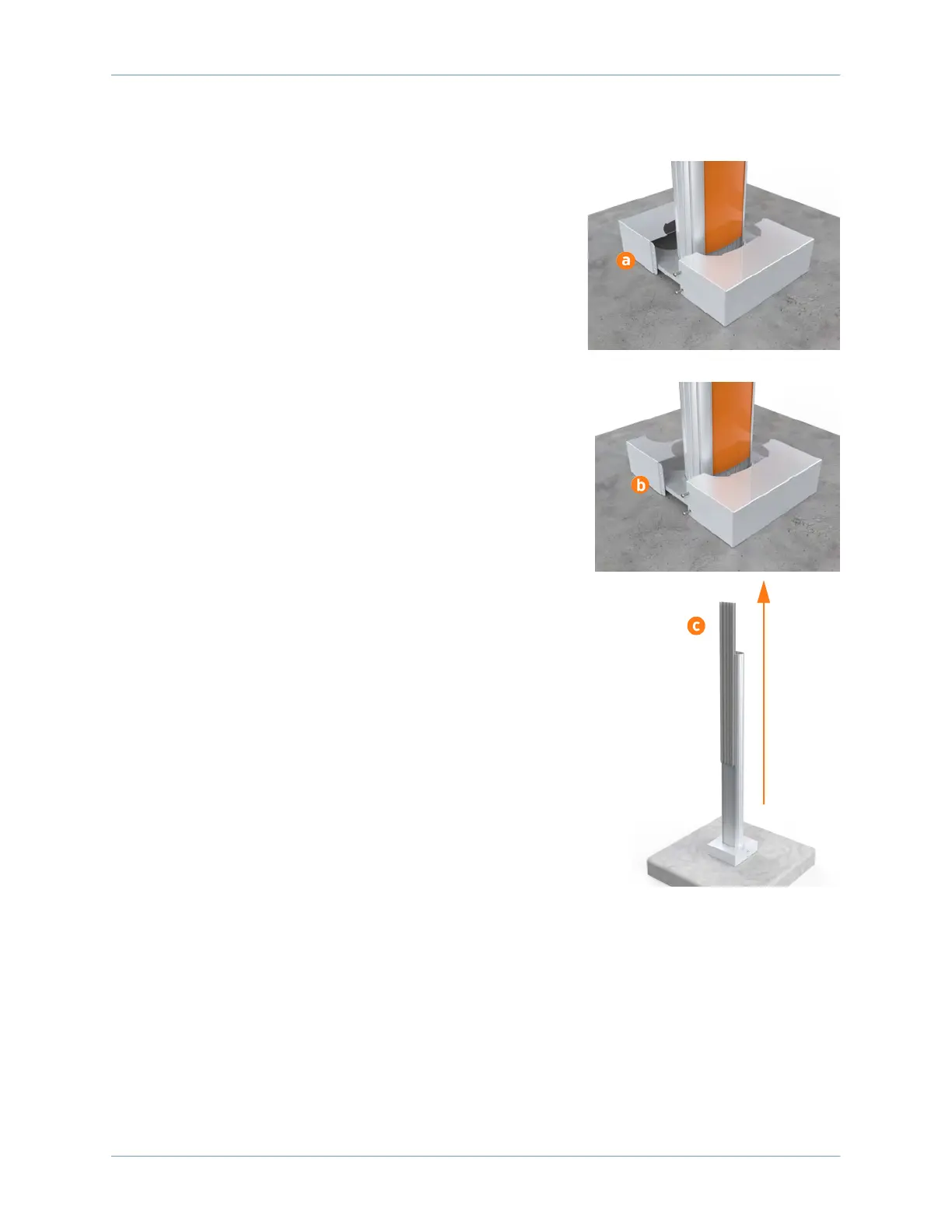
1. Select the appropriate pedestal covers from the three
pieces provided:
a. If the station is not using a CMK, use the back pedestal
cover without a cut-out.
b. If the station is using a CMK, use the back pedestal cover
with the cutout for the CMK.
2. Position the two-piece pedestal cover over the bottom of
the pedestal.
3. Insert the four 3/8 in screws, two into each side of the
pedestal.
4. Tighten the screws using a Phillips screwdriver.
5. If the station is not using a CMK, slide the spacer (c) at the
back of the pedestal upward to remove it.
6. Discard the extra pedestal cover (and the spacer, if you are
installing a station without a CMK).
Choose Your Configuration
Proceed to the next section according to the configuration of the installation:
• For a single station installation with no CMK, proceed to Section 5.
• For a single station installation with CMK, proceed to Section 6.
• For a dual station installation with no CMK, proceed to Section 7.
• For a dual station installation with CMK, proceed to Section 8.












 To Next Page