User manual CHD FiVE
6.4 DATE AND TIME
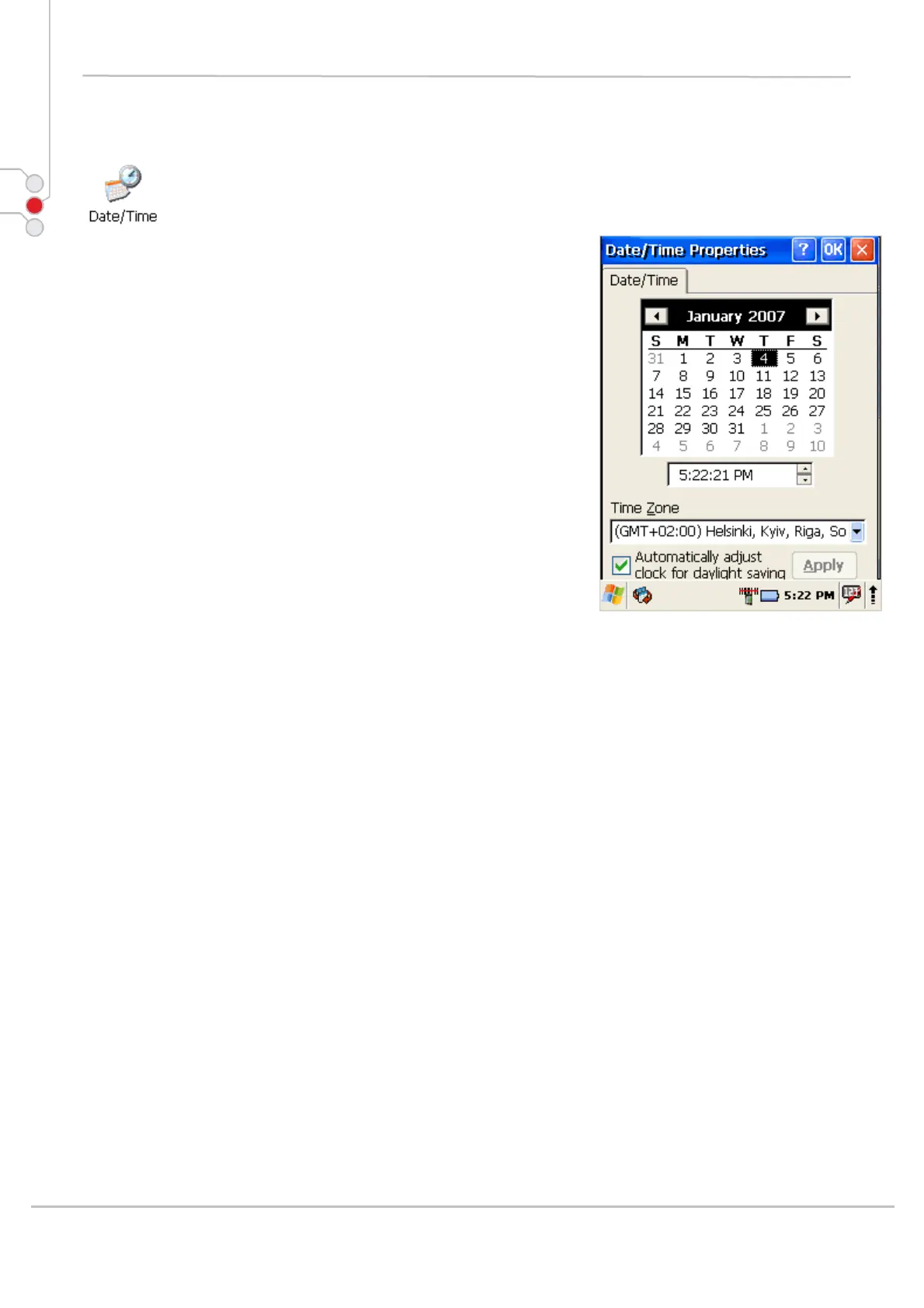
In the Date/Time options, you can change the year,
month, date, time, time zone, or select automatic adjust
for Daylight Savings Time.
To set or change the date and time:
1. Open Date/Time Properties
Start > Settings > Control Panel >
Date/Time
2. Select month
Tap on month name to open a pull down list of
months or press the arrow buttons on either side of
the month to increase or decrease the month.
3. Change the year
Tap on the year to open a numeric dial.
Select the up arrow to increase the value; select
the down arrow to decrease the value.
Or you can type a new value in the field.
4. Change the time,
Select the hour, minute, seconds, or AM/PM and
select the up arrow to increase the value; select/tap the
down arrow to decrease the value. You can also type a
new time value in the field.
5. Select your correct time zone from the pull-down list.
6. To automatically adjust the clock for Daylight Savings
Time, enable the checkbox at the bottom of the screen.
7. Select Apply to make save your changes [and make
additional modifications] or select OK to exit the
Date/Time settings.
© All rights reserved
Computer Hardware Design 32



 To Next Page