User manual CHD FiVE
© All rights reserved
1 About this document
1.1 REVISION HISTORY
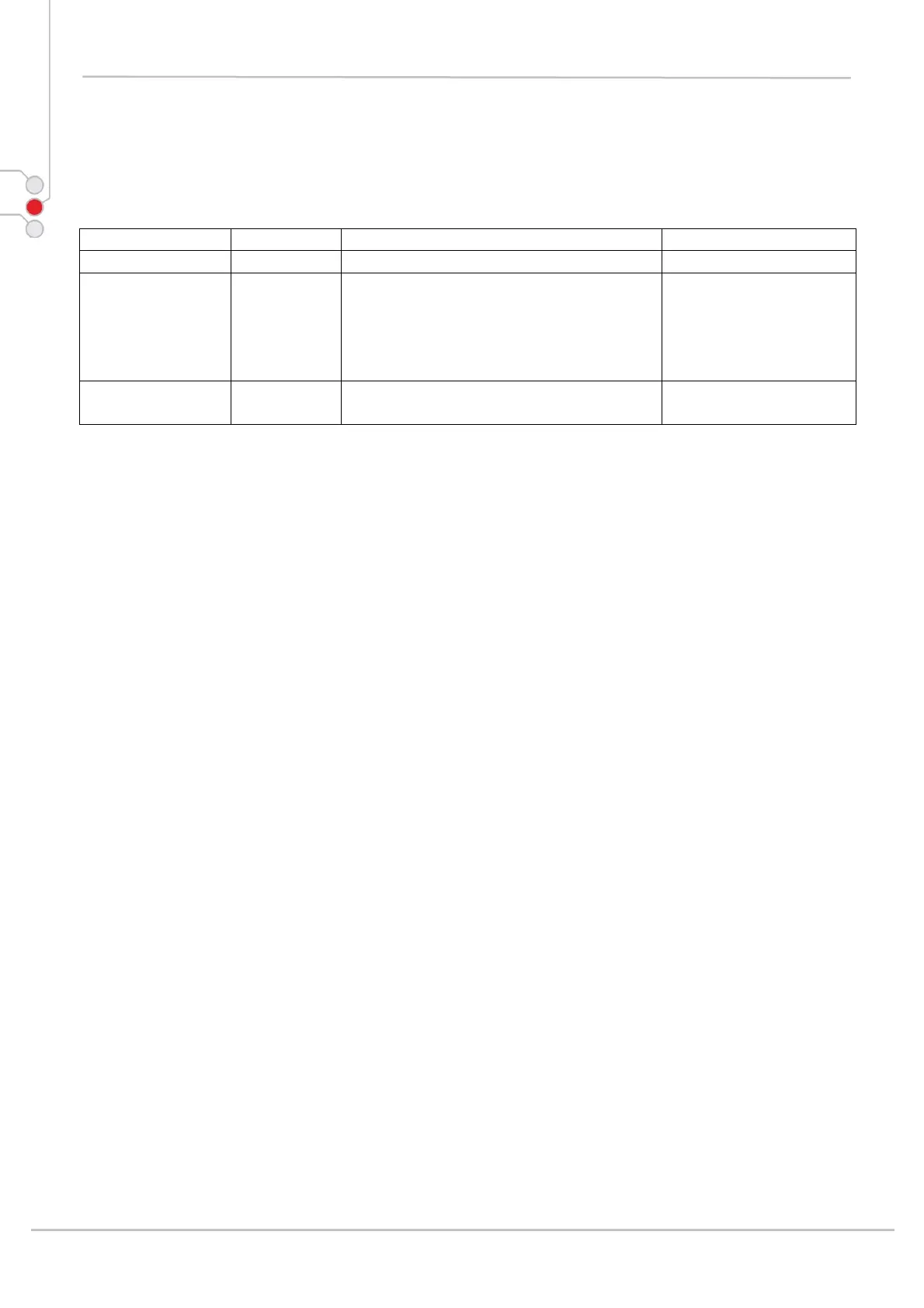
Version Date Description Author
1.1 04.07.2007 1. Revision history started Janis
1.2. 19.07.2007 1. Updated screenshots in section
Configuring a PDA
2. Added Networks,
Communications and connection
3. Added Extend battery life [2.6]
Janis
1.3 03.08.2007 1. Added CHD FiVE section
2. Added information about cradle
Janis
1.2 KEYSTROKES
Filenames, paths, keystrokes entered by the user are shown in this typeface.
1.3 WINDOWS CONTROLS
Windows controls including command bar sequences, prompts, dialog boxes, fields, pull-
down lists, checkboxes and radio-buttons are printed in this bold typeface.
1.4 PDA Keys
Keys on the PDA are bracketed by "greater than" and "less than" characters (< >) to
distinguish them from keys on the PC, example, <ENTER>.
1.5 S
TYLUS ACTIONS
Single Tap or Select – tap the display screen once with the stylus to activate a specific
button or select an item from a pull-down list.
Double-Tap – tap the stylus twice rapidly in the same location to open an application.
Tap and Hold – tap and hold the stylus to view the context menu.
Computer Hardware Design 6



 To Next Page