[DB600] General Instruction Manual MODE 5
- 87 -
5-7 MODE5 [Input parameter]
5-7-1
Setting overview
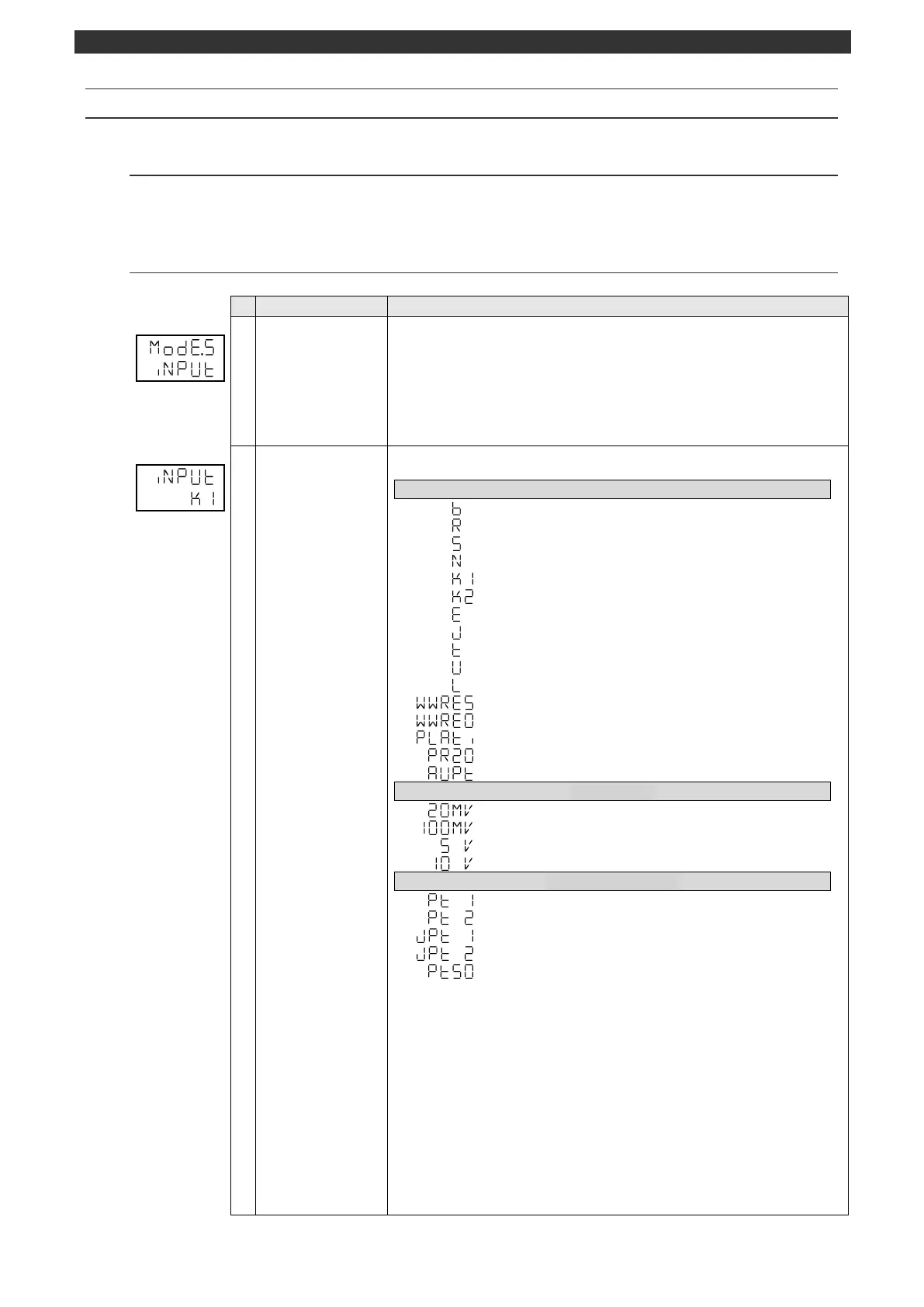
MODE5 provides the input (measurement) related settings. Configures the settings related to the input
type, measuring range, condition, and scale.
5-7-2
Setting screen and function
MODE5 initial screen
(Input parameter)
MODE5 (input parameter) initial screen
Pressing the [] key makes a switch to the MODE4 screen.
Pressing the [] key makes a switch to the MODE6 screen.
No parameter is set by the [ENT] key.
[Switch to operation initial screen]
Press and hold the [MODE] key to display the screen set on the MODEt operation
initial screen.
Thermocouple B Measuring range 0.0 to 1820.0 °C
Thermocouple R 0.0 to 1760.0 °C
Thermocouple S 0.0 to 1760.0 °C
Thermocouple N -0.0 to 1300.0 °C
Thermocouple K -200.0 to 1370.0 °C
Thermocouple K -200.0 to - 500.0 °C
Thermocouple E -200.0 to - 900.0 °C
Thermocouple J -200.0 to 1200.0 °C
Thermocouple T -200.0 to - 400.0 °C
Thermocouple U -200.0 to - 400.0 °C
Thermocouple L -200.0 to -900.0 °C
Thermocouple W-WRe5-26 0.0 to 2310.0 °C
Thermocouple W-WRe26 0.0 to 2310.0 °C
Thermocouple Platinel II 0.0 to 1390.0 °C
Thermocouple PtRh40-20 0.0 to 1880.0 °C
Thermocouple Au-Pt 0.0 to 1000.0 °C
±20mV Measuring range --20.00 to- 20.00mV
Pt 100 Measuring range: -200.0 to - 850.0°C
Pt0100 -200.0 to -200.0°C
JPt 100 -200.0 to - 649.0°C
JPt 100 -200.0 to - 200.0°C
Pt 50 -200.0 to - 649.0°C
Use the [], [] and [ENT] keys to set the input type.
When the input type is changed, the following parameters will be initialized for each
input type.
Measuring range lower/upper limit (MODE5)
Unit (MODE5)
Linear scale zero/span (MODE5)
SV limiter lower/upper limit (MODE5)
Display decimal point (MODE5)
Transmission scale zero/span (MODEb)
* When "Transmission type (MODEb)" is PV or SV
Remote scale zero/span (MODEc)
PV decimal point
SV decimal point
Event decimal point



 To Next Page