Control Setup Chore-Tronics® 3 Control
33
MT2398C
Dump Scale
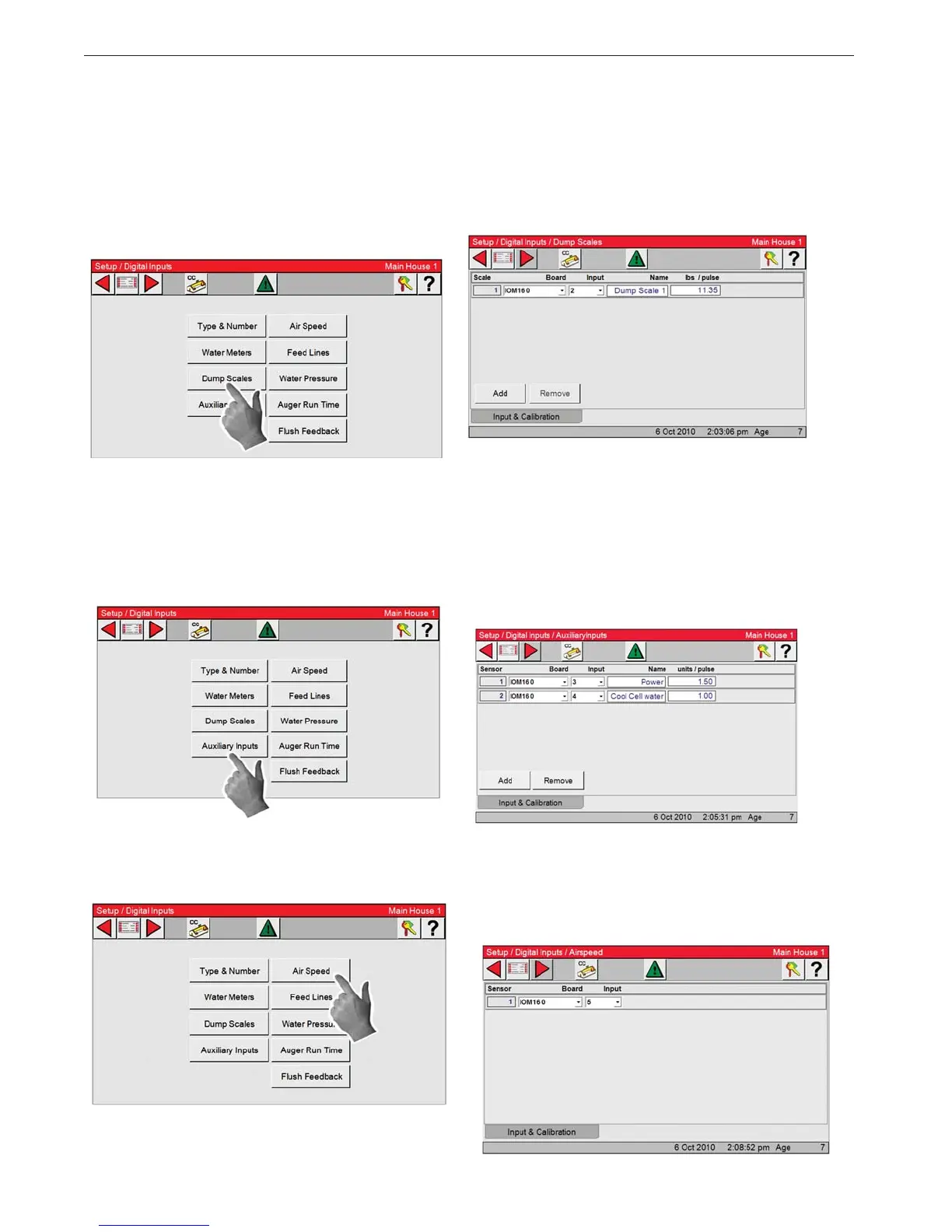
1. Select the Dump Scale Button.
All feed scales that are connected to the Control
needs the input it is connected to assigned here.
All feed scales that are assigned inputs here will
have their daily usage added to the total amount
of feed consumed in the management screen.
2. Assign an input to each of the feed scales con-
nected to the Control here. Each Input assigned
here will have its daily usage added to the total
amount of feed consumed in the management
screen.
Auxiliary Inputs
1. Press Auxiliary Input button
Many different types of auxiliary digital Inputs
can be used with the Ct3.
2. Types of auxiliary Inputs include non-drinker
water meters (water meters attached to evapora-
tive cool pads, etc.), pulsed output electric me-
ters, pulsed output gas meters, etc. Each inputs
usage will be monitored separately and will not
be added to any total usage.
Airspeed Sensor
1. Press the Air Speed button. 2. Enter the board and input numbers for the Air
speed meter. The parameters are setup in the
Alarm screen under the Environment tab.


 To Next Page