Electrical Safety Analyzer 19032 User’s Manual
3-2
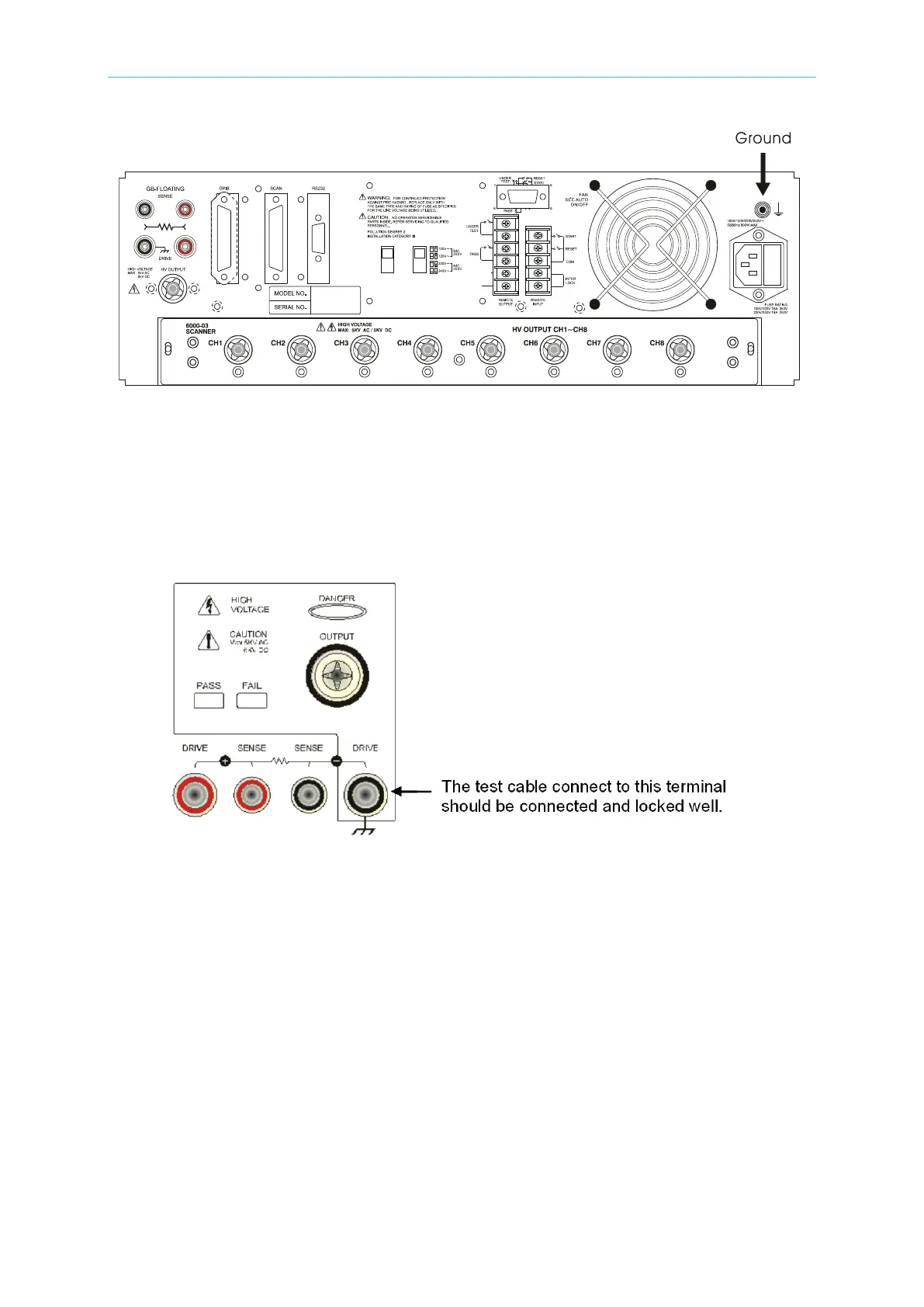
Figure 3-1
3. Connect test cable to COMMON terminal
Tightly connect cable(s) to the (black) DRIVE- terminal, as shown in Figure 3-2. If this is
not done, the DUT’s casing can be charged to the high voltage test level and serious
injury or electrical shock hazards could result if the DUT is touched. To connect to the
DUT with this cable, connect the test cable to the COMMON terminal before connecting it
to the DUT.
Figure 3-2
4. Connect test cable to High Voltage output terminal
After the COMMON test cable has been connected, follow the steps below to connect the
high voltage output cable:
• Press the [STOP] key.
• Confirm the DANGER indicator LED is not illuminated.
• Short the COMMON terminal with the high voltage output terminal; confirm there is no
voltage output.
• Plug the high voltage test cable into the high voltage output terminal.
• Connect the COMMON test cable to the DUT first, and then connect the high voltage
test cable to the DUT.
5. Test stop
When the test is over or the analyzer is not running or needs to be shut down, turn the
power switch OFF (0) as shown in Figure 3-3.



 To Next Page