-Clean Inside the Printer Using Cleaning Kit
Clean inside the printer using the cleaning kit every month or every 1000 cards
Make sure to follow the instructions provided below on a regular basis as dusts
or contaminants may affect the printing quality or damage the parts.
① Cleaning Kit & Use
1) CR80 Cleaning Card:
Use for cleaning the printer path, roller, and feeding roller.
2) Long-T Cleaning Card:
Use for cleaning the printer path, roller, and feeding roller.
3) Alcohol Swab:
Use for cleaning the interior case and sensor.
4) Cleaning Pen:
Use for cleaning the TPH and sensor.
② Clean the Printer Using CR80 Cleaning Card / Long-T
Cleaning Card
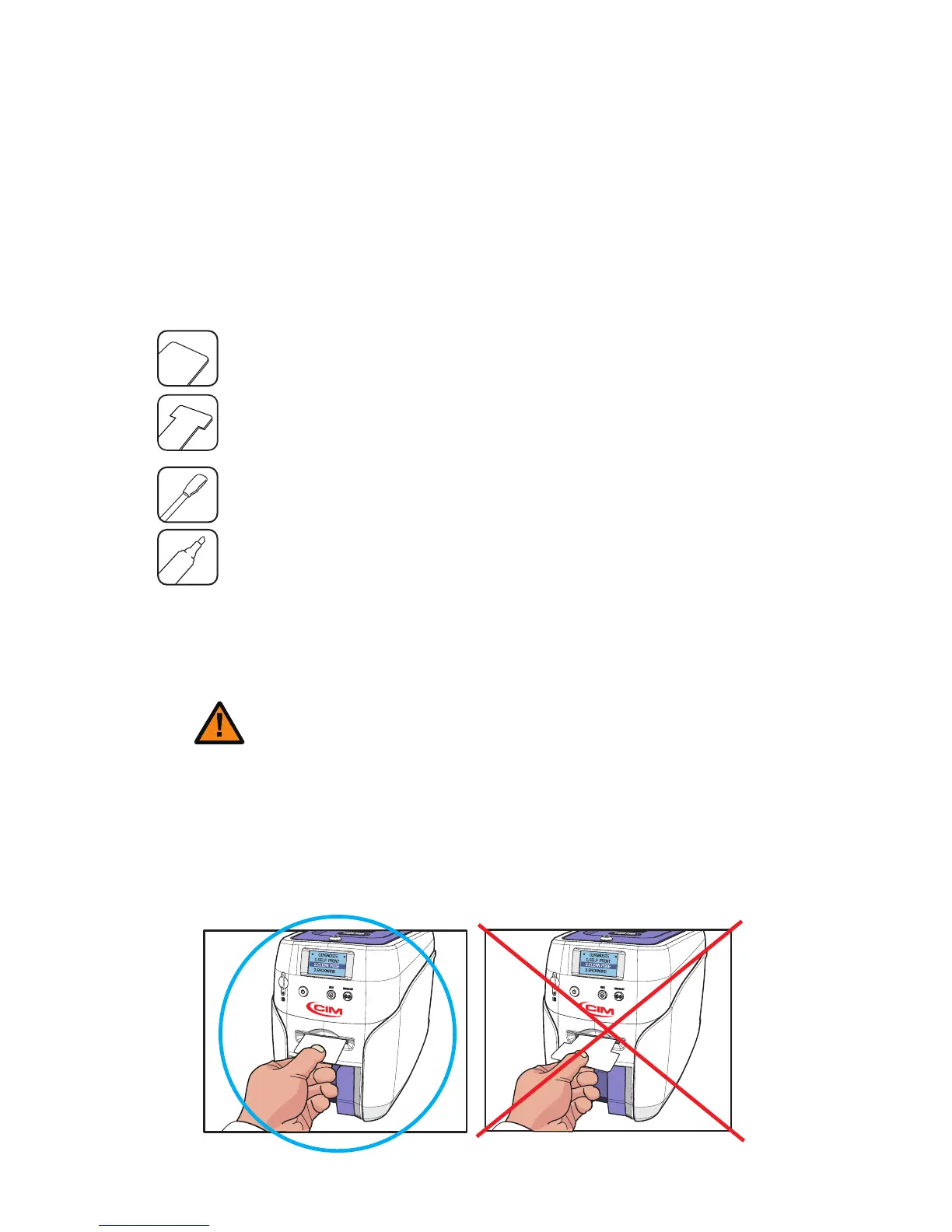
CR80 Cleaning Card : insert the card to the Single Card Slot.
T Cleaning Card : remove the Input Hopper and insert the card through the tray.
Using the cards in any other way may cause an error.
Caution
Insert the CR80 Cleaning Card to the Single Card Slot as shown in the picture.
1) Check the Proper Use of CR80 Cleaning Card / T Cleaning Card
CR80 Cleaning Card
68
Install printer and ready



 To Next Page