Manual Feeding, Double-sided Printing
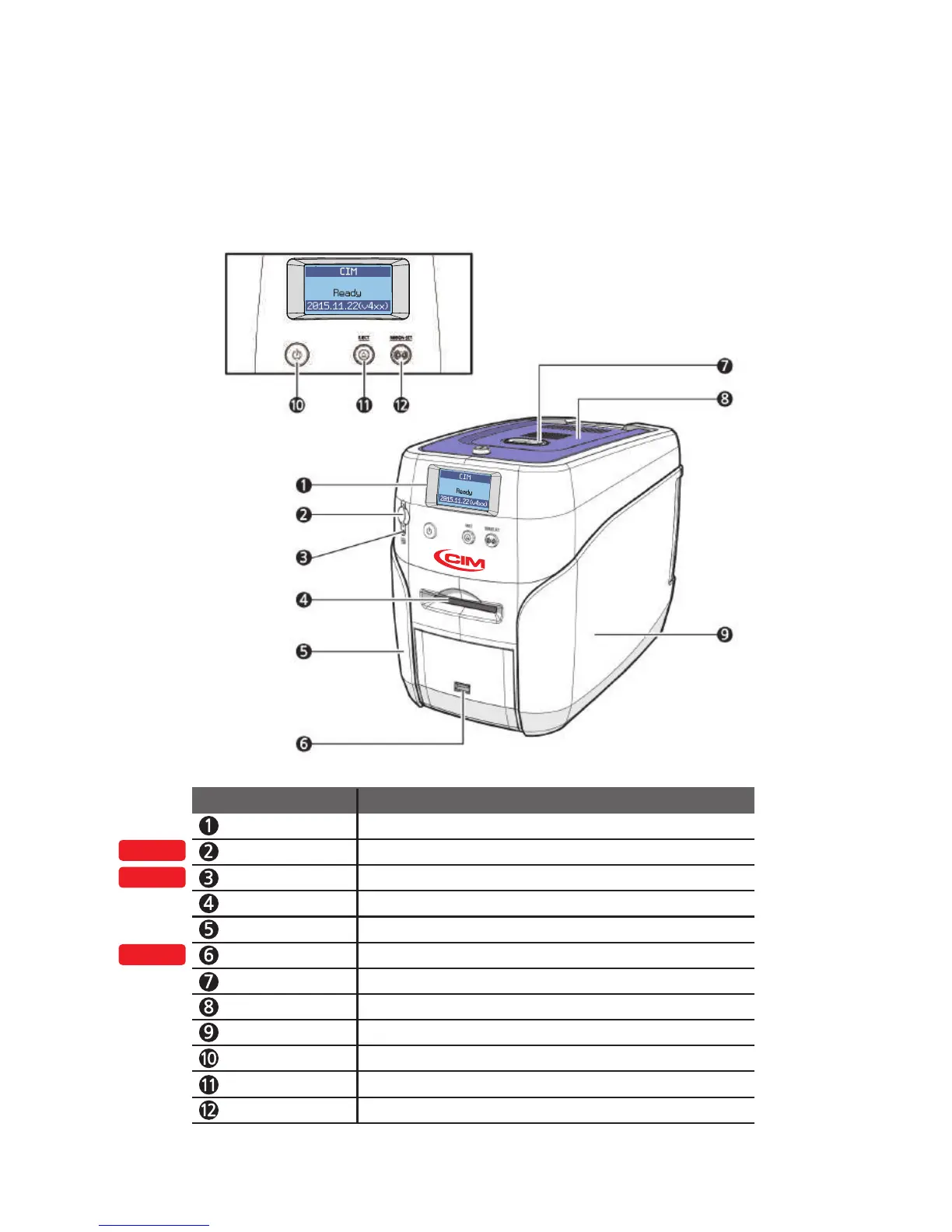
LCD Display Displays the printer’s operation status on the LCD screen.
Mobile Connector Used for inserting mobile chips.
Mobile Connector LED
Indicates the mobile chip status.
Single Card Slot Used to insert or release a single card.
Left Side Cover Open to install optional accessories or fix errors.
USB Socket Used to insert USB memory media or to connect to a PC.
Top Cover Button Opens the Top Cover.
Top Cover Open to replace the cleaning roller.
Right Side Cover Open to replace the main board or fix errors.
Power Switch
Turns the printer on/off.
Card Eject Button Release the card inside the printer.
OPTION
OPTION
OPTION
Ribbon Set Button Replace or reposition the ribbon.
Name Description
12
Install printer and ready



 To Next Page