GE+ ACDC Installation and operation manual v11
108 / 121
Once the limits are ready, press Send Limits. The button Refresh Limits will show in the
windows the limits that the equipment has in that moment.
When the converter is switched off and on again, these limits will be erased and
substituted for the factory ones. It is possible to save limits in the equipment in the
EEPROM memory, but a password is required (explained in the chapter 1.6. Limits of this
manual).
II. DC Bipolar
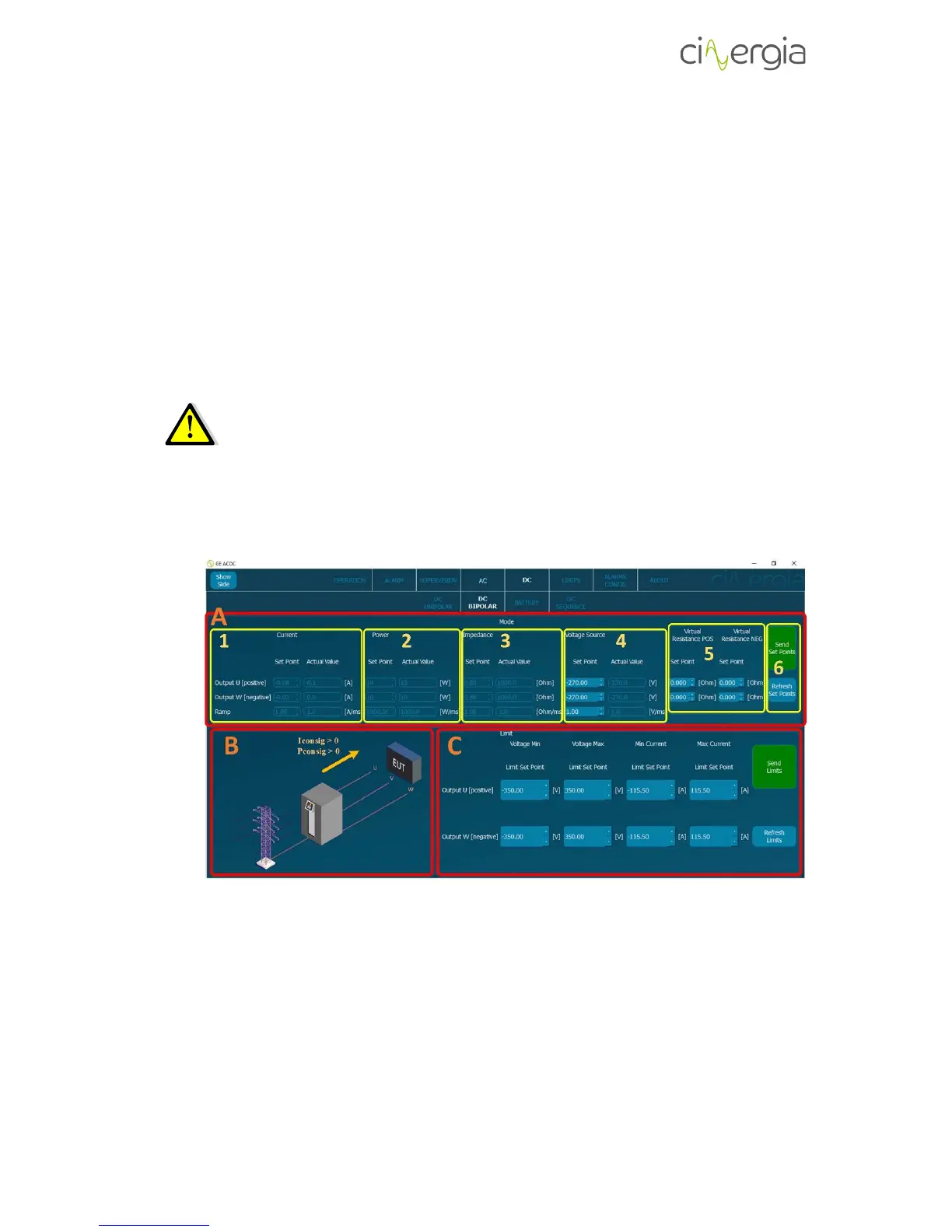
This subtab allows the user to send all the DC parameters to control the Cinergia converter in
bipolar connection: current, power, impedance, voltage setpoints, virtual resistances and limits.
Please read the Operation Modes document to know more about how to connect
the equipment in bipolar.
- A: Part of the subtab to introduce all the setpoints to be sent to the converter. The
interface will illuminate the parts where the values can be introduced depending on the
control mode (current, power, impedance or voltage).
1. Set the current setpoints to be sent and its ramp. The allowed maximum and
minimum values are ± rated current and the ramps go from 0 to 1000A/ms.
2. Set the power setpoints to be sent and its ramp. The allowed maximum and
minimum values are ± rated power and the ramps go from 0 to 1000W/ms.



 To Next Page