GE+ ACDC Installation and operation manual v11
110 / 121
Once the limits are ready, press Send Limits. The button Refresh Limits will show in the
windows the limits that the equipment has in that moment.
When the converter is switched off and on again, these limits will be erased and
substituted for the factory ones. It is possible to save limits in the equipment in the
EEPROM memory, but a password is required (explained in the chapter 1.6. Limits of this
manual).
III. DC Sequence
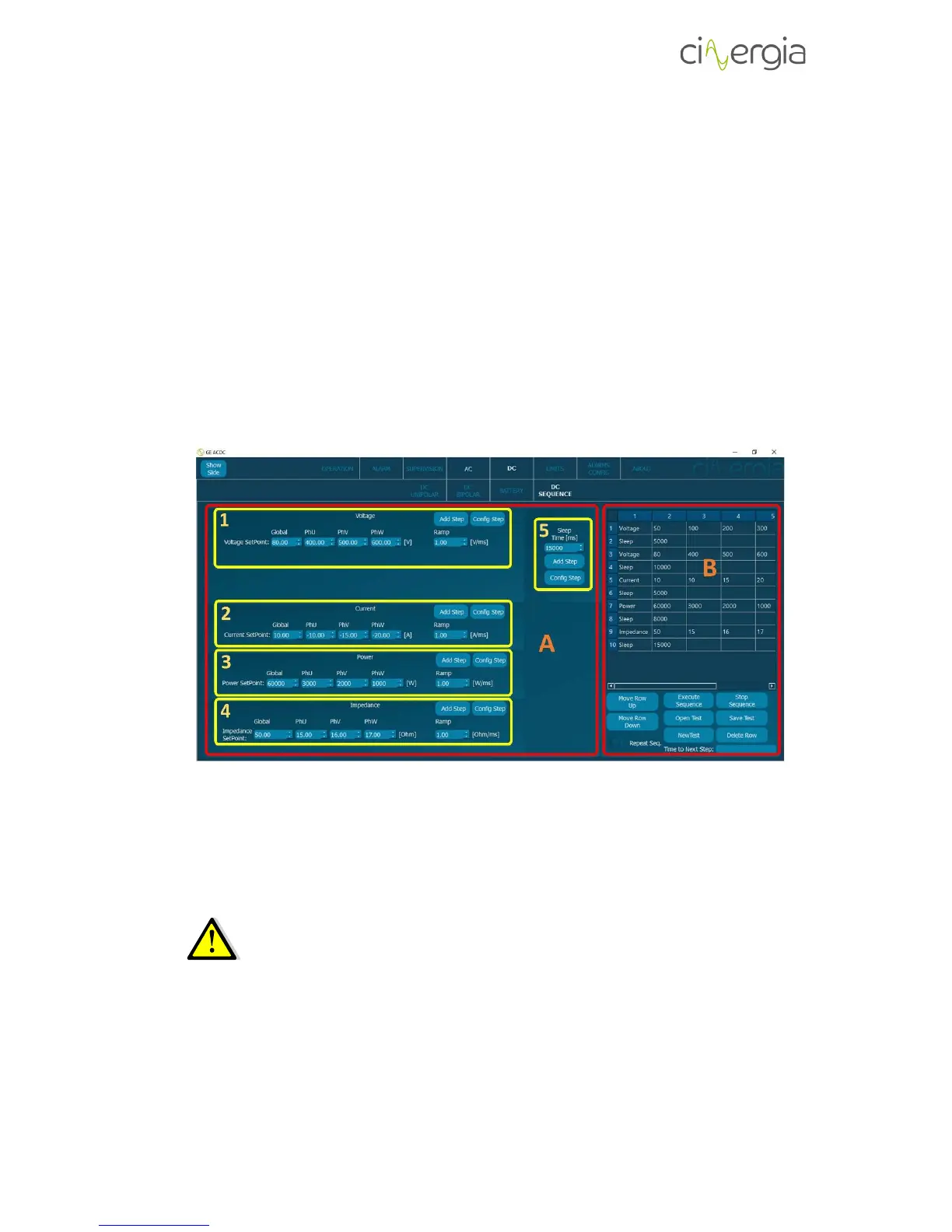
The converter can execute sequences created by the user. These sequences can be made
in the interface or in an external program and saved as a CSV (Coma Separated Values) file.
This chapter explains how to create this file/sequence through the interface.
- A: Part of the subtab to introduce all the values that will conform the sequence. This can
be multiple, which means that the equipment can be in voltage, current, power or
impedance mode in the same sequence.
When the equipment is in current, power or impedance mode is controlling
current, which means that a voltage source is required. The logical DC sequence
is the one with the same type of control: voltage or current. It is recommended
to create two types of DC sequences: one with voltage mode and one with
current, power and impedance mode.
The sequence is configured with rows and each row is one step of the sequence.
All the following parts of A (1, 2, 3, 4 and 5) contain two buttons: Add Step and Config
Step. They are used to add or modify rows in the sequence.



 To Next Page