GE+ ACDC Installation and operation manual v11
94 / 121
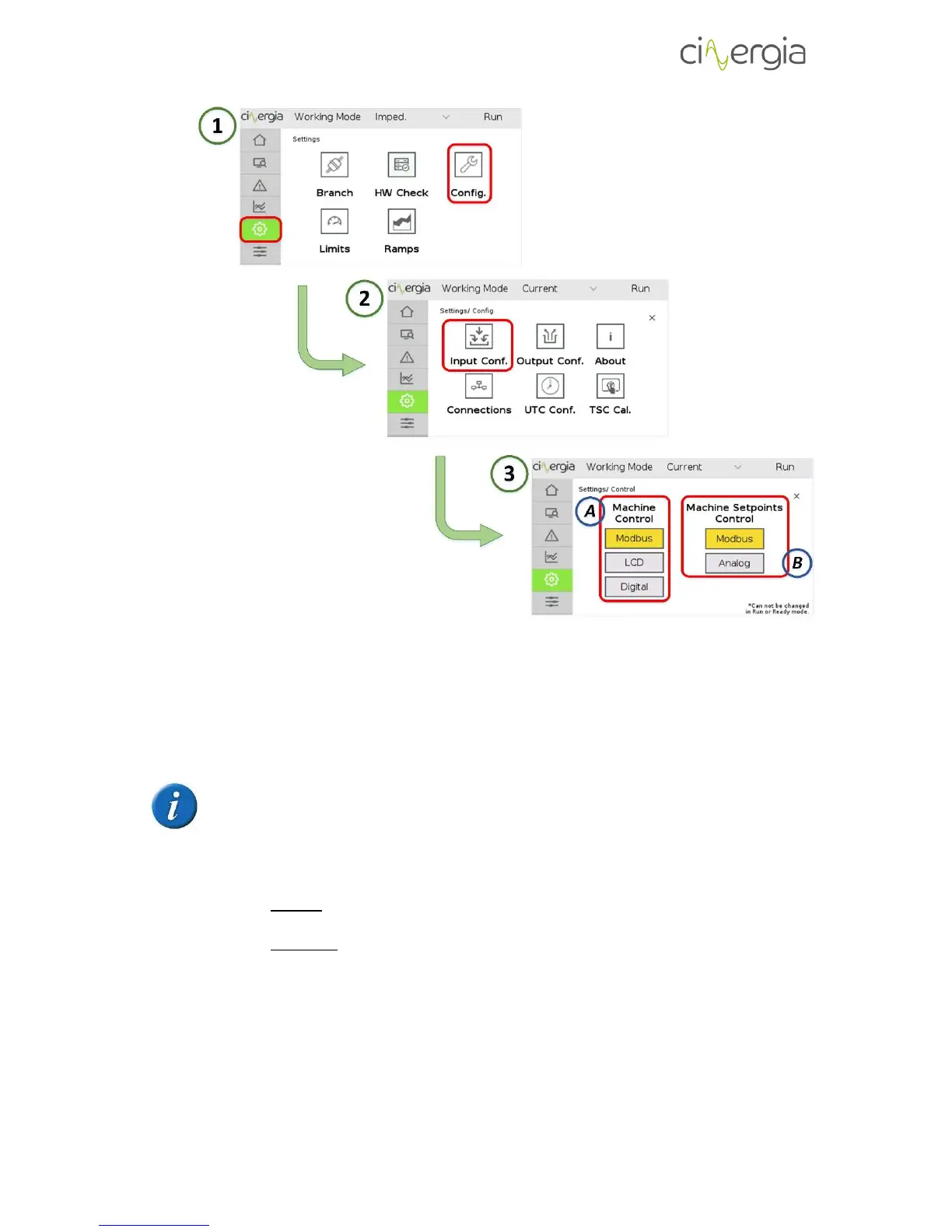
Follow the steps 1, 2 and 3 of the above picture to reach the LCD touchscreen submenu that
enables the configuration of the Machine Control and Setpoints Control. Once the user is in the
third step, A part is for the Machine Control (Enable, Disable, Run, Ready and Reset) and B part
is for the setpoints (the equipment will send the setpoints only in Run state).
Please note that the machine state and the setpoints control are independent.
It is not possible to change the control when the equipment is in RUN state.
- D: Branch control (Optional). The converter can work with all three channels together
using the same Run button or work with each phase independently.
- Unified: the phases are activated together with the button explained in the
chapter 1.1. part B.
- Separated (Optional): each channel is activated with the buttons explained in
the chapter 1.1. part D.
This separated mode allows the user to work with only one phase without
being necessary to activate the others.
If the equipment is working with separated branches, the user can activate a PID
control between the phases U and V which balances the current passing through them.
- E: Connection settings. The converter can be connected to the interface using the
following methods:



 To Next Page