16-18
Cisco Catalyst Blade Switch 3120 for HP Software Configuration Guide
OL-12247-01
Chapter 16 Configuring IEEE 802.1Q and Layer 2 Protocol Tunneling
Monitoring and Maintaining Tunneling Status
Monitoring and Maintaining Tunneling Status
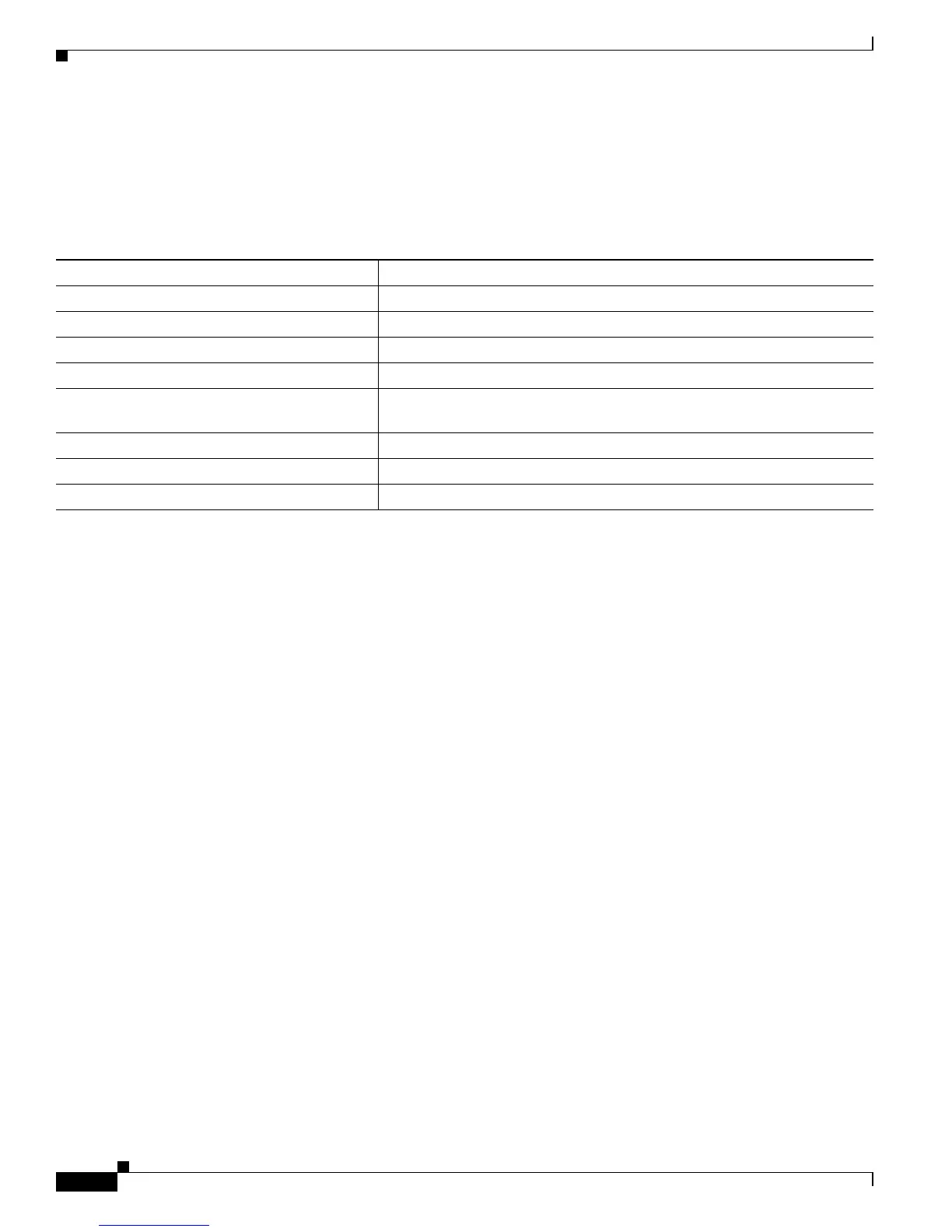
Table 16-2 shows the privileged EXEC commands for monitoring and maintaining IEEE 802.1Q and
Layer 2 protocol tunneling.
For detailed information about these displays, see the command reference for this release.
Table 16-2 Commands for Monitoring and Maintaining Tunneling
Command Purpose
clear l2protocol-tunnel counters Clear the protocol counters on Layer 2 protocol tunneling ports.
show dot1q-tunnel Display IEEE 802.1Q tunnel ports on the switch.
show dot1q-tunnel interface interface-id Verify if a specific interface is a tunnel port.
show l2protocol-tunnel Display information about Layer 2 protocol tunneling ports.
show errdisable recovery Verify if the recovery timer from a Layer 2 protocol-tunnel error disable
state is enabled.
show l2protocol-tunnel interface interface-id Display information about a specific Layer 2 protocol tunneling port.
show l2protocol-tunnel summary Display only Layer 2 protocol summary information.
show vlan dot1q tag native Display the status of native VLAN tagging on the switch.












 To Next Page