Page 30 | 53
Copy to. After setting the video for a certain day, click to
apply the settings of that day to other times.
Time period
setting
Click one of the set recording time periods, pop up the time
period setting, select the recording type, set the time period,
and click Save to complete the setting. When you click Del, the
selected time period is deleted.
More
Settings
Click to enter the pre-record time setting interface, set the
prerecord action status 0 seconds to 30 seconds before the
recording, click OK.
Table 6-31
3. Click Save to complete configuration.
6.1.2 Encode
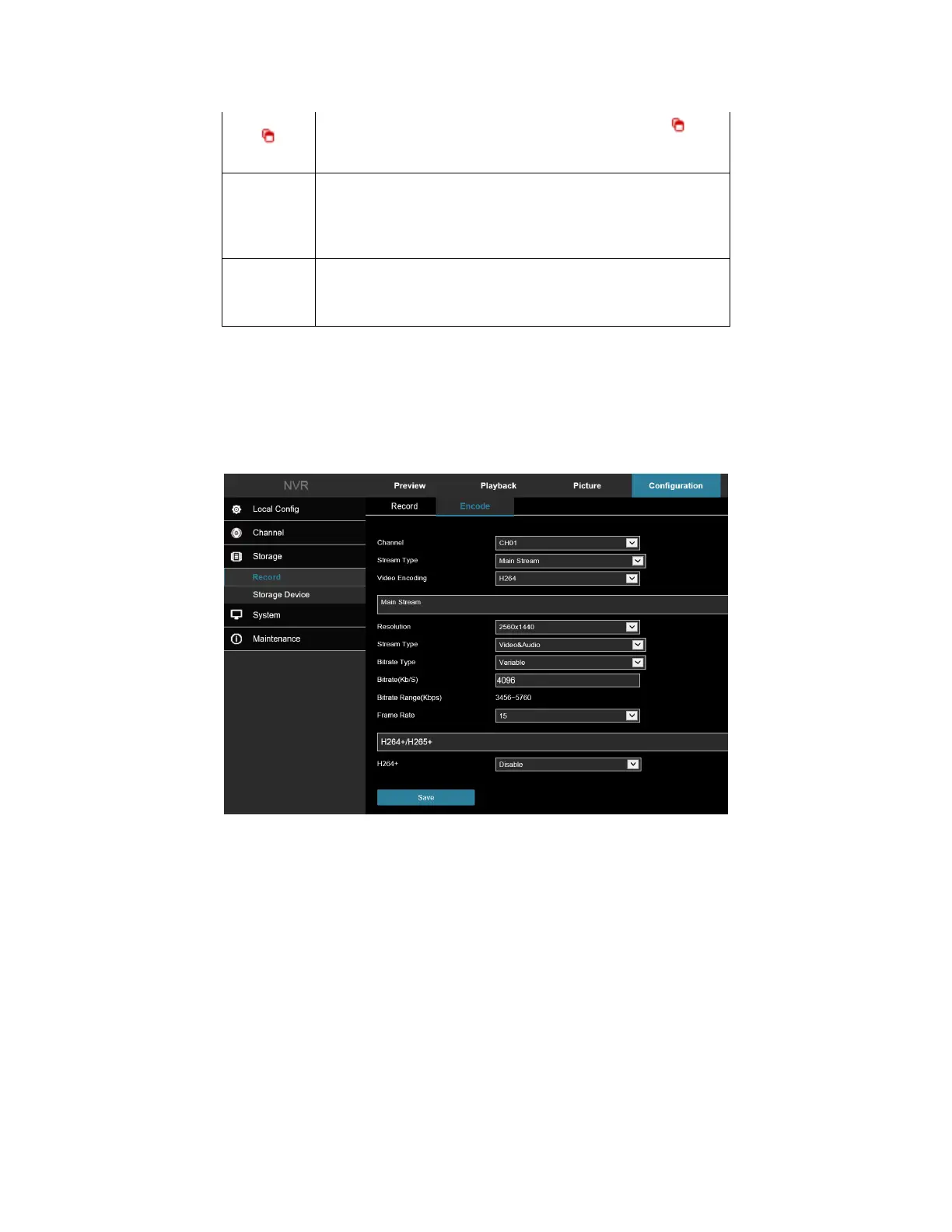
In the main interface, click Configuration → Storage → Record → Encode to enter the encoding setting interface
Figure 6-32. Here you can view and set the encoding parameter values for accessing each camera.
Figure 6-32
6.2 Storage Device
6.2.1 HDD
In the main interface, click Configuration → Storage → Storage Device → HDD to enter the HDD interface, Figure
6-33. Here you can view hard drive details, connected cameras, and format the hard drive.



 To Next Page