Page 40 | 53
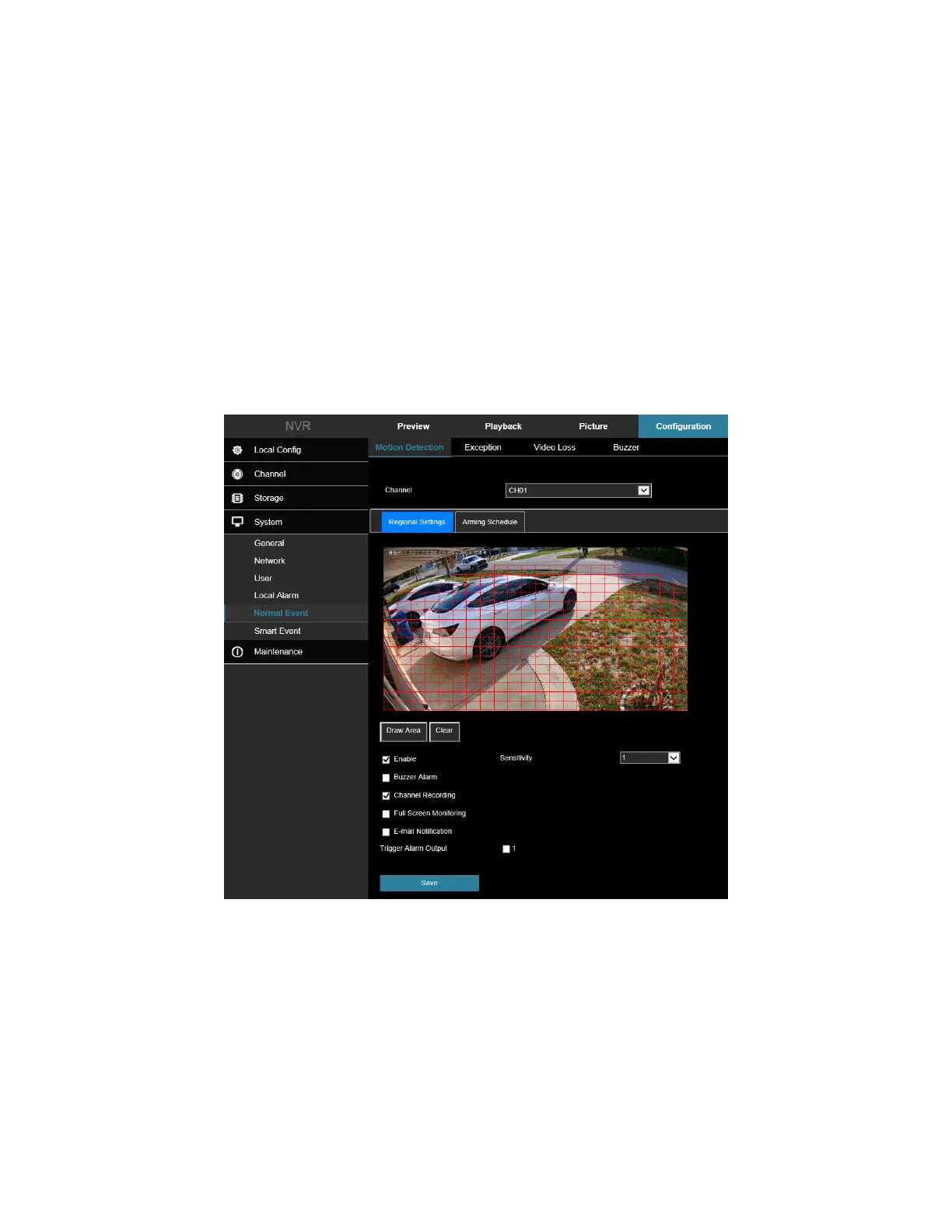
Enable: Check to turn on/off motion detection alarm.
Set Area: Select all areas by default, click to enter the area setting interface, set the range of the dynamic
detection area, press and hold the left mouse button to select the alarm area. After selection, the alarm area
is replaced by the red grid. Select the red grid again to cancel the alarm area setting.
Sensitivity: Can be set 0 to 10, the higher the value, the more sensitive the device.
Buzzer Alarm: Check to turn on/off the buzzer alarm function.
E-mail Notification: Check to turn on/off when the device alerts the mail function.
Channel Recording: Check to turn on/off the channel recording function.
Full Screen Monitoring: When an alarm is triggered on the preview interface, the real-time video of the device
channel is displayed in full screen.
Alarm Output: Select the alarm output port, it is connected to the alarm device, within the set alarm time
range, when the device motion detection alarm, it will trigger an external alarm device to alarm.
Figure 7-50
Arming Schedule
As shown in Figure 7-51, you can view, edit, and delete the arming time of motion detection. The default is to arm
the alarm 24 hours a day.



 To Next Page