THE SMART SOLUTION FOR ENERGY EFFICIENCY
MPC MultiProtoCol DDC Controls
November 19, 2018
59
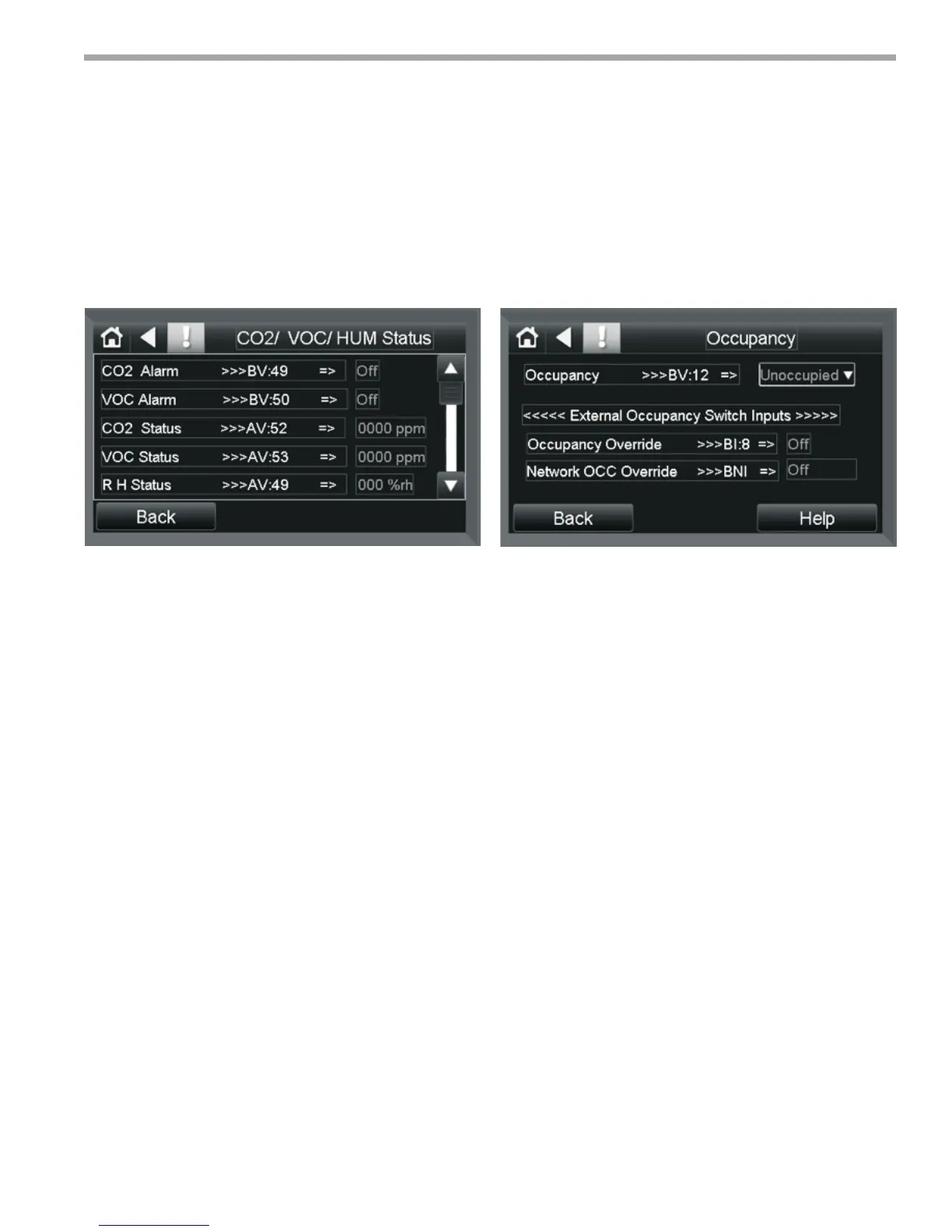
CO2/ VOC/ Humidity Status Screen
This sub-screen of the CO2/ VOC/ humidity Control
Screen is used to access the status of the various Alarms
and readings of the afore mentioned sensors,
Control Points associated with this screen are
shown below:
1. CO2 Alarm- Set the CO2 Alarm when the CO2 level
exceeds the Setpoint. The Alarm will extinguish
when the CO2 levels drop below the setpoint.
2. VOC Alarm- - Set the VOC Alarm when the CO2
level exceeds the Setpoint. The Alarm will extinguish
when the VOC levels drop below the setpoint.
3. CO2 Status- Displays the actual CO2 level from the
sensor in PPM.
4. VOC Status- Displays the VOC level from the sensor
in PPM.
5. R.H Status- Displays the Relative Humidity from the
sensor in %.
Occupancy Screen
Password Protected
Provides access to the control points related to setting
and the overriding of Occupancy. (Control/ Status)
1. Occupancy - This point controls whether the unit
is in occupancy or is unoccupied. It is normally
defaulted to occupancy. It can be set and overridden
via the Equipment Touch or from the BMS control
program (WEBCNTL).
2. Occupancy Override - is a digital input BI:8 used
to input a signal from an external Motion sensor to
Override the occupancy. For this to function OCC/
Dirty Filter Sensor (BV:59) must be set to OFF.
3. Network OCC Override - BNI is used via the
Network to override the occupancy status of the
MPC unit.
Equipment Touch Screen Descriptions
Figure 40:
Figure 41:


 To Next Page