EasyManua.ls Logo

COMO AUDIO Amico - Browsing Internet Radio Content; Navigating Station Categories; Accessing Podcast Content

COMO AUDIO Amico
56 pages
Print Icon
To Next Page IconTo Next Page
To Previous Page IconTo Previous Page
Loading...
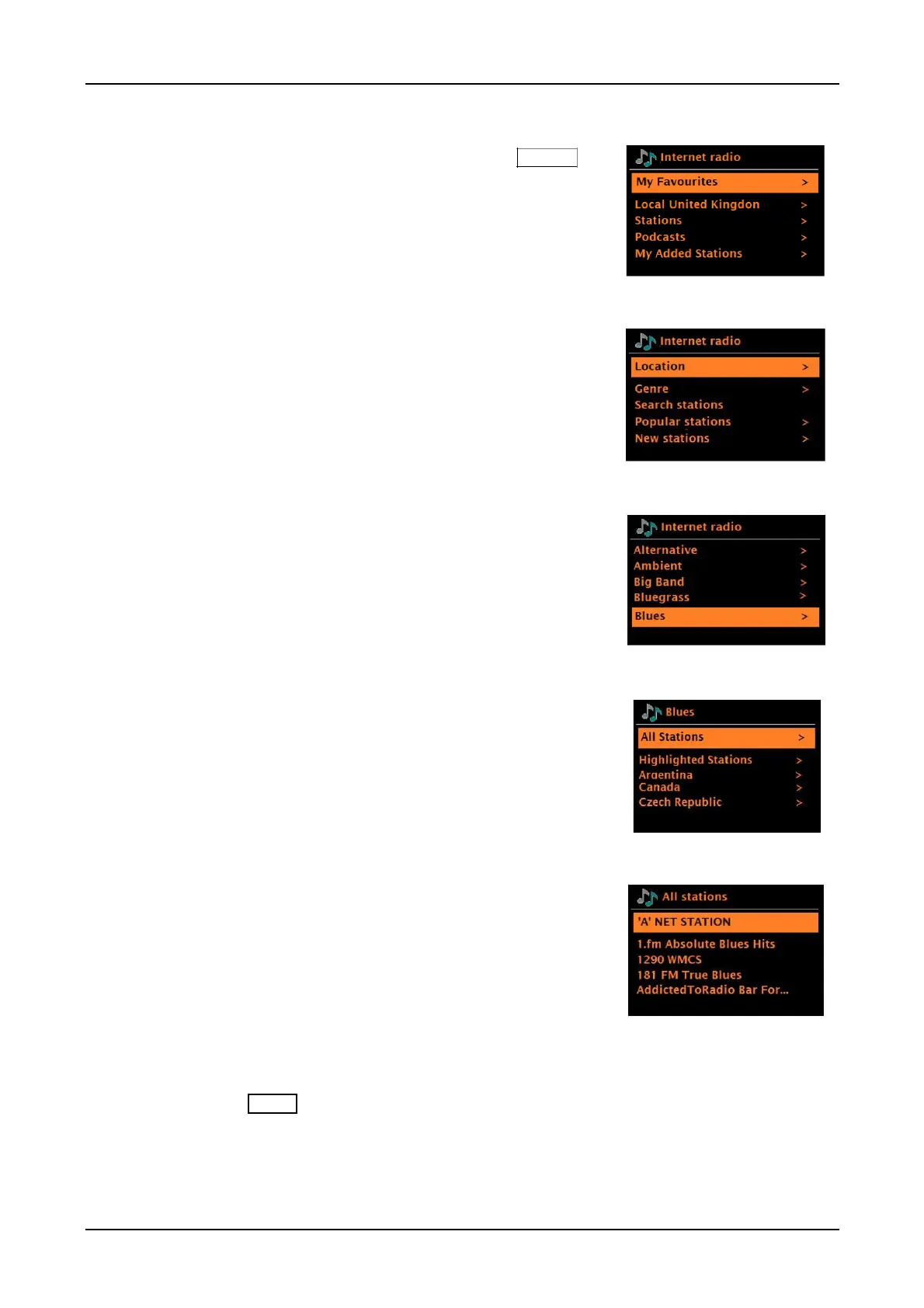
Browse Internet stations
To browse Internet broadcasts, press and hold the Menu
knob > Station list > Stations.
Browse through the menus to find appropriate broadcasts.
For example: Select Stations:
And the Stations menu is displayed, select Genre:
To see the Genre menu, Select Blues:
And the Blues menu allows you to select a station from
a complete list or from specific countries.
Choose a station from the list to tune to that station.

Note:
BBC radio ‘Listen Again’ programs are accessible through the Podcast menu. For example, press
and hold the
Menu
knob > Podcasts > Location > Europe > United Kingdom > All shows >
BBC Radio 4 > You and Yours > 20/05/2019 - May 20.

Table of Contents

Other manuals for COMO AUDIO Amico