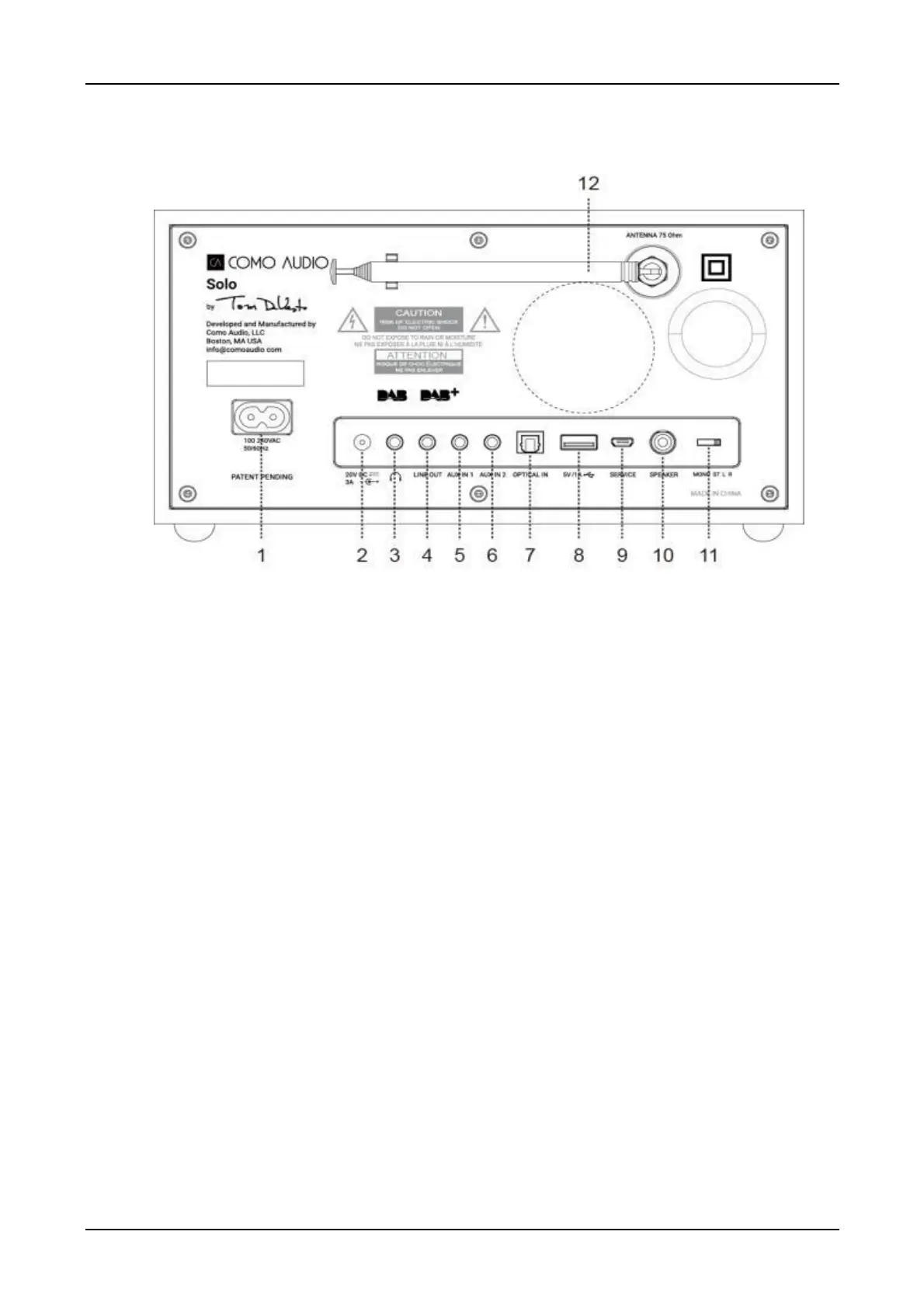
Rear panel Inputs/Outputs
The above illustration is of the Solo (with DAB) rear panel. Other models vary.
1. AC power in, 100-240V, 50/60Hz: For use with included power cord. The correct voltage for your
region will be automatically detected.
2. DC power in (20VDC/3A) (external adapter not included): Never use an adapter and the
power cord simultaneously. The adapter connector should be 5.5mm/2.1mm, center positive.
3. Headphone out (level adjusted using volume knob/remote control), 3.5mm stereo. Long-term
exposure to loud music may cause hearing damage. It is best to avoid extreme volume levels
when listening via earbuds or headphones, especially for extended periods.
4. Line out (fixed level, not affected by volume control), 3.5mm stereo: Connect an analog audio
cable to another device’s analog audio input, such as a home stereo system, to hear the sound
from Solo or Duetto through another system.
5. Auxiliary 1 in, 3.5mm stereo, Hi-Res: See Page 48.
6. Auxiliary 2 in, 3.5mm stereo, Hi-Res: See Page 48.
7. Optical in, Hi-Res: See Page 48.
8. USB in / 5V/1A: See Page 37.
9. Service: For use only by authorized repair agents. Do not connect anything to this input.
10. RCA out (Solo and Amico only): For connecting to the Ambiente (for Solo) or Amica (for Amico) Speaker.
11. Audio switch (Solo & Amico only): Set to ‘M’ for Mono, or; set to ‘ST’ if the Ambiente or Amica
Speaker is connected; or when using two Solos (or two Amico) for wireless stereo, set one to ‘L’
and the other to ‘R’ for dedicated wireless stereo if desired. Due to the nature of WiFi, it is possible
there may be some latency (delay) between the right and left channel information. Stereo FM &
DAB broadcasts will be indicated by 2 speaker icons in the lower right side of the display.
12. DAB/FM Antenna: Extend and position for best reception. This antenna has no bearing on WiFi or
Bluetooth reception. Be sure the antenna is extended before performing a DAB station scan or tuning
FM stations. Signal strength will be indicated on the antenna icon in the lower right side of the display.
To connect a different antenna, a tool can be obtained from Como Audio to remove the stock antenna.
13. Reboot (Musica and Amico only): Press briefly to cycle the power without losing any settings.



 To Next Page