50 Maintenance
7.7 Replacingtheoptionalltercartridge
To replace the lter cartridge, proceed as follows
1. Switch off the Condair RM via the unit switch.
2. Make sure the white hose is connected to the bypass connector on the lter head.
3. Place a rag below the lter cartridge in order to collect any residual water which ows out when the
lter cartridge is removed.
4. Close the shut-off valve in the water supply line to the Condair RM.
5. Hold the lter cartridge rmly with both hands on the circumference, so that it does not fall down
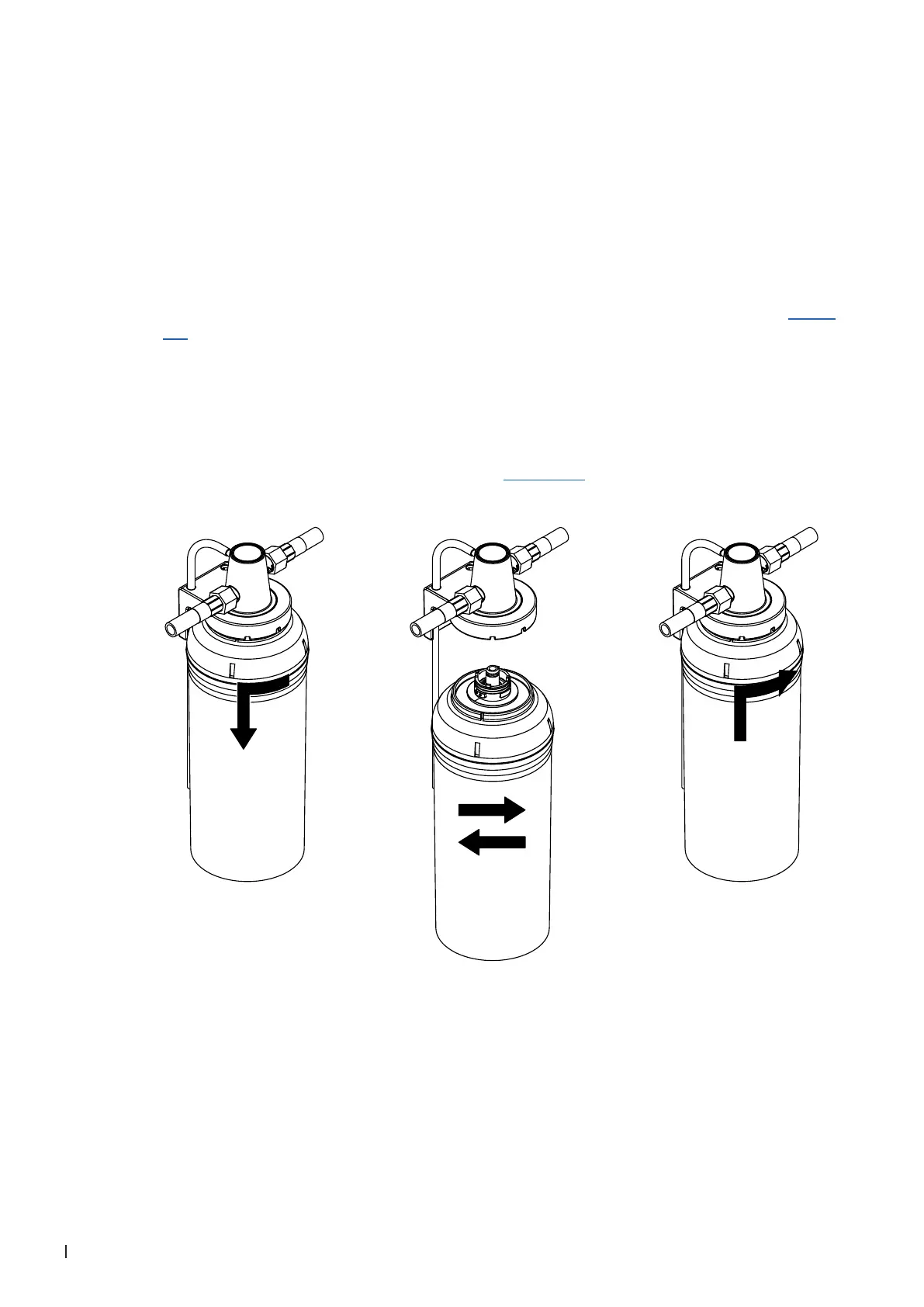
during removal. Then, carefully turn lter cartridge in the direction of the arrow as shown in Fig. 13
left until it comes to a stop (approx. 45 °) and remove lter cartridge.
6. Unpack new cartridge and remove protecting cap.
7. Place the lter cartridge below the lter head in such a way, that the label on the lter cartridge points
to the front (that way all necessary information is always visible).
8. Simultaneously push lter cartridge upwards and turn it until the lter cartridge engages into the
bayonet catch in the lter head. Then, while slightly pushing the lter cartridge upwards turn lter
cartridge in the direction of the arrow as shown in Fig. 13 right into the lter head until it comes to a
stop (approx. 45 °).
Fig. 13: Replacing the lter cartridge



 To Next Page