FSG/MTM/001 060511
148
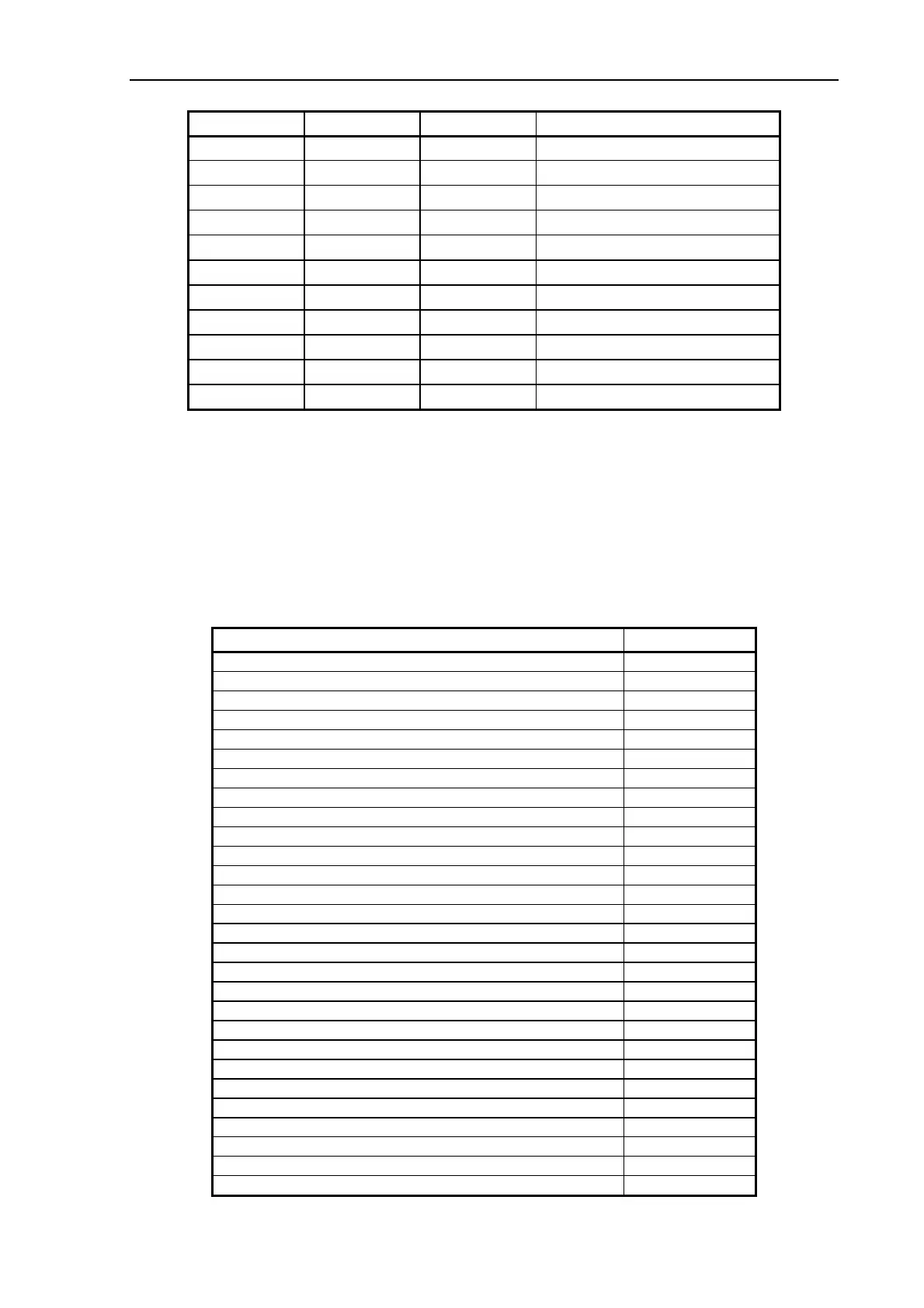
Diagnostic Wait Ready Error Description
F 1 x F OFF Correction of Camera A failed
F 2 x F OFF Correction of Camera B failed
F 3 x F OFF Correction of Camera C failed
F 4 x F OFF Correction of Camera D failed
F OFF 1 x F Error on SUC-Board
F OFF 2 x F Error on CBE/CBF-Board
F OFF 3 x F Invalid Scanner ID setting
F OFF 4 x F Error on IMB/IMD-Board
F OFF 5 x F Invalid Smart Card
F F F Scanner is in Boot Mode
F OFF OFF Refer to the Section below
1 x F, 2 x F, ... means that the Wait and/or the Ready Indicator blinks 1, 2, ... times every time
the Diagnostic Indicator is turned ON.
F, F, F means that all three indicators are blinking simultaneously.
7.3.2 Error Codes displayed on the PC Screen
If SCANtest 6 is started when the scanner is in Error condition it will display the Error Code
Number and a short description of the error.
The following error messages may be displayed:
Error Code and Description Refer to page:
ERROR 08-147: Invalid Scanner ID Switch setting 152
ERROR 08-149: Invalid Smart Card for this scanner type
ERROR 08-208: Keyboard check failed
ERROR 08-220: Lamp Cartridge detached
ERROR 10-159: Paper Jam
ERROR 30-140: Correction of Camera A failed 152
ERROR 30-141: Correction of Camera B failed
ERROR 30-142: Correction of Camera C failed
ERROR 30-143: Correction of Camera D failed
ERROR 30-240: Correction of Camera A failed
ERROR 30-241: Correction of Camera B failed
ERROR 30-242: Correction of Camera C failed
ERROR 30-243: Correction of Camera D failed
ERROR 32-144: Stitching of Camera A/B failed 153
ERROR 32-145: Stitching of Camera B/C failed
ERROR 32-146: Stitching of Camera C/D failed
ERROR 32-244: Stitching of Camera A/B failed
ERROR 32-245: Stitching of Camera B/C failed
ERROR 32-246: Stitching of Camera C/D failed
ERROR 40-35: CBx, Camera A not found 154
ERROR 40-36: CBx, Camera B not found
ERROR 40-37: CBx, Camera C not found
ERROR 40-38: CBx, Camera D not found



 To Next Page