CVC TECHNOLOGIES, INC. CVC 400 OPERATION MANUAL
11. 4 Label Peel Blades Adjustments (Head A and Head B)
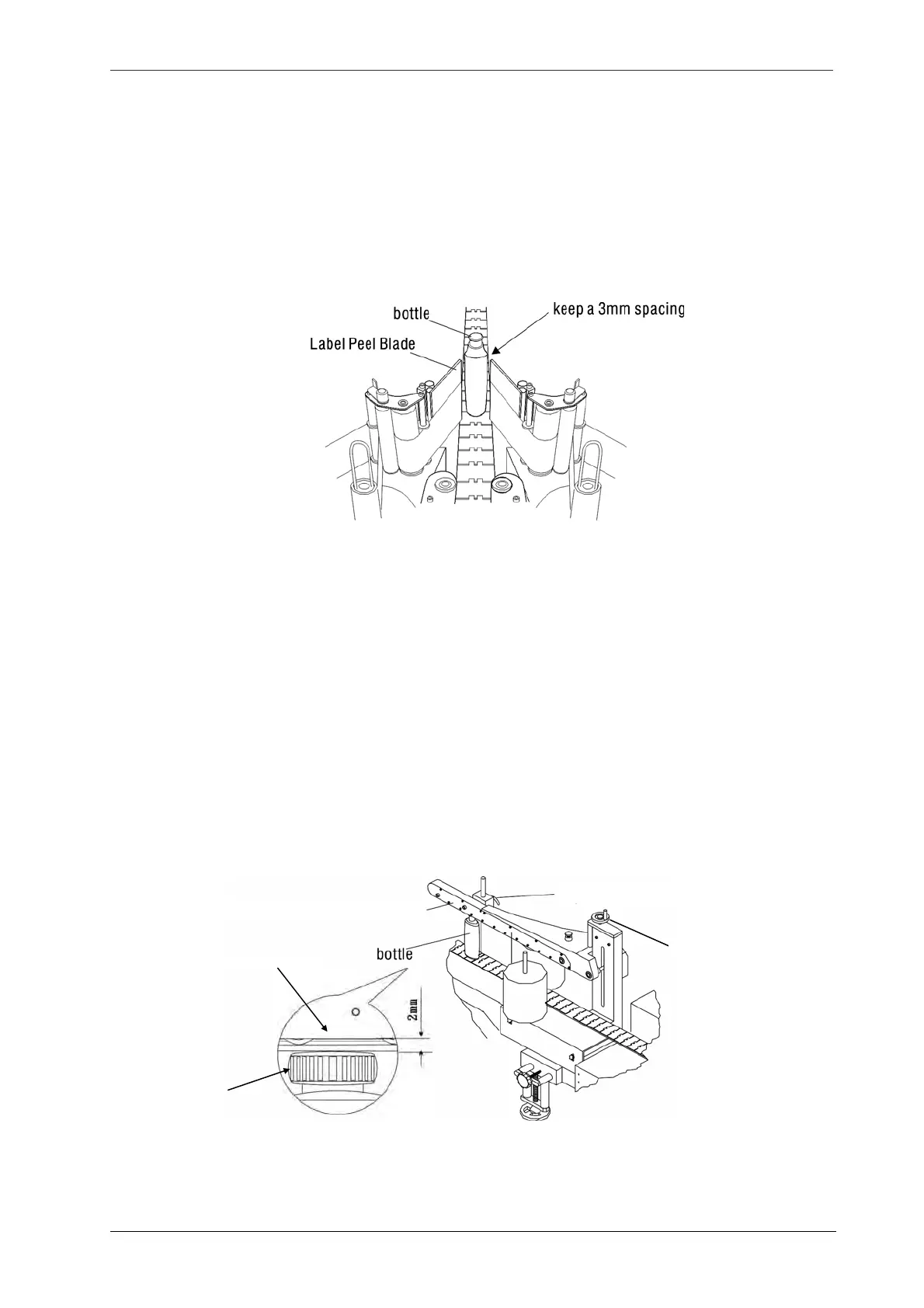
Adjust the spacing between the two label-peel blades and the product for proper labeling.
a. Place a product on the conveyor between the two label peel blades.
b. Rotate the lateral adj. knob (Fig 11.3-1) to move the label head blade to allow a 1/8" (3mm) space
between the product and the each peel blade (Fig 11.4-1).
Fig
11.4-1
11.5 Top Hold-Down Mechanism Adjustments
The top hold-down bar is to prevent the product swaying during labeling; the swaying product would
make improper label placement. The adjustment procedures are illustrated as follows.
a. Place a product under the hold-down bar (Fig 11.5-1).
b. Loosen the L-type fastening lever and then rotate the height adj. handwheel to adjust the height of
the hold-down bar. The belt of the hold-down bar should touch the bottle cap in a depth of 2mm for
stable and secure labeling.
c. Tighten the L-type fastening lever after adjustments.
Height adj. handwheel
Fastening lever
Top hold-down ba
To
hold-down ba
Cap
Fig
11.5-1
11 - 3



 To Next Page