103D-Link DWR-961 User Manual
Section 3 - Conguration
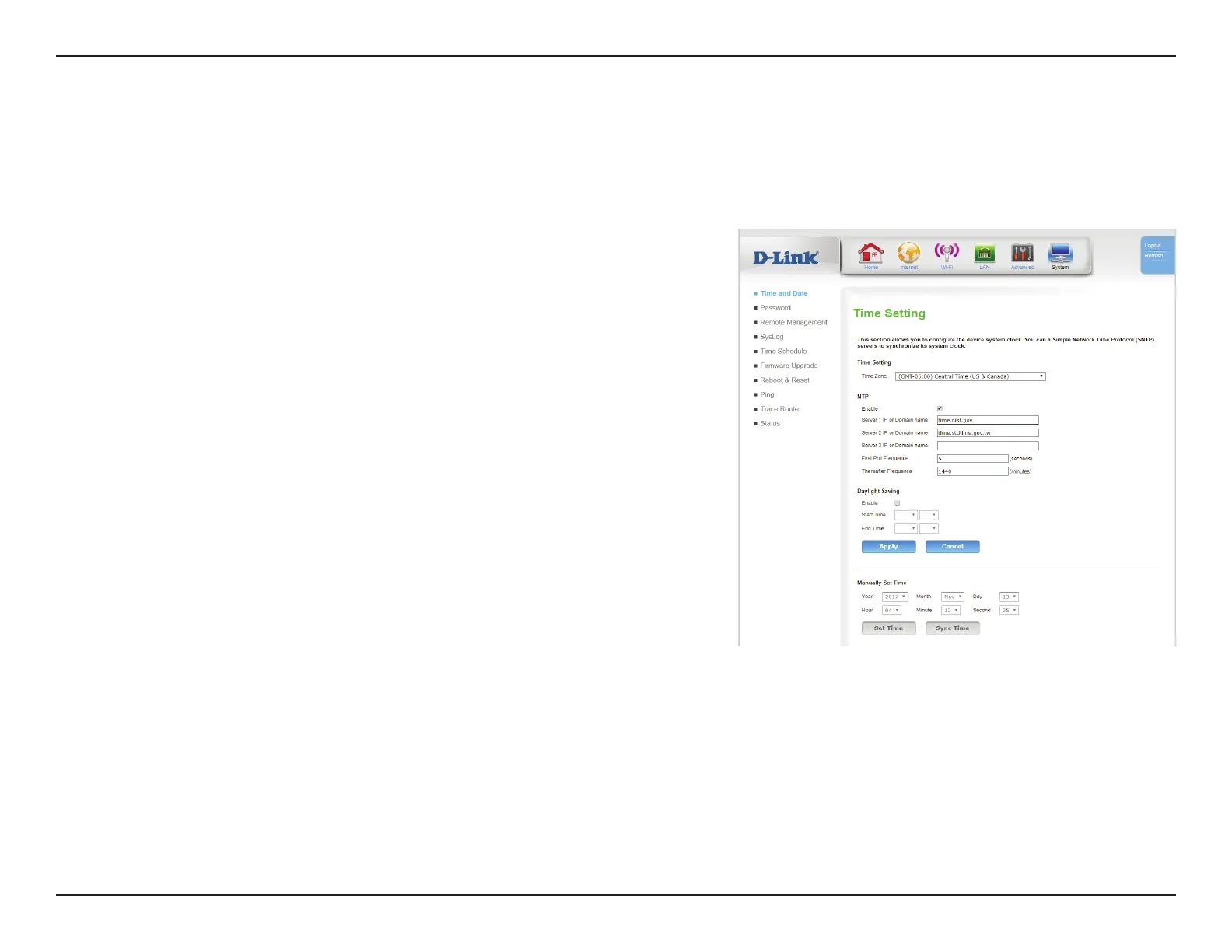
This section will help you set the time zone that you are in and an NTP (Network Time Protocol) server to use. Daylight Saving can also be congured
to adjust the time when needed.
System
Time Settings
Ethernet Interface
Time Zone: Select the appropriate Time Zone from the drop-down box.
NTP
Enable: Check the box to allow the router to use an NTP server to update
the router’s internal clock.
Server 1/2/3
IP or Domain
name:
Enter an NTP server to use for time synchronization, or use the
drop-down box to select one.
First Poll
Frequence:
Initial poll after connectivity established.
Thereafter
Frequence:
Specify the frequency of updates in minutes.
Daylight Saving
Enable: Check the box to allow for daylight saving adjustments.
Start Time: Specify a start date for daylight saving time adjustments.
End Time: Specify an start date for daylight saving time adjustments.
Click Apply to save your settings, or Cancel to revert to your previous settings.









 To Next Page