51D-Link DWR-961 User Manual
Section 3 - Conguration
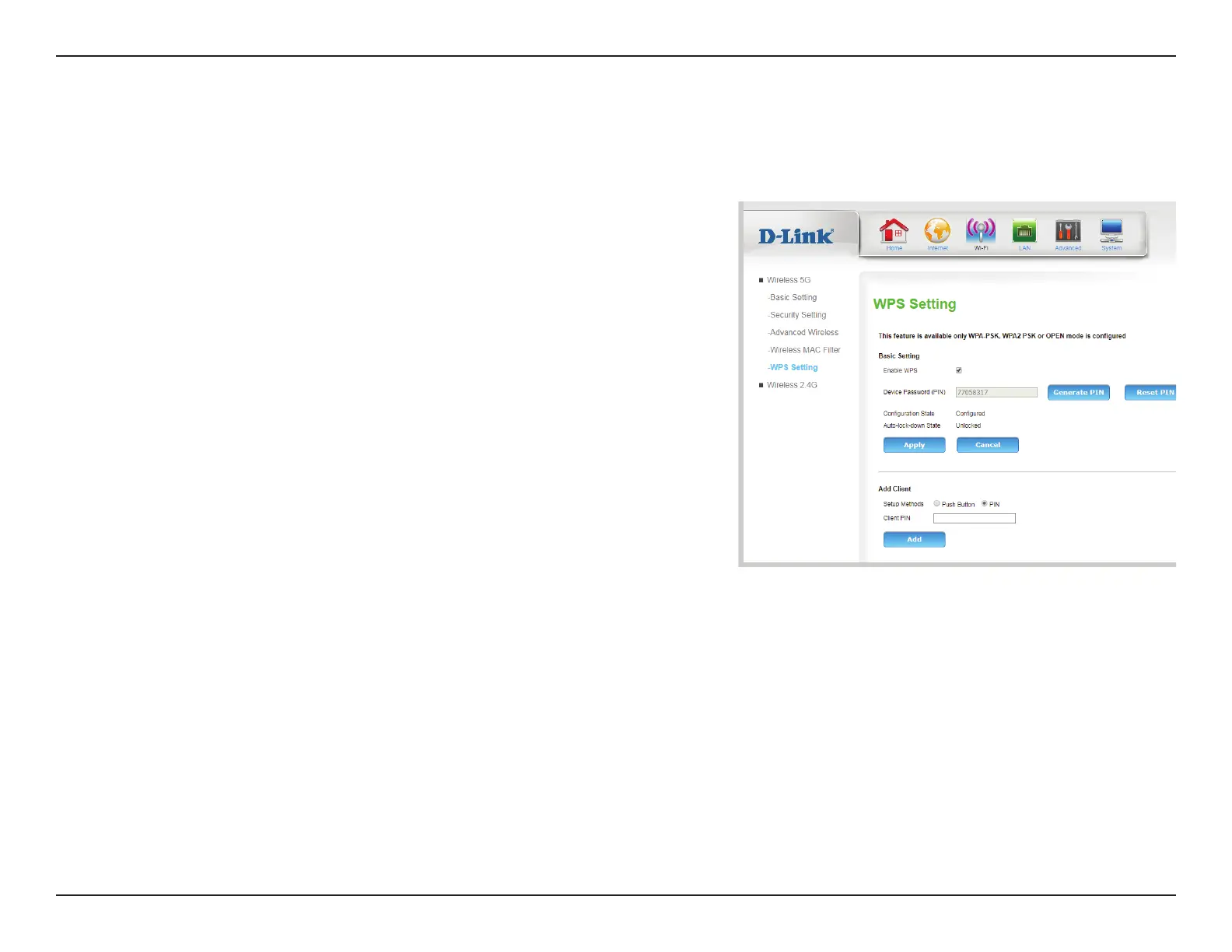
The Wi-Fi Protected Setup page allows you to create a wireless connection between your router and a device automatically by simply pushing a
button or entering a PIN code.
WPS
Basic Setting
Enable WPS: Check this box to enable pairing via WPS
Device
Password
(PIN):
If you use Windows 7’s Connect to a network wizard to do
initial conguration of the router, you will have the option to
enter the WPS PIN/AP PIN into the wizard when prompted. The
factory default WPS PIN/AP PIN is printed on a label located on
the bottom of the router. You can click the Generate New PIN
button to change it to a randomly generated PIN. Note that the
PIN is provided for compatibility purposes only, and has minimal
functionality for your protection.
Conguration
State:
If this is set to CONFIGURED, the router will be marked as
“already congured” to computers that try to use WPS-PIN
conguration, such as Windows 7’s Connect to a network
wizard. For your protection, the CONFIGURED ag is
permanently set in order to close vulnerabilities in the WPS-PIN
conguration.
Auto-lock-
down State
Auto-lock-down is activated when a device attempts too many
unsuccessful PIN-based WPS pairing attempts.
Click Apply to save your settings, or Cancel to revert to your previous settings.









 To Next Page