9D-Link DWR-961 User Manual
Section 3 - Conguration
Internet
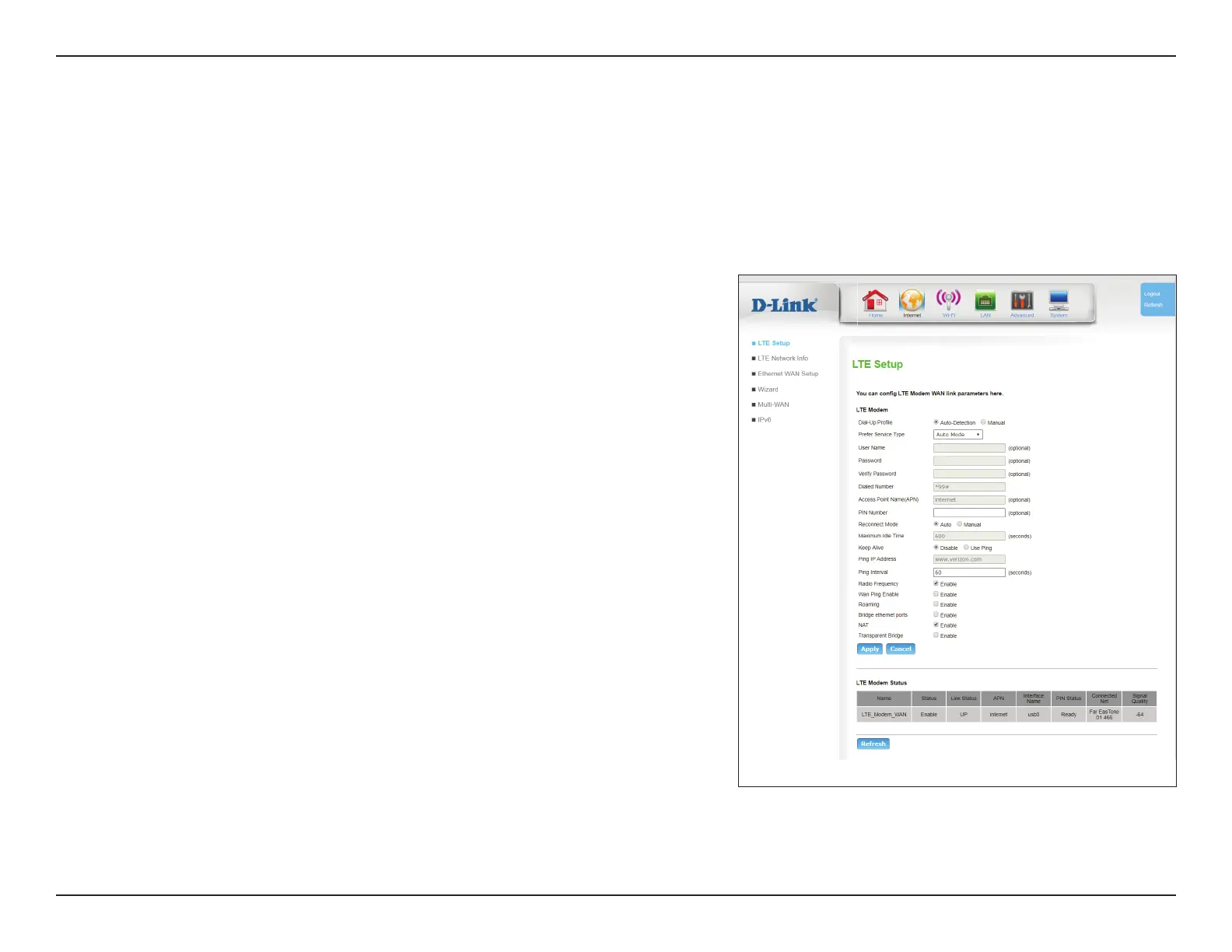
LTE Setup
This page allows you to congure your 3G/4G LTE Internet connection. Note that by default, the router uses this connection as the primary
Internet connection.
LTE Modem
Dial-Up
Prole:
Choose whether to use an auto-detection prole or a manual
prole.
Prefer Service
Type:
Choose from drop down list which mode of service to use.
User Name: (Optional) Specify a user name.
Password: (Optional) Specify a password.
Verify
Password:
(Optional) Should you have specied a password above, verify your
password one more time.
Dialed
Number:
Specify number to dial.
Access point
Name (APN):
Enter the access point name provided by your carrier.
PIN Number: (Optional) If your SIM/USIM card is protected with a PIN number,
enter it here. Note that repeatedly entering the wrong PIN may
cause the SIM card to become locked.









 To Next Page