33D-Link DWR-961 User Manual
Section 3 - Conguration
Multi-WAN
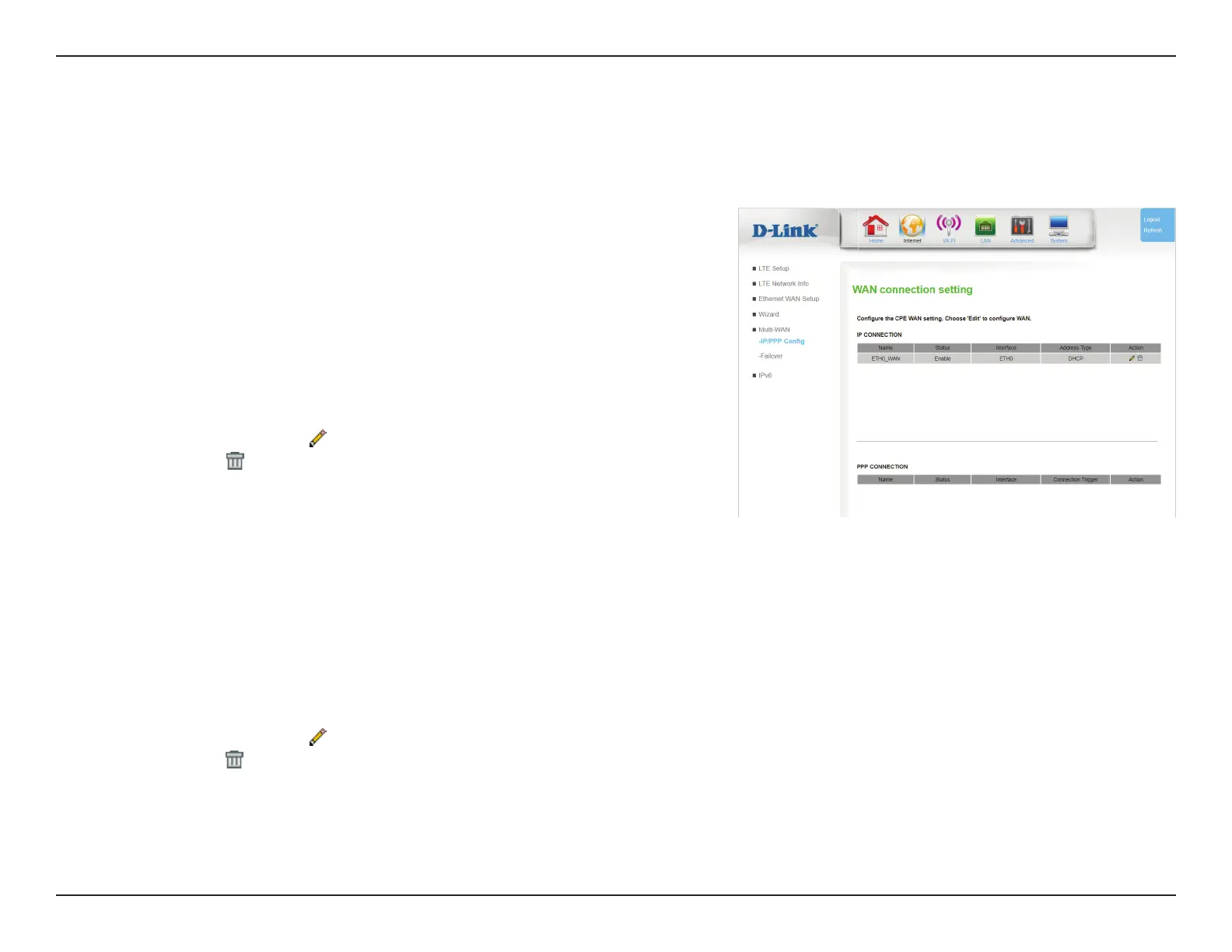
IP/PPP Cong
The DWR-961’s multi-WAN feature allows you to set your router to automatically switch to a secondary Internet connection if your primary Internet
connection is lost. Note that you must rst setup your Ethernet connection before you can congure failover. By default, the primary connection
is 3G/4G.
IP Connection
Name: Indicates the name of the connection.
Status: Indicates whether the connection is Enabled or Disabled.
Interface: Indicates the physical interface of the connection.
Address Type: Indicates how the IP address is assigned (DHCP, Static etc...).
Action: Click the pencil (
) icon to edit the connection, click the trash can
icon ( ) to delete the connection.
PPP Connection
Name: Indicates the name of the connection.
Status: Indicates whether the connection is Enabled or Disabled.
Interface: Indicates the physical interface of the connection.
Connection
Trigger:
Specifies the circumstances when the connection will be
established (Always On, Manual, or On Demand).
Action:
Click the pencil (
) icon to edit the connection, click the trash can
icon ( ) to delete the connection. Note that the 3G_Modem_PPP
connection cannot be modied or deleted.
Click Apply to save your settings, or Cancel to revert to your previous settings.









 To Next Page