59D-Link DWR-961 User Manual
Section 3 - Conguration
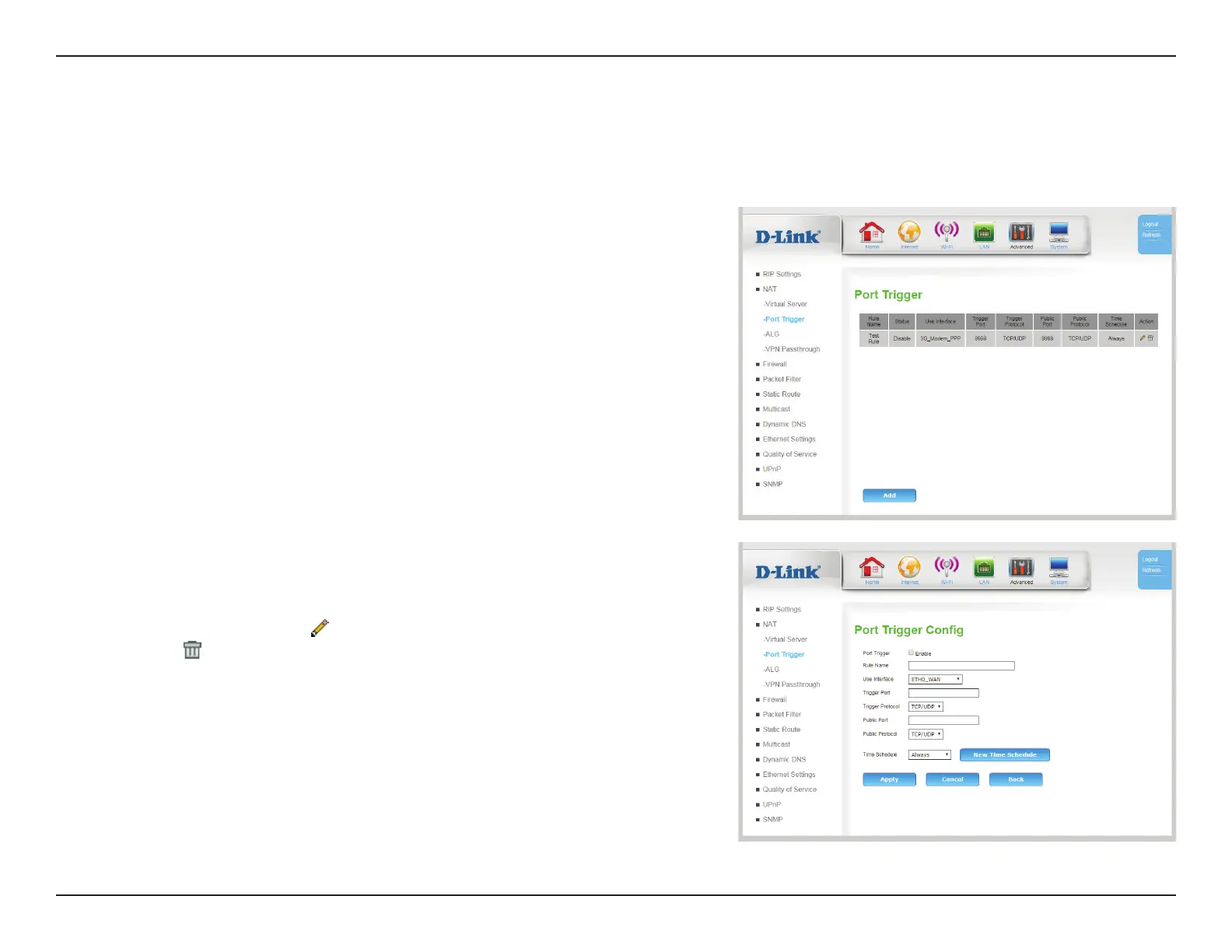
Some legacy applications require multiple connections, such as Internet gaming, video conferencing, and Internet telephony. These applications
may have diculty working through NAT (Network Address Translation). The Port Trigger feature allows some of these applications to work with
the DWR-961 by opening ports after detecting trac being sent through a trigger port.
Port Trigger
Rule Name: Indicates the name of the rule for reference.
Status: Indicates the current status of the trigger.
Use Interface: Indicates which interface the rule is bound to.
Trigger Port: Indicates the port(s) on LAN that will trigger the rule.
Trigger
Protocol:
Indicates the protocol that will trigger the rule.
Public Port: Indicates the public port(s) that the trigger will forward to.
Public
Protocol:
Indicates the protocol type that triggers the rule.
Time
Schedule:
Select the time schedule during which the port trigger rule is
active. To create a new time schedule, click New Time Schedule.
Action: Click the pencil (
) icon to edit the lter, click the trash can icon (
) to delete the port trigger.
Click Add to add a new port trigger, described on the next page.









 To Next Page