105D-Link DWR-961 User Manual
Section 3 - Conguration
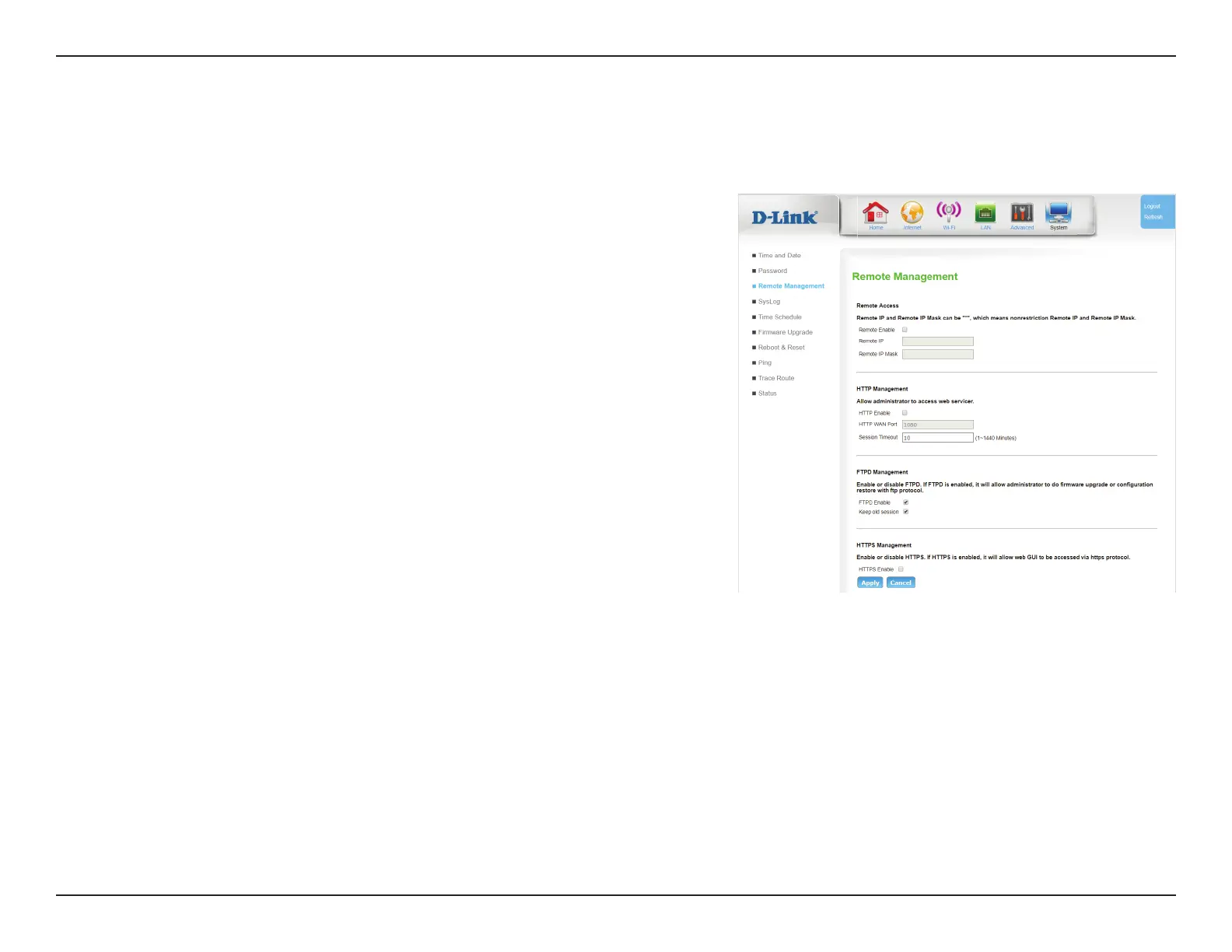
The Remote Management page allows conguration of the router from a remote location, usually over WAN.
Remote Management
Remote Access
Remote
Enable:
Check Enable to enable remote access.
Note: this setting could allow remote attackers to access your router.
Use with caution.
Remote IP: You can specify an authorized IP address for remote
management. Packets appearing from other sources will be
dropped. Enter an asterisk (*) to allow remote access from any IP.
Adding an asterisk (*) into this eld could present a security risk
and is not recommended.
Note: This method does not provide packet authentication, and
provides only basic security.
Remote IP
Mask:
You can specify an authorized subnet mask for remote
management. Packets appearing from other sources will be
dropped. Enter an asterisk (*) to allow remote access from
any mask. Adding an asterisk (*) into this eld could present a
security risk and is not recommended.
Click Apply to save your settings, or Cancel to revert to your previous settings.
Http Management
Http Enable: Check this check box to enable remote management. Remote
management allows the DWR-961 to be congured over the
Internet through a web browser. A username and password will
still be required to access the web-management interface.









 To Next Page