65D-Link DWR-961 User Manual
Section 3 - Conguration
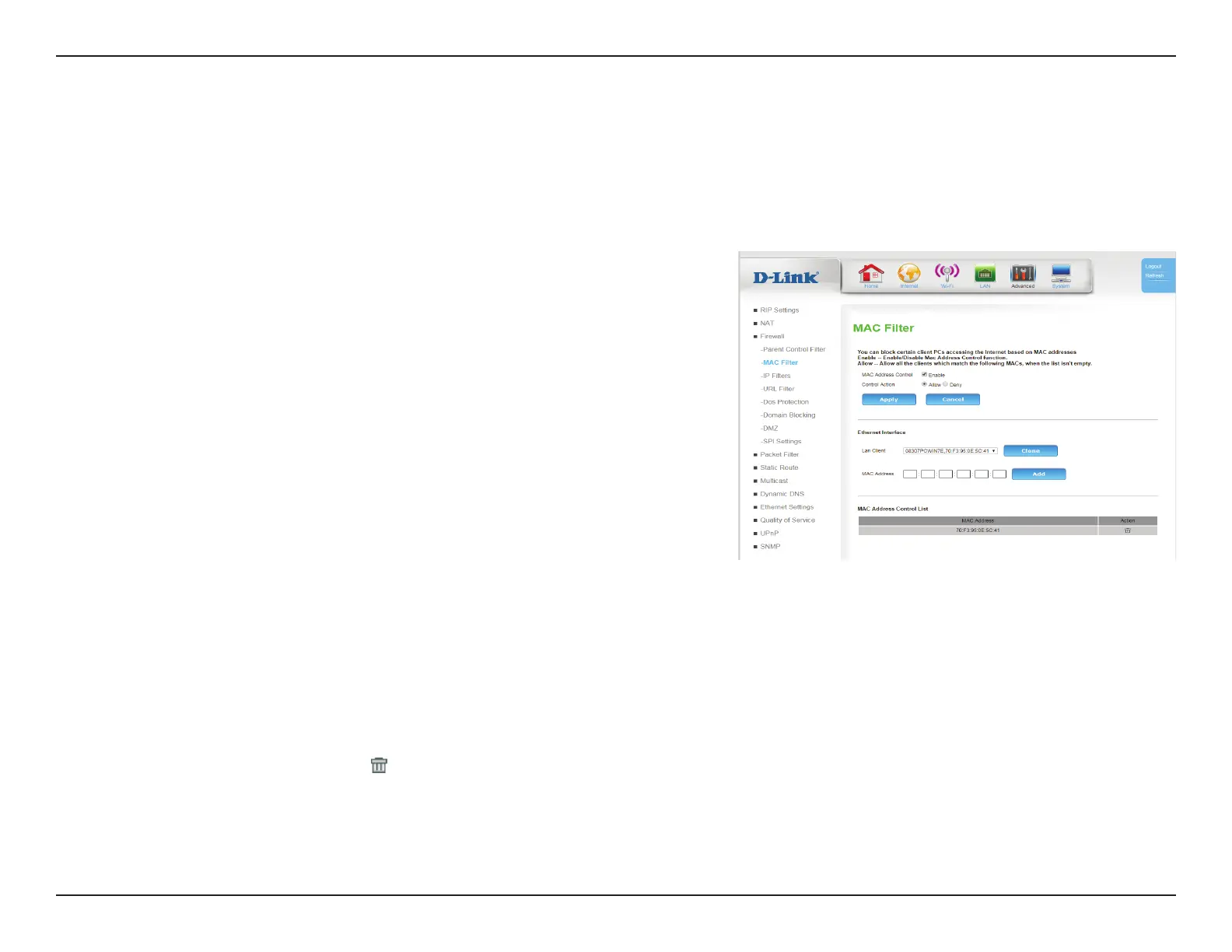
MAC Filter
MAC Address
Control:
Select Enable to enable MAC Address ltering.
Control
Action:
Select Allow to allow only clients on the list to connect, creating a
white list. Select Deny to allow all connections except to the clients
on the list, creating a black list.
Click Apply to save your settings, or Cancel to revert to your previous settings.
Ethernet Interface
Lan Client: You can optionally select a LAN client from the list of clients. Once
selected, click Clone to auto-ll the eld below.
MAC Address: Enter a MAC address or edit one cloned from the Lan Client eld.
Click Add to
Click Apply to save your settings, or Cancel to revert to your previous settings.
MAC Address list
MAC Address Displays the MAC Address(es) to be ltered.
Action: Click the trash can icon (
) to delete the rule.
The MAC (Media Access Controller) Filter option is used to control Ethernet LAN network access based on the MAC address of the network adapter.
A MAC address is a unique ID assigned by the manufacturer of the network adapter. This feature can be congured to ALLOW or DENY network/
Internet access.









 To Next Page