55D-Link DWR-961 User Manual
Section 3 - Conguration
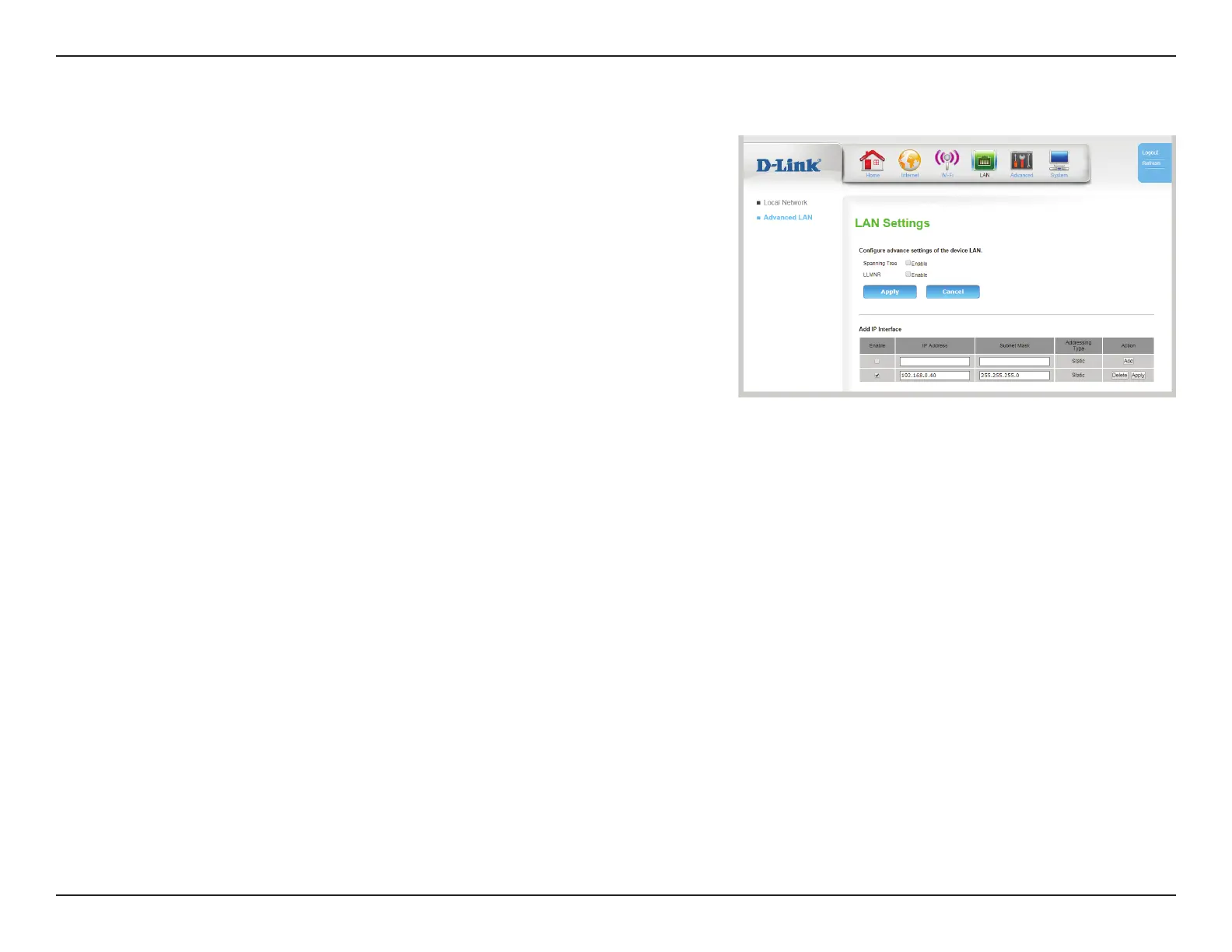
Advanced LAN
Congure advance settings of the device on LAN
Spanning
Tree:
Check this box to enable spanning tree over Ethernet. This is
disabled by default.
LLMNR: Check this box to enable Link-Local Multicast Name Resolution.
Click Apply to save your settings, or Cancel to revert to your previous settings.
Add IP Interface
Enable: Check this box to enable access to the GUI over an alternative static
IP address. This is particularly useful for VLANs or bridges.
IP Address: Enter the static IP that will be used to access the GUI
management interface.
Subnet Mask: Enter the subnet mask over which this IP address will function.
Addressing
Type:
Displays the type of address
Action: Click Delete to delete an interface, or click Apply to apply any
changes made in the previous elds.









 To Next Page