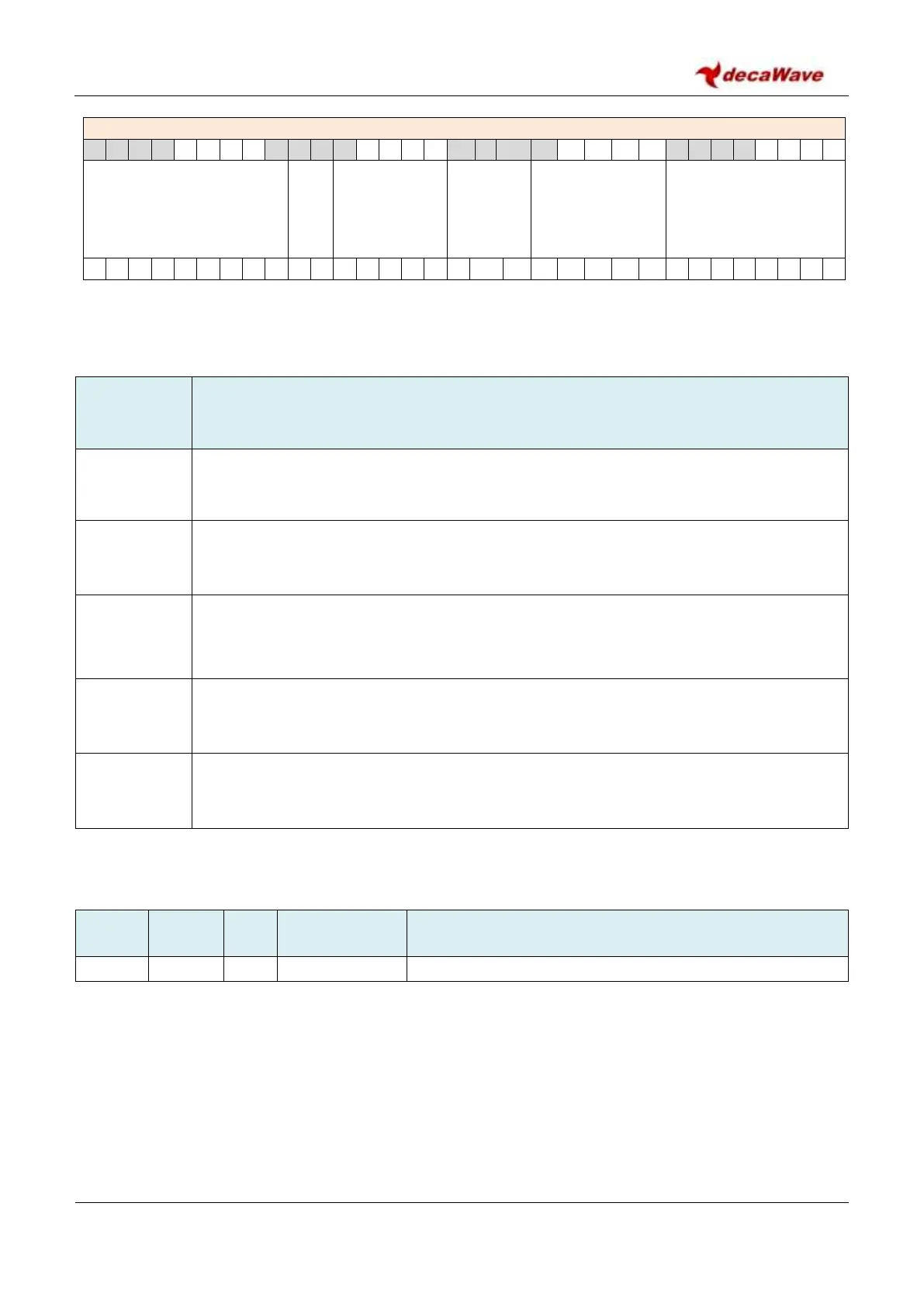
REG:28:00 – RF_CONF – RF Configuration Register
Definition of the bit fields within
Sub-Register 0x28:00 – RF_CONF
Description of fields within
Sub-Register 0x28:00 – RF_CONF
Reserved
reg:28:00
bits:31:23,7:0
These fields are reserved, and should not be set to 1 (may be overwritten with 0).
TXFEN
reg:28:00
bits:12:8
Transmit block force enable. Write 0x1F to force all TX blocks on. Enabling this field will be
used for certain test and calibration modes where we want to force the transmitter on
when there are not packets being TX’d (i.e. Continuous Wave mode).
PLLFEN
reg:28:00
bits:15:13
PLL block force enables. Write 0x5 to enable the CLK_PLL or 0x7 to enable both the CLK_PLL
and RF PLL. Enabling this field will be used for certain test and calibration modes where we
want to force the PLLs on when there are not packets being TX’d (i.e. Continuous Wave
mode).
LDOFEN
reg:28:00
bits:20:16
Write 0x1F to force the enable to all LDO’s. Enabling this field will be used for certain test
and calibration modes where we want to force the LDOs on when there are not packets
being TX’d (i.e. Continuous Wave mode).
TXRXSW
reg:28:00
bits:22:21
Force the TX/RX switch. To configure for TX the value written should be set to 0x2, and to
configure for RX the value should be set to 0x1.
7.2.41.2 Sub-Register 0x28:04 – RF_RES1
Register file: 0x28 – Analog RF configuration block, sub-register 0x04 is a reserved register. Please take care
not to write to this register as doing so may cause the DW1000 to malfunction.
Note that calibration programming steps may require writes to this register.


 To Next Page