2
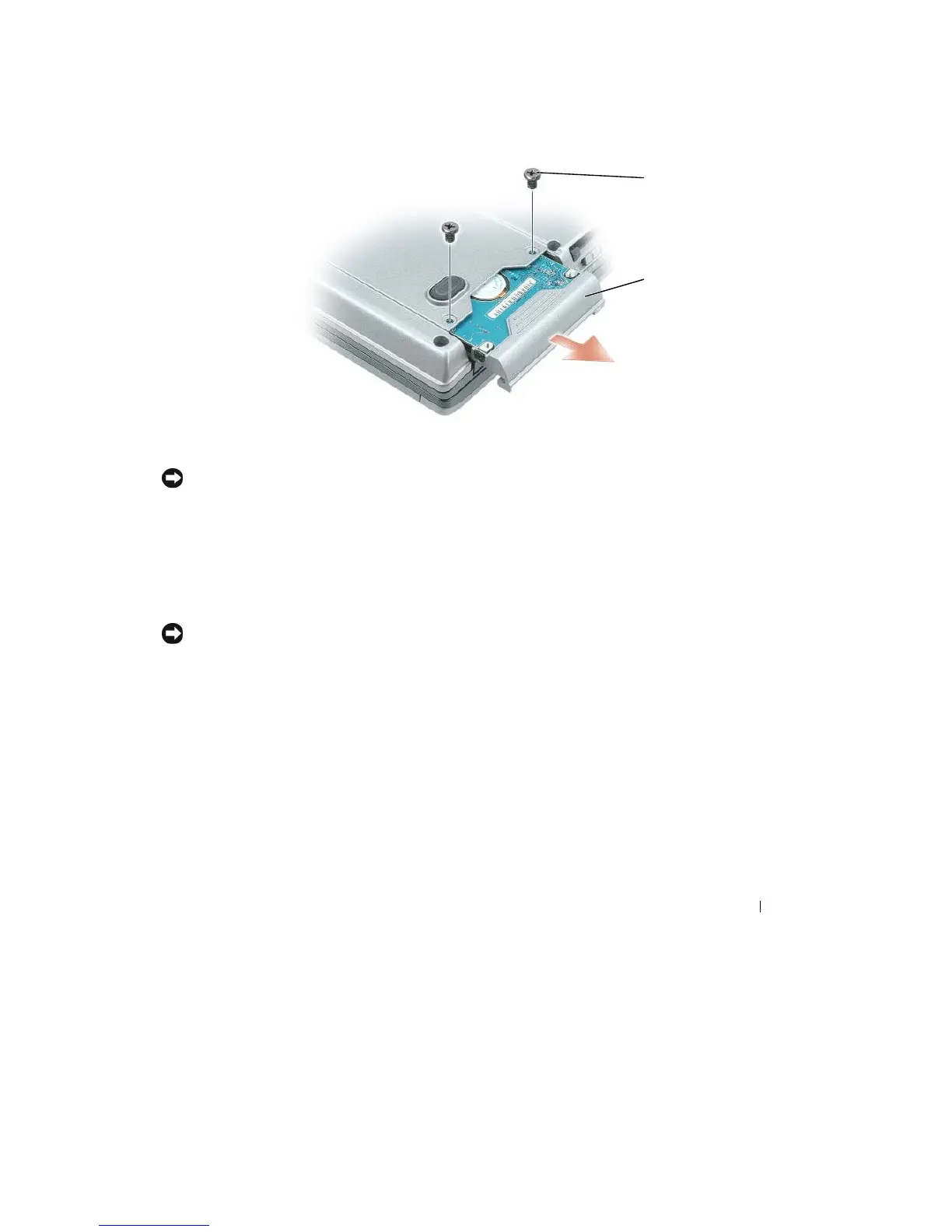
Turn the
computer upside-down, and remove
the
two screws
that
secure
the
hard drive carrier
to the
chassis.
1
2
1
screws
(2) 2
hard drive
NOTICE:
When the hard drive is not in the computer, store
it
in protective antistatic packaging. See
"Protecting
Against Electrostatic Discharge" in the Product Information
Guide
.
3 Slide
the
hard drive carrier
out of the computer.
4 Remove
the
two
M3 x
5-mm screws
from the
sides
of the
hard drive bezel and
pull the
bezel
off the
hard
drive.
5 Remove
the
new drive
from its packaging.
Save
the
original packaging
for
storing
or
shipping
the
hard
drive.
NOTICE:
Use firm and even pressure to slide the drive into place.
If
you use excessive force, you may damage
the
connector
.
6 Slide
the
hard drive bezel
that
you took
off the old
hard drive onto
the
new hard drive and fasten
the
two
M3 x
5-mm screws on
the
sides
of the bezel.
7 Slide
the
new hard drive
into the
bay and
into the
connector
until it
is
fully seated.
8 Replace the
scr
e
ws.
9 Install
the
operating system
for
your computer (see "Restoring Your Operating System" on page
102).
10 Install the drivers and
utilities for
your computer (see
"Reinstalling Drivers and
Utilities"
on page
100).
Adding and Replacing Parts
109










 To Next Page