1
2
1
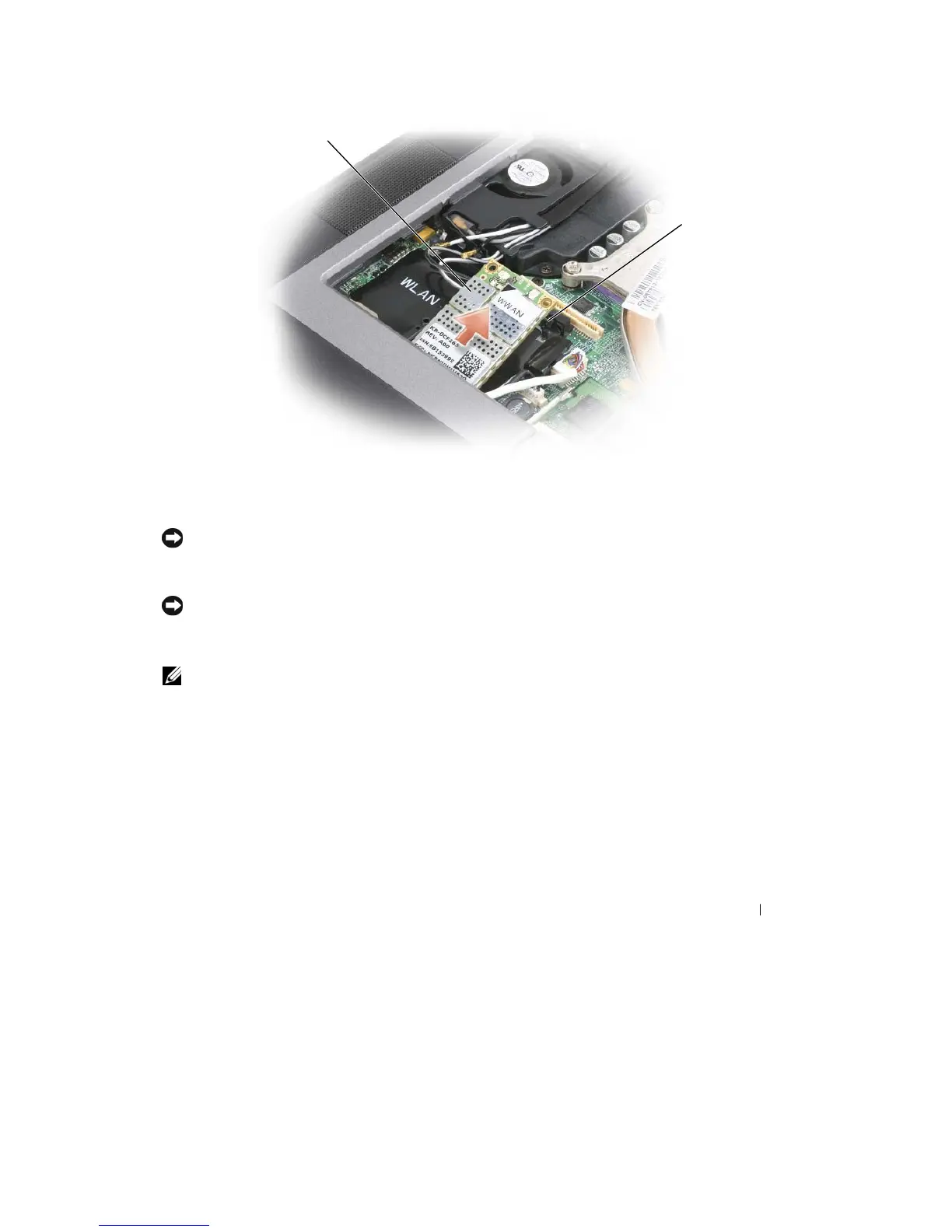
WWAN card
2
metal securing brackets
(2)
c
Lift the
card
out of its connector.
NOTICE:
The
card connectors are keyed to ensure correct insertion.
If
you feel resistance, reinstall the card
to
realign
it
in the connector
.
6 Install
the card.
NOTICE:
To avoid damaging the WWAN card, never place cables on top of or under the
card.
a
Align the card
with
the connector
at
a 45-degree angle, and press the card
into
the connector
until
it clicks.
NOTE:
Most antenna connectors have color-coded markings that correspond to the color of the cable. For
more
specific information about which cable to connect to which connector, see the documentation that came with
your
WWAN
card.
b
Connect
the
antenna cables
to the WWAN
card, ensuring
that
you route
the
cables
correctly.
7 Reinstall
the
keyboard and hinge
cover.
FCM (Flash Cache
Module)
The FCM, or
Flash Cache
Module,
is an
internal
flash drive
that
helps improve
the
performance
of your
computer.
Adding and Replacing Parts
123










 To Next Page