NOTE:
This card is only compatible with the Microsoft Windows V
®
operating
system.
NOTE:
If
you ordered a
FCM
card
with
your computer,
the
card is already
installed
.
1 Follow
the
procedures
in
"Before You Begin" on page
107.
2 Remove
the
hinge cover (see "Hinge Cover" on page
112).
3 Remove
the
keyboard (see "Keyboard" on page
113).
4 Ground yourself by touching one
of the
metal connectors on
the
back
of the computer.
NOTE:
If
you leave the area, ground yourself again when you return to the computer
.
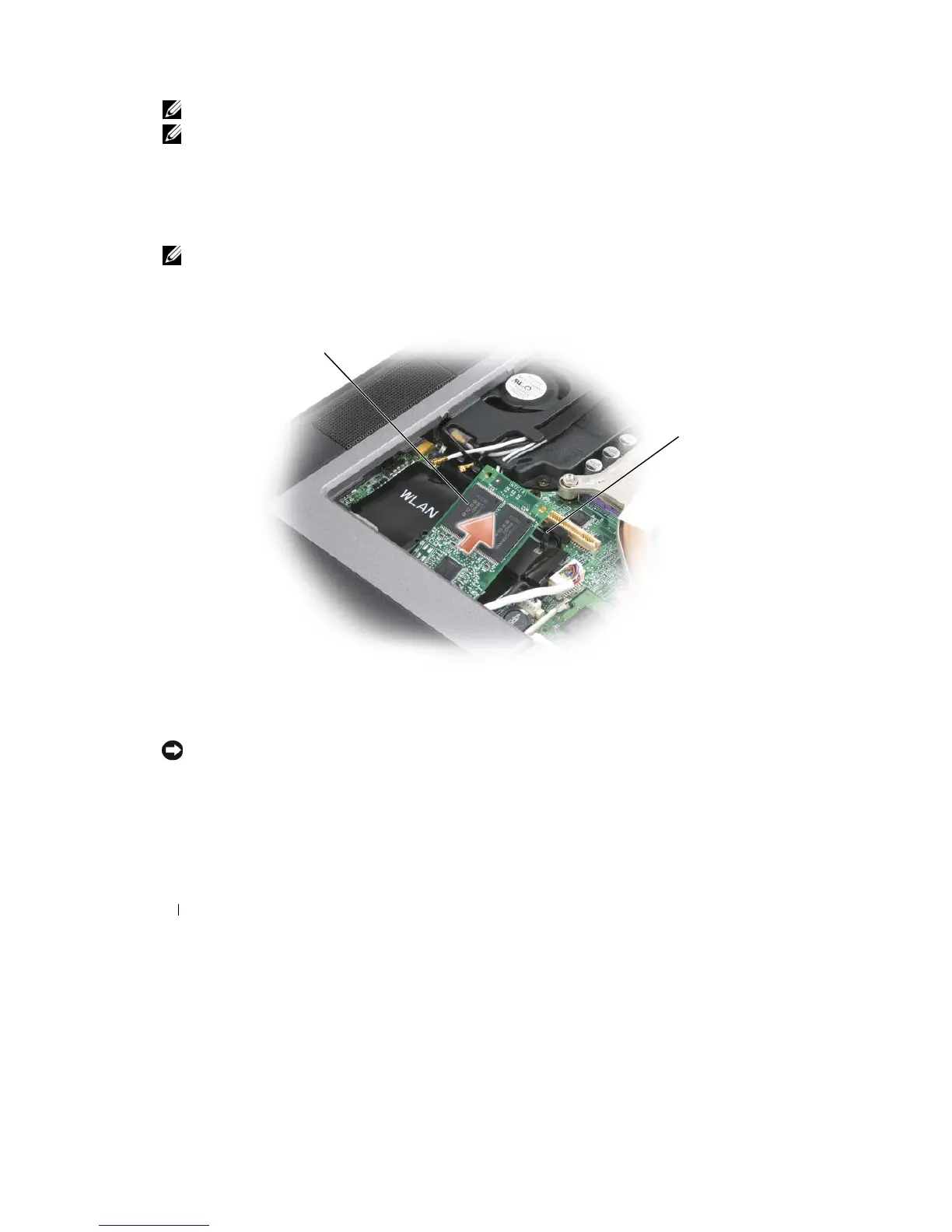
5 Release
the
card by pushing
the
metal securing brackets away
from the
card
until the
card pops
up
slightly.
1
2
1
FCM card
2
metal securing brackets
(2)
6
Lift the
card
out of its connector.
NOTICE:
This
card works only in the WWAN card connector. When installing this card, do not install
it
in
the
WLAN card connector. Doing so may cause damage to your
computer
.
7 Install
the
card by aligning
it with the
connectors
at
a 45 degree angle and pressing
the
card
into the
connector
until it clicks.
8 Reinstall
the
keyboard and hinge
cover.
124
Adding and Replacing
Parts










 To Next Page