EasyManua.ls Logo

Dell PP04X - Page 117

Dell PP04X
161 pages
Print Icon
To Next Page IconTo Next Page
To Previous Page IconTo Previous Page
Loading...
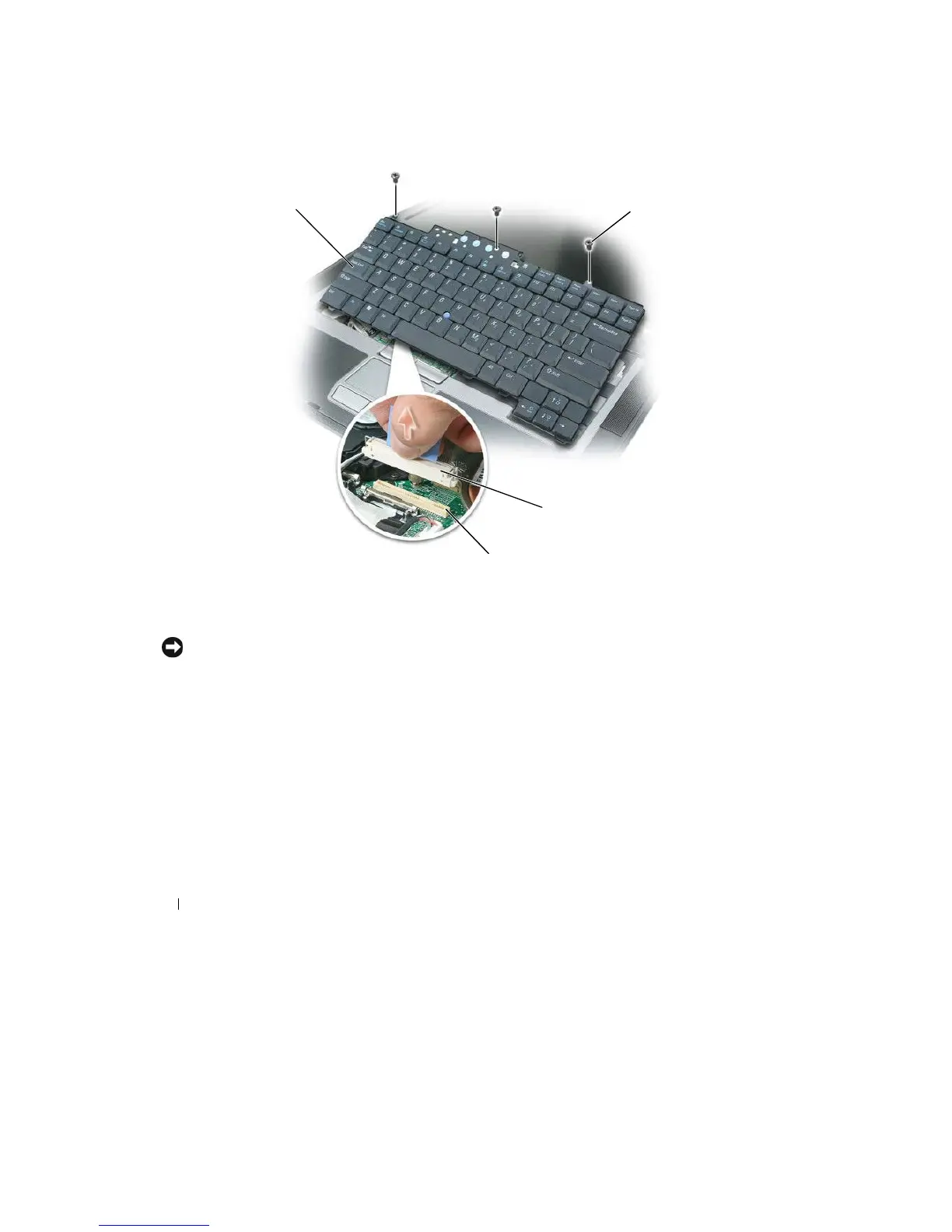
5 Pull
up
on
the
pull-tab
to
disconnect
the
keyboard cable connector
from the
keyboard connector
on
the
system
board.
1
2
3
4
1
keyboard
2
keyboard screws
3
cable
connector
4
keyboard
connector
NOTICE:
To
avoid scratching the palm rest when replacing the keyboard, hook the tabs along the front edge of
the
keyboard into the palm rest, and then secure the keyboard in
place.
To
replace
the
k
e
yboar
d
:
1 Connect
the
keyboard connector
to the
system
board.
2 Place
the
tabs along
the front
edge
of the
keyboard
into the
palm rest and lay
the
keyboard down
on
the
palmr
e
st.
3 Replace the three screws
at the top of the
k
e
yboar
d
.
4 Replace the hinge
cover.
114
Adding and Replacing
Parts

Table of Contents

Related product manuals