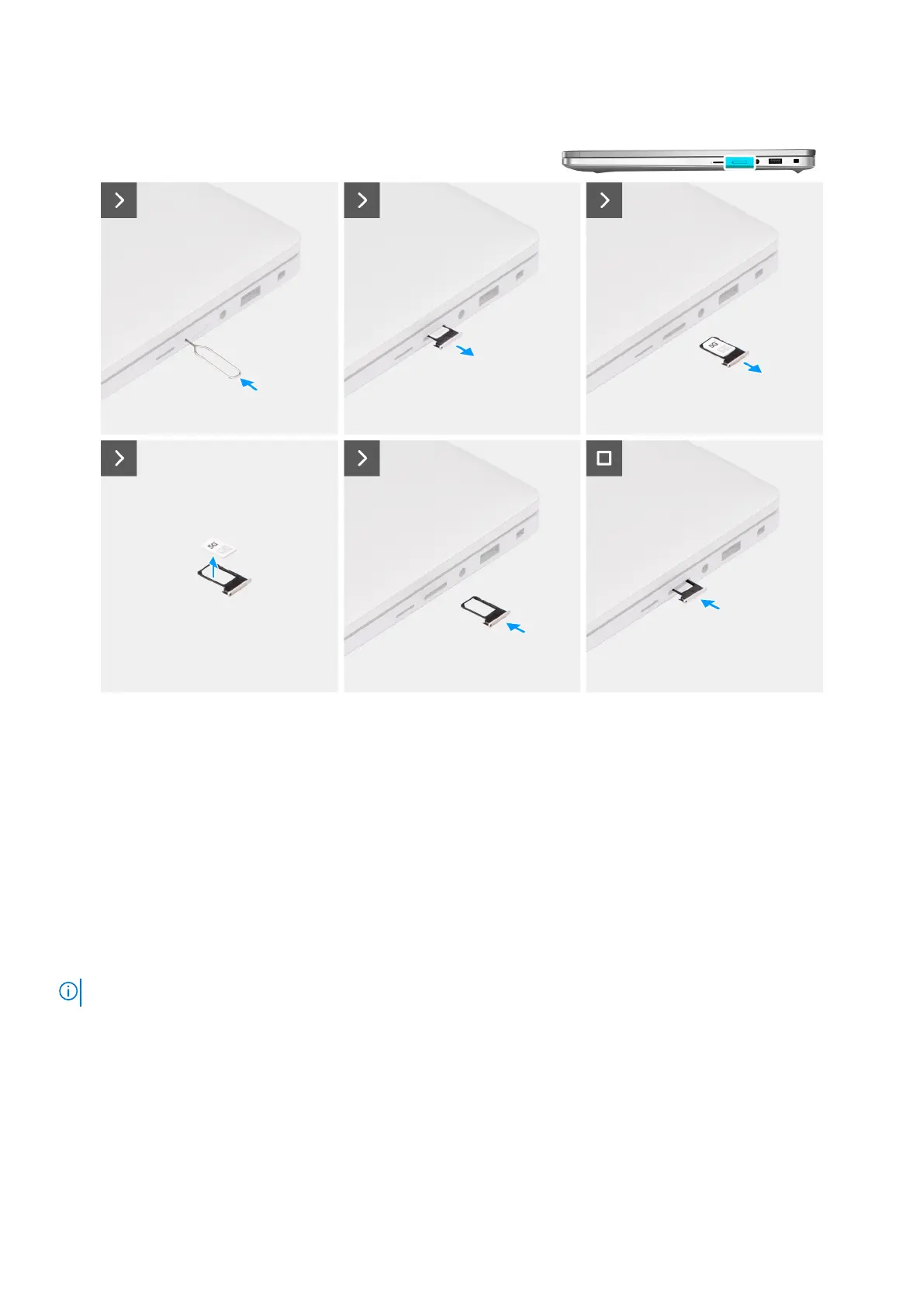
Figure 4. Removing the SIM card tray
Steps
1. Insert a SIM-ejector pin into the release hole to release the SIM card tray.
2. Push the SIM-ejector pin to disengage the lock, and eject the SIM card tray.
3. Slide the SIM card tray out of the slot on the computer.
4. Remove the SIM card from the SIM card tray.
5. Slide and push the SIM card tray back into the slot.
Installing the SIM card tray (optional)
Prerequisites
NOTE: The procedure for SIM card tray installation is only applicable for computers that are shipped with a WWAN module.
If you are replacing a component, remove the existing component before performing the installation procedure.
About this task
The following images indicate the location of the SIM card tray and provide a visual representation of the installation procedure.
Removing and installing Customer Replaceable Units (CRUs)
43











 To Next Page