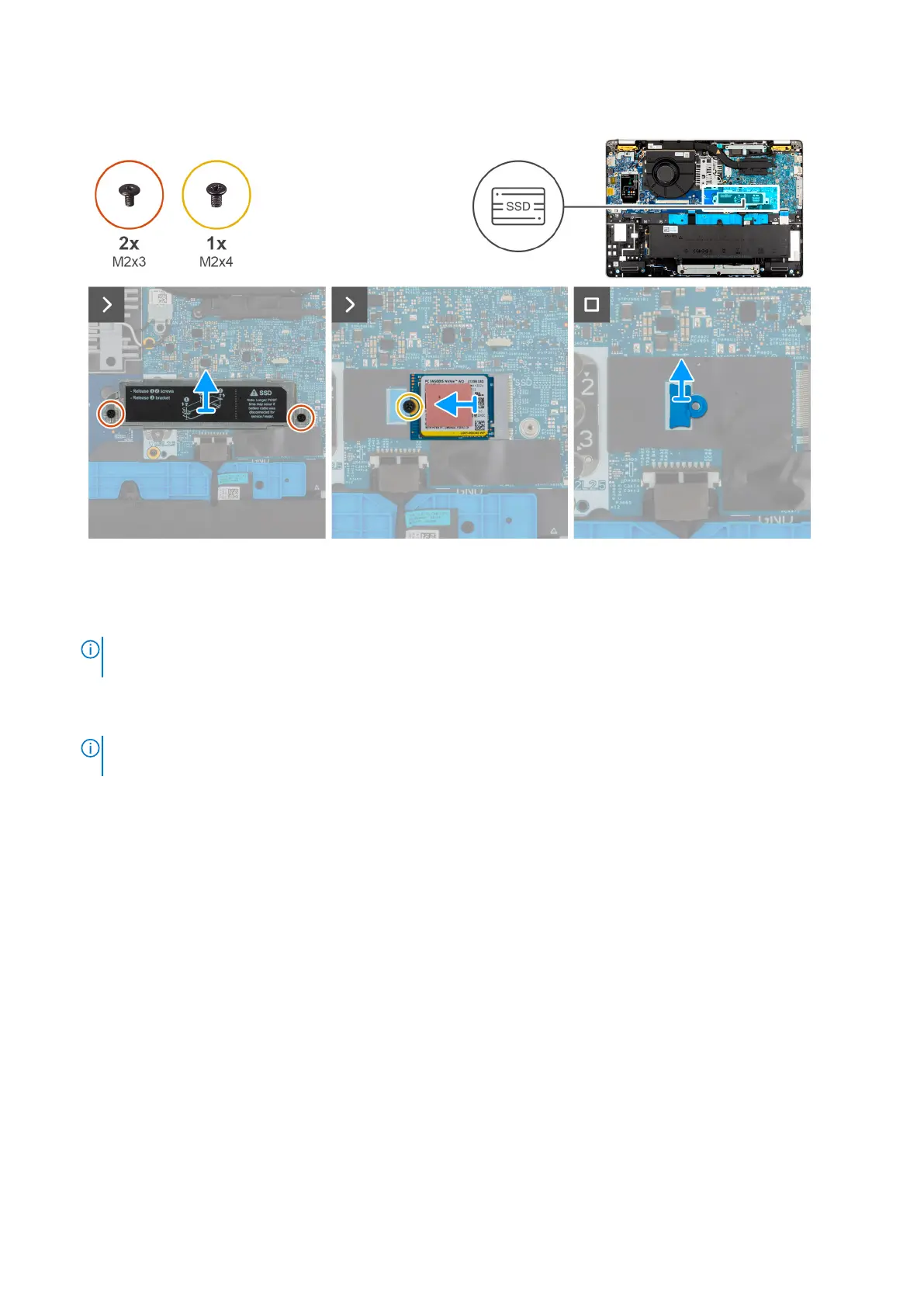
Figure 12. Removing the M.2 2230
SSD
Steps
1. Remove the two screws (M2x3) that secures the SSD bracket to the palm-rest assembly.
2. Slide and lift the M.2 2230 SSD bracket off the SSD slot.
NOTE:
If the thermal pads get separated from the shielding cover or gets adhered to the SSD while replacing the SSD,
the technicians must readhere the thermal pad to the SSD cover before reinstalling it to the computer.
3. Remove the screw (M2x4) that secures the M.2230 SSD to the palm-rest assembly.
4. Remove the M.2 2230 SSD and the mounting bracket from the palm-rest assembly.
NOTE:
For models shipped with M.2 2230 SSD, ensure that the SSD screw holder is transferred when the system board
is replaced.
Installing the M.2 2230 SSD
Prerequisites
If you are replacing a component, remove the existing component before performing the installation process.
About this task
The following images indicate the location of the M.2 2230 SSD and provide a visual representation of the installation procedure.
56
Removing and installing Customer Replaceable Units (CRUs)











 To Next Page