- 17 -
Programming Voice/Vibration Alerts
You can program voice alerts to report telemetry information on demand. If an
alarm goes off, you won’t have to look at the transmitter display to see what's
happening and just keep your eyes on what’s you’re flying. You can also set
vibration alert for alarm conditions.
Setting Method:
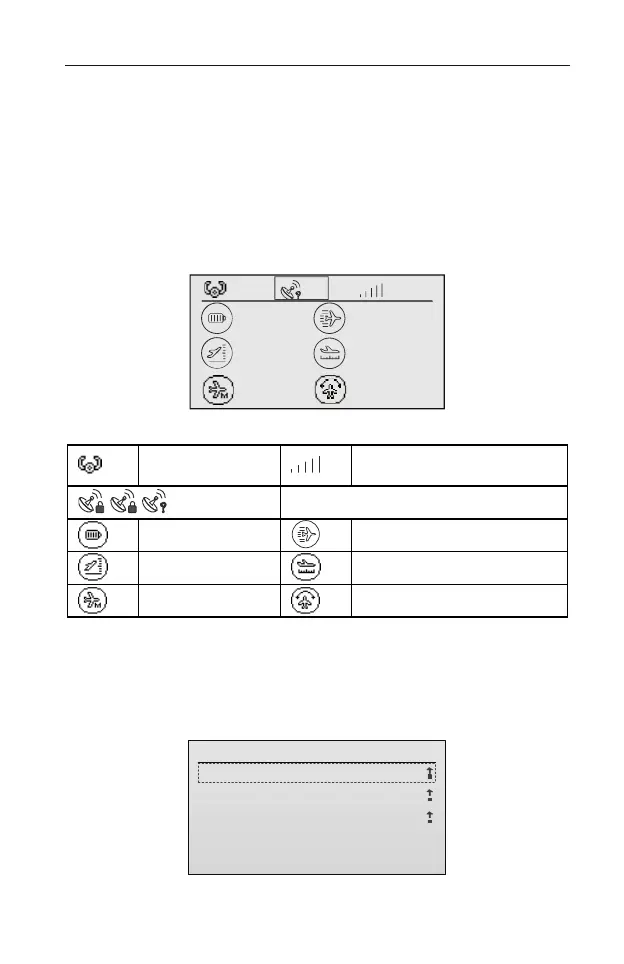
1. On the main screen, press CLEAR button to enter the telemetry data
interface, as shown in the figure below.
The icons are described in the table below.
RSSI (Received Signal
Strength Indicator)
GPS (unlocked/locked/not connected)
In this interface, you can program voice/vibration alerts for the parameters of
GPS, Voltage, Speed, Altitude, and Distance.
2. Take the Distance setting as an example.
(1) Roll the scroll wheel to select the Distance icon, then press the scroll wheel
to enter the setting interface, as shown in the figure below.
Distance Set
1/3
1.Distance Alert:
2.Distance Max:
3.Distance Min:
OFF
0
0
(2) Roll the scroll wheel to select the parameter, press and then roll the scroll
— — — — — — — — dBm
— — — — — — v
— — — — — — m— — — — — — m
— — — — — — m/s
— — — — — — — — — — — —°



 To Next Page