15
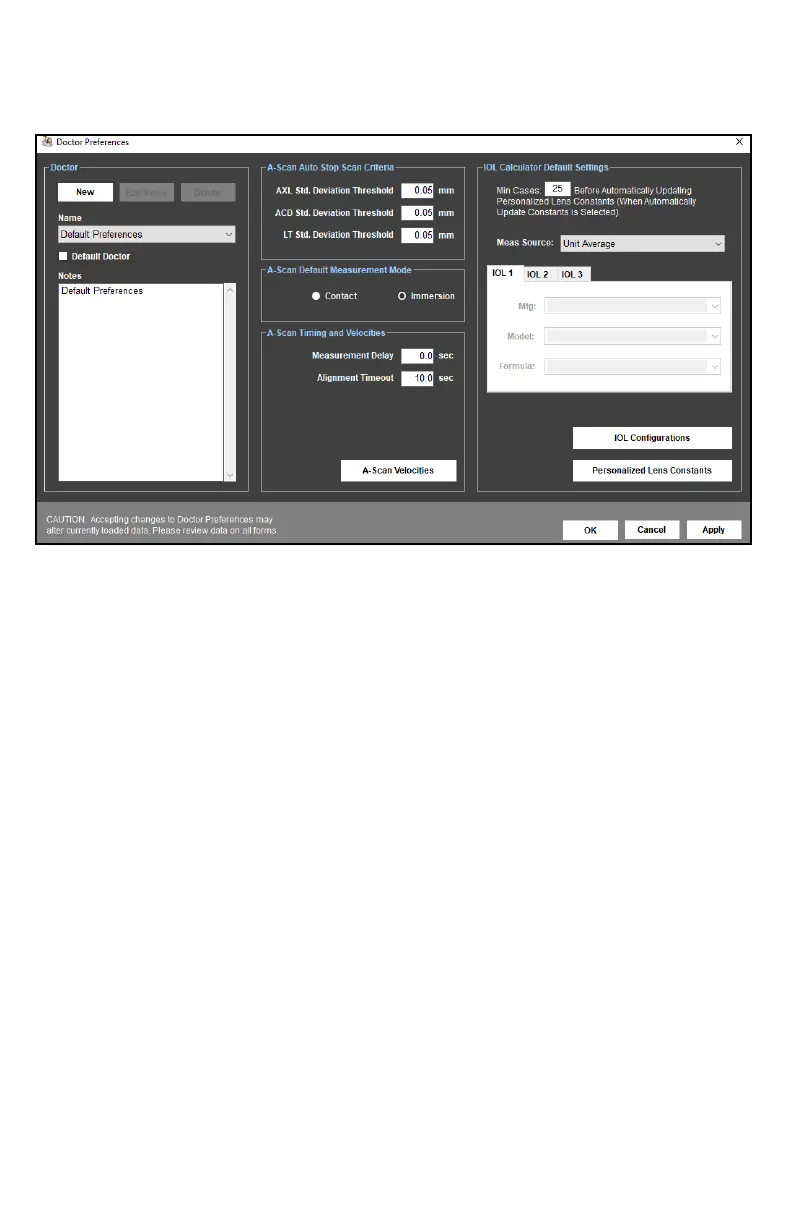
DOCTOR PREFERENCES MENU
The Doctor Preferences Menu allows the user to create, edit or delete individual doctor
preferences for the device. Doctor Preferences dene the default protocol for performing
A-Scans and IOL Calculaons.
A-SCAN AUTO STOP CRITERIA
This secon allows the user to create standard deviaon thresholds to use with the soware
Auto Stop feature. Individual threshold limits can be dened for the Axial Length (AXL), Anterior
Chamber Depth (ACD) and Lens Thickness (LT). Each category of standard deviaon is calculated
from eight (8) A-Scan measurements. Measurements in the measurement bank must fall within
the standard deviaon thresholds for the system to automacally stop scanning.
MEASUREMENT DELAY
The Measurement Delay is the amount of me aer alignment is detected, but before an A-Scan
measurement is taken. A Measurement Delay of 0 ms will result in a measurement as soon as
alignment is achieved.
ALIGNMENT TIMOUT
Alignment Timeout is the amount of me the probe can be in contact with the eye before the
soware reduces or disables the alignment algorithm. If Alignment Timeout is set to 0 ms, the
alignment algorithm is disabled (Esmate Mode). Refer to the Alignment Ranking System
secon for more informaon on alignment meout.
MIN CASES
This text box allows the user to set the minimum number of procedures that must be performed
before a Personalized Lens Constant is calculated for a given IOL model.



 To Next Page