36
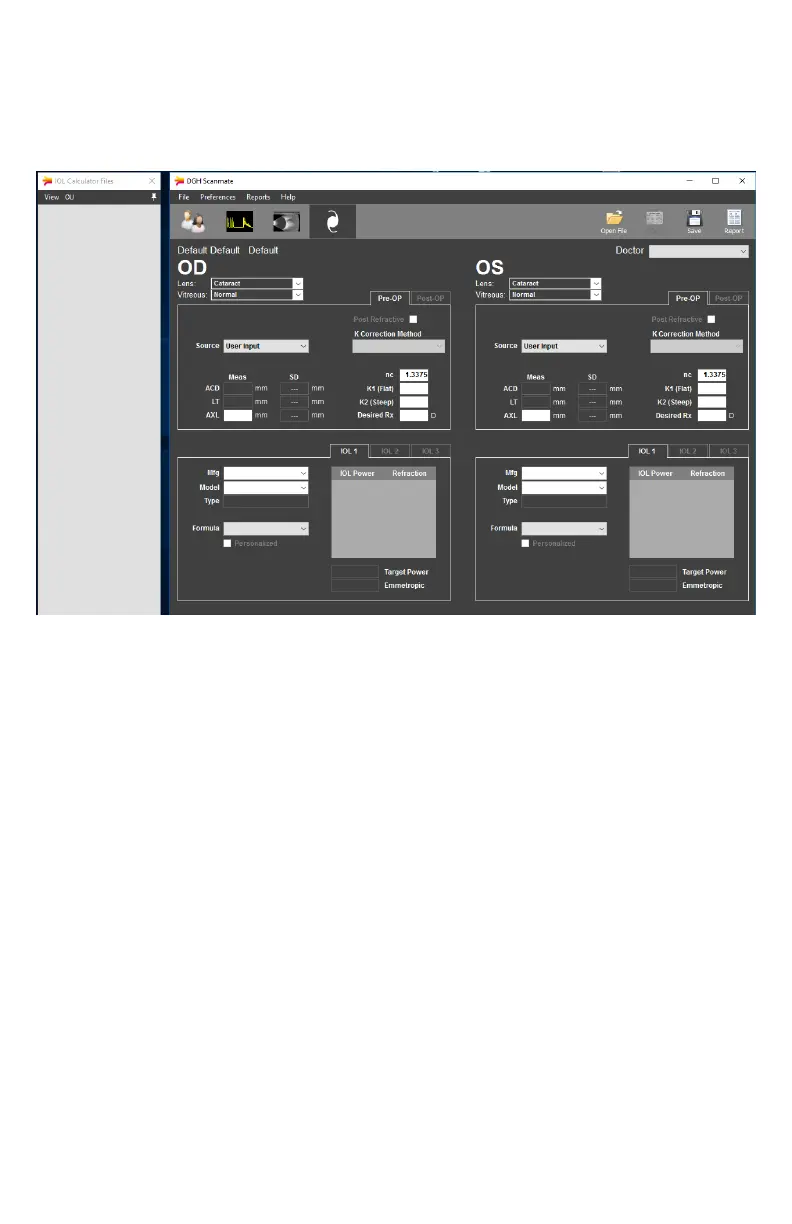
IOL CALCULATOR SCREEN (OPTIONAL FEATURE)
The IOL Calculator Screen allows the user to perform and review intraocular lens power
calculaons for the currently selected paent. If available, measurements and the selected lens
and vitreous type are automacally loaded from the A-Scan Screen. Informaon from the
Paent Data screen, (Paent Name, ID, Doctor) will be imported into the IOL Calculator.
Pre-Operave Data: Clicking the [PRE-OP] tab will present all elds necessary to perform
IOL calculaons. ACD, LT and AXL measurement values will
automacally be imported from the paent’s selected A-Scan. Other
values that may be edited by the user are highlighted. Missing or out-
of-range inputs are automacally marked in red. The results of the IOL
calculaon (Target IOL Power, Emmetropic Power, and Range of IOL
Power and Refracons) are displayed for up to three (3) IOLs for each
eye.
Post-Refracve Data: If the paent has previously undergone refracve surgery, select the
[POST REFRACTIVE] checkbox for the aected eye. This will enable the
Post Refracve K Calculator which can assist the user in determining the
true corneal power of eyes that have undergone corneal refracve
surgery. This calculator can perform Kcorr calculaons using history
derived, clinically derived, refracon derived, contact lens over-
refracon or double-k calculaon methods
Post-Operave Info: Clicking the [POST-OP] tab will present the Post-Operave secon of
the Paent Data Screen, where the user may input the stabilized
surgical results for the current paent and procedure. This secon of
the Paent Data Screen is only editable if valid Pre-Operave Data has
been entered for the selected eye.



 To Next Page