45
DATABASE MANAGEMENT—SQL SERVER DATABASE BACKUP
If a Client PC installaon was performed, an SQL Server database is used to store paent
records. Electronic records should be backed up regularly to prevent data loss. To backup the
Scanmate database using the Backup / Restore tool:
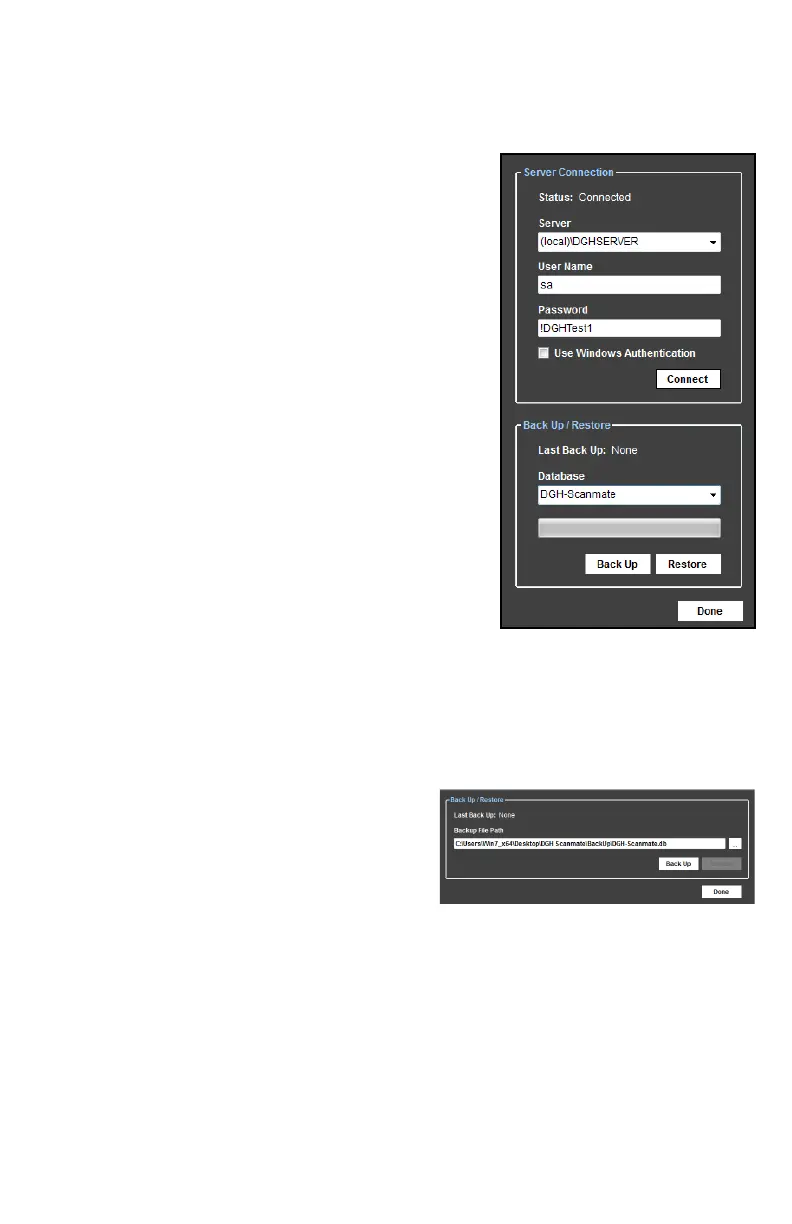
1. Open the Back Up / Restore window by selecng
File > Database > Backup / Restore.
2. Connect to the DGH Database Server by entering the
system administrator username and password that was
created when the DGH Database Server was installed
and clicking the [CONNECT] buon.
NOTE: This is the same username and password that
were created during SQL Server prerequisite
installaon.
3. Select the desired database to Back Up from the combo
box and select the [BACK UP] buon
4. Once the back up process has completed, a message
box will display the locaon of the backup le. It is
recommended that the backups be performed regularly
and stored in a safe locaon. Preferably, backup les
should not be stored on the same physical drive that
hosts the database.
DATABASE MANAGEMENT—SQLITE DATABASE BACKUP
If a Single PC installaon was performed, a SQLite database is used to store paent records.
Electronic records should be backed up regularly to prevent data loss. To backup the database
using the Backup / Restore tool:
1. Open the Back Up / Restore window by selecng File > Database > Backup / Restore.
2. The combo box shows the default locaon
where the backup le will be created. If a
dierent locaon is desired, click the […] buon.
A dialog window will open and allow a
dierent locaon to be selected.
3. Once the desired backup locaon is selected, click the [BACK UP] buon.
4. Once the back up process has completed, a message box will display the locaon of the
backup le. Click the [OK] buon. It is recommended that the backups be performed
regularly and stored in a safe locaon. Preferably, backup les should not be stored on the
same physical drive that hosts the database.
DATABASE MANAGEMENT—RESTORING AND TROUBLESHOOTING
Addional procedures for database management, restoring and troubleshoong are available in
the DGH Scanmate Installaon Guide.



 To Next Page