18
A-SCAN PAGE PREFERENCES
The A-Scan Page Preferences allow the user to select the Default Lens Type and Default Report.
Default Lens Type: This is the lens type that will be entered by default when a new A-Scan
procedure is started.
Default Report: This seng determines what report will be generated when clicking the
[REPORT] buon on the A-Scan Page.
B-SCAN PAGE PREFERENCES
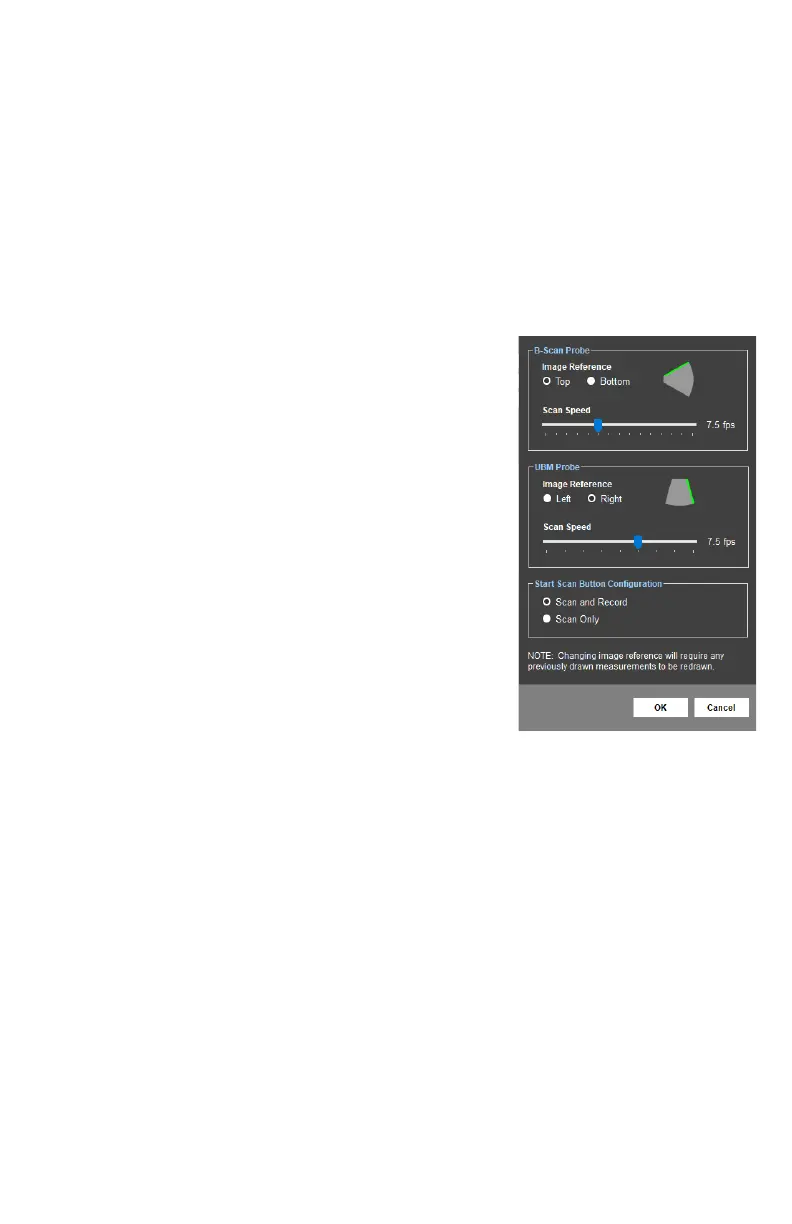
The B-Scan Page Preferences allow the user to adjust image reference, scan speed and scan/
record sengs.
Image Reference: The green line indicates the side of the
image/video that will correspond to the
top posion on the probe.
NOTE: Changing the image reference seng will change the
orientaon of the images stored in the database. If this
reference is changed aer images have been acquired, any
measurements overlaying the image will need to be redrawn.
Scan Speed: Determines the number of frames
that are acquired per second during a
scan.
Start Scan Buon The [START SCAN] and [RECORD]
Conguraon: buons on the B-Scan page can be
congured to operate together or
independently.
- Scan and Record: When the [START SCAN] buon is clicked to start a
scan, the soware will automacally record video. Recording will stop
when the scan is stopped.
- Scan Only: When the [START SCAN] buon is clicked, the scan will
start; however, video will not be recorded unl the [RECORD] buon is
clicked. Recording can be toggled on/o as needed during a scan.



 To Next Page