28
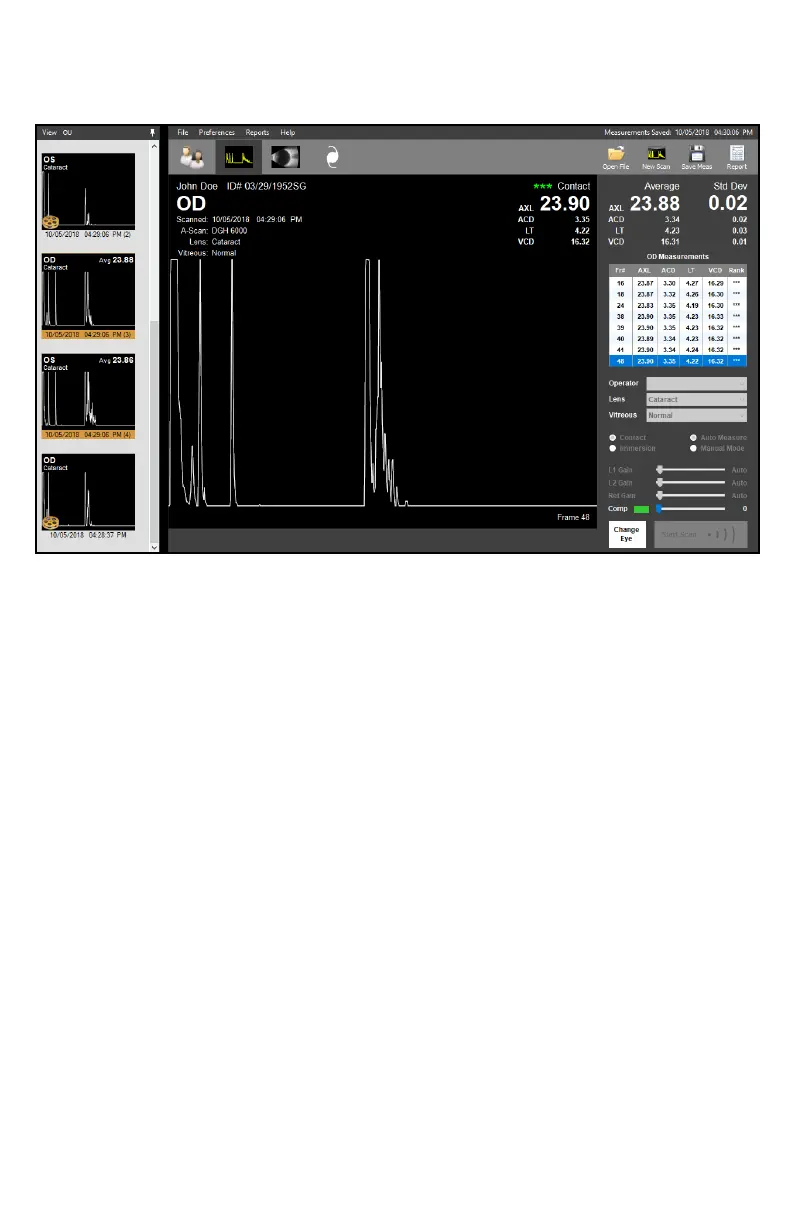
A-SCAN SCREEN
The A-Scan Screen allows the user to perform A-Scan procedures and review the loaded
paent’s A-Scan records.
Open File: To view A-Scan videos, measurements and records associated with the
current paent, click the [OPEN FILE] buon in the upper right-hand
corner. Load the desired le from the window by double-clicking the
corresponding icon.
Measurement Type: If performing a new measurement, it is necessary to select the
measurement type by marking the [CONTACT] or [IMMERSION] radio
buon.
Measurement Mode: Measurements can be taken in Manual Mode or Auto Measure Mode.
In Manual Mode, the operator must manually select the measurements
to be entered into the measurement bank and manually stop the scan.
In Auto Measure Mode, measurements that meet alignment criteria will
automacally be entered into the measurement bank, and
measurement will stop once the bank has been populated with
measurements that fall within Standard Deviaon requirements. Refer
to the Alignment Ranking System secon for more informaon.
To select the measurement mode, mark the [AUTO MEASURE] or
[MANUAL MODE] radio buon.
Begin New Scan: To begin a new scan, click the [NEW SCAN] buon in the upper right-
hand corner, to begin scanning click the [START SCAN]† buon in the
lower right-hand corner. To stop the scan, click the same buon. To
switch between the OD and OS, click the [CHANGE EYE]† buon.
†This command may be executed through voice control. Refer to the A-Scan Voice Controls secon.



 To Next Page