Operation 23
6 Operation
The machine is equipped with sample programs with preset parameters (see Example Programs
on page 64).
It is possible to optimise a program for your products by modifying the parameters of a program,
see Changing the Program Settings on page 31.
• All persons responsible for the operation of this machine must at least fully read and
understand the chapters Safety on page 8 and Operation on page 23.
• Failure to follow or disregard of the safety instructions may result in serious injury.
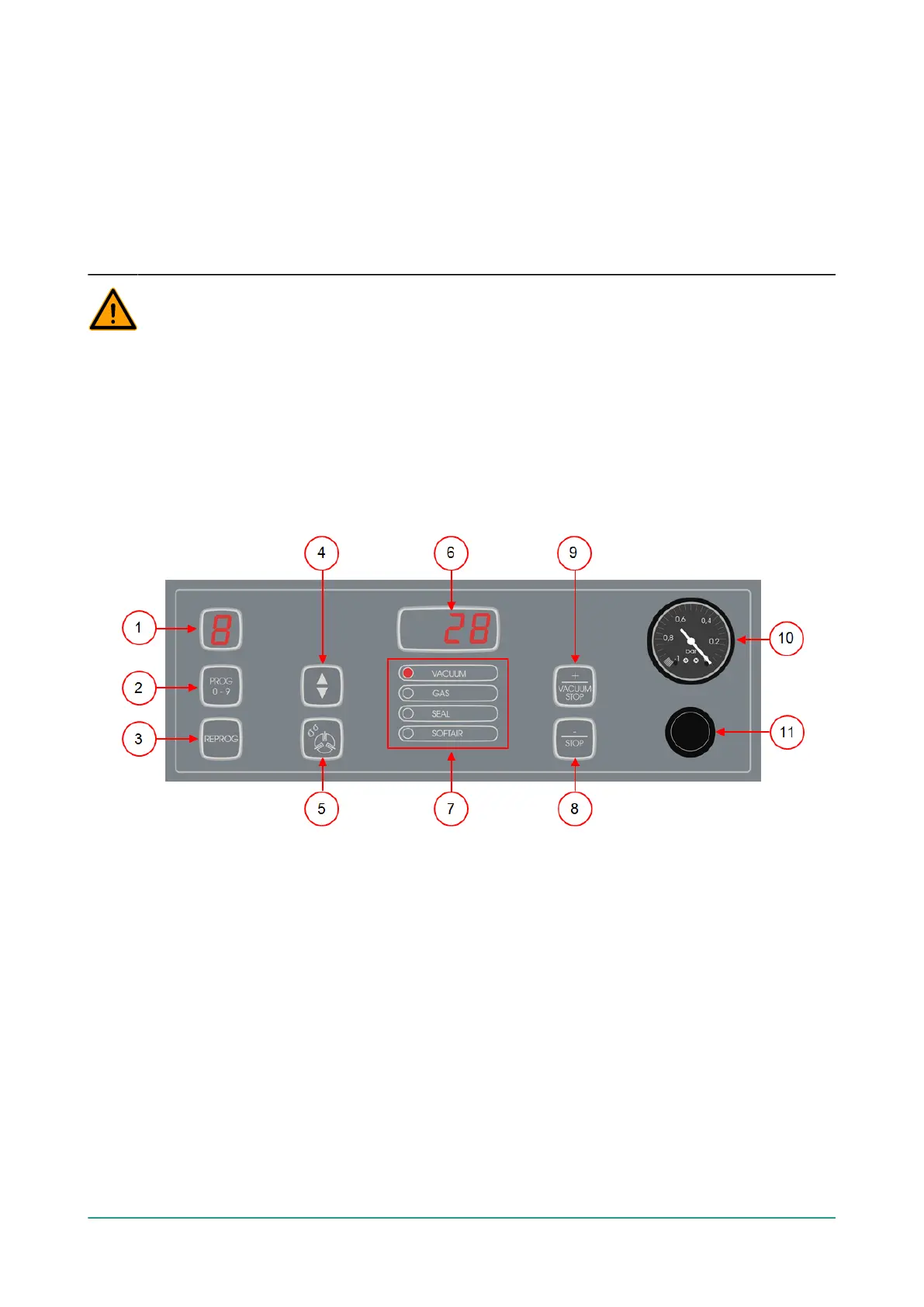
6.1 Operating Elements of the 10-Program Control System
The 10-program control system allows the machine to be operated and programs to be changed.
See Operation on page 23 for instructions on the operation and programming.
Figure 6: Control Panel of the 10-Program Control System
1. Program display
Shows the selected program.
2. PROG 0 – 9 button
This is used to select the desired program.
3. REPROG button
This is used to enable the programming mode. The parameters can be changed using the
Cursor key, the – / STOP button and the + / VACUUM STOP button.
4. Cursor key
This key is used to operate the functions of the parameter display and function display.



 To Next Page