Operation 46
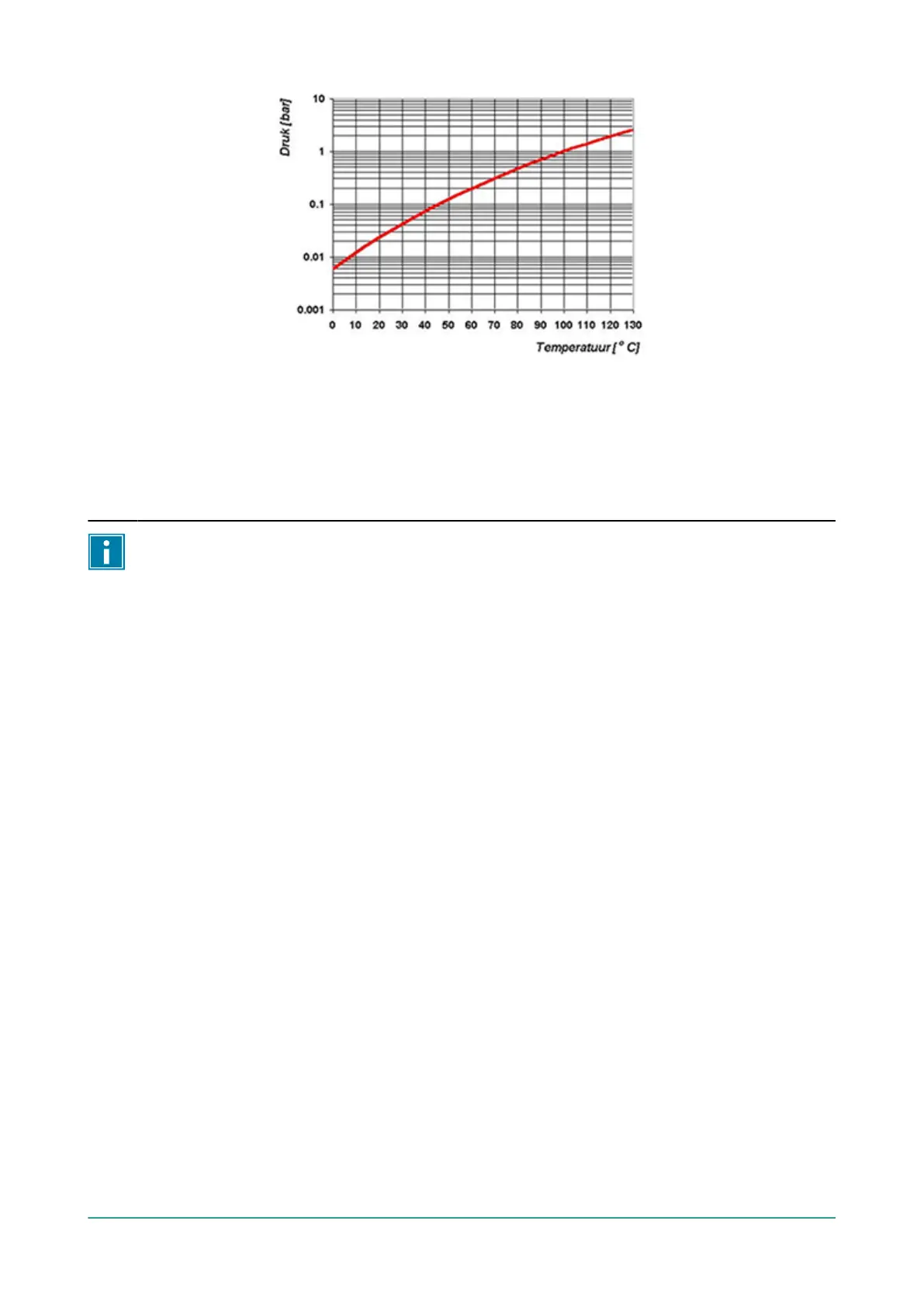
Figure 15: Vapour Pressure Curve of Water
6.9 Printer (ACS only)
A printer can be connected to the machine to print package labels.
From software version 90, the mounted sensor is automatically detected. A message is
displayed if you close the lid and no sensor is detected.
6.9.1 Connecting a Printer
To connect a printer to the machine, follow the steps below:
1. Connect the printer to the mains supply.
2. Connect the printer to the USB connector on the machine.
3. Turn on the printer.
4. Select the correct printer in the machine menu.
a. Open the menu.
b. Enter the owner code 1324.
c. Go to Settings.
d. Go to 1.1 Printer.
e. Select ZD410.
f. Press the cursor key
◄
to return to the menu.
6.9.2 Creating a Label
To create a label, perform the steps below:
1. Open the menu.
2. Enter the owner code 1324.
3. Go to Settings.
4. Go to 1.1 Printer.
5. Go to Labels.
6. Enter the desired information.



 To Next Page