Operation 36
2. Program the External Vacuum program according to the steps specified in 10-Program Control
System on page 31.
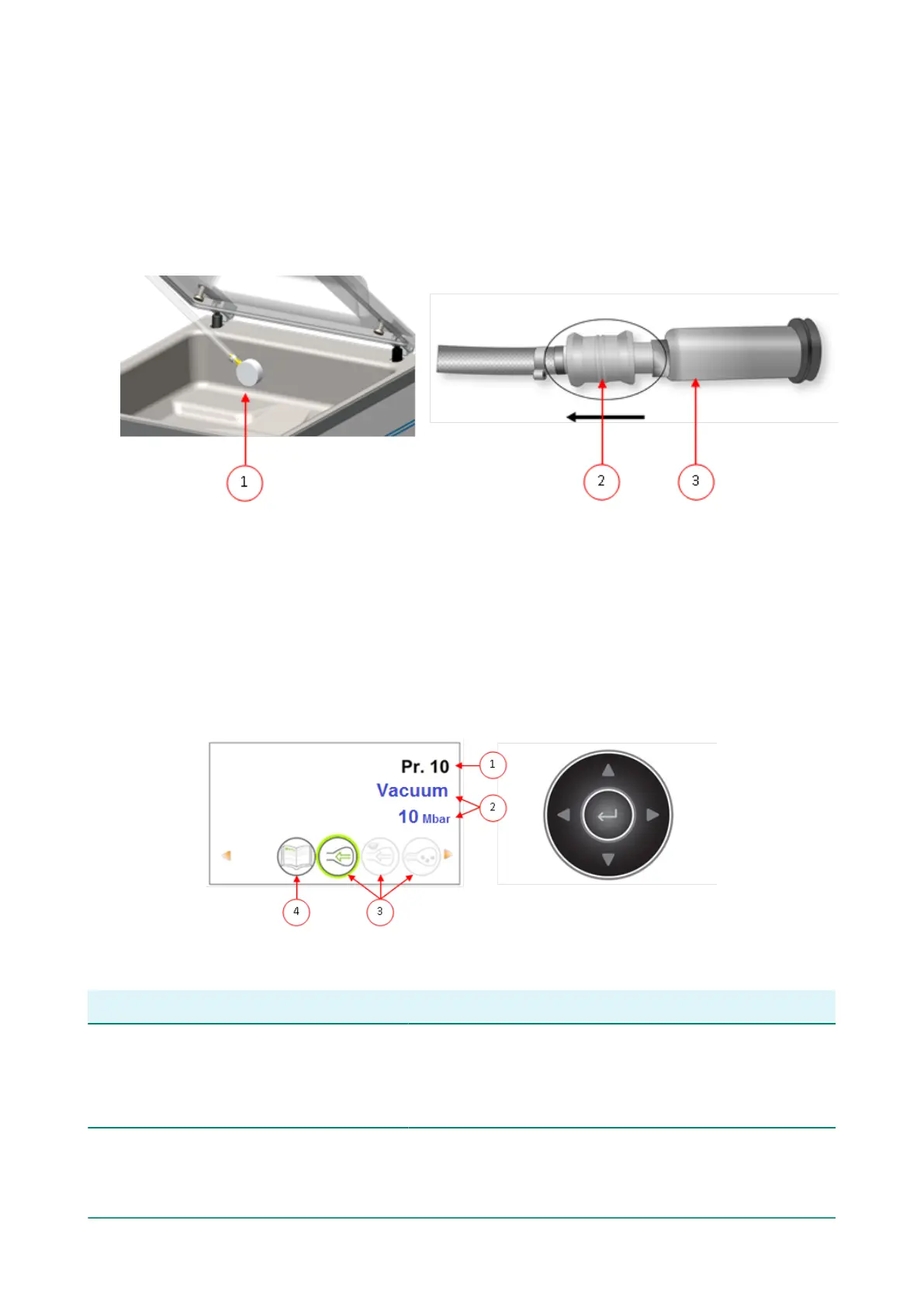
3. Connect the external vacuum hose to the machine by placing the adapter over the suction
inlet (1) in the vacuum chamber.
4. Connect the external vacuum hose to the packaging.
a. Connect the adapter (3) of the external vacuum hose to the valve of the packaging.
b. Slide the sliding valve (2) towards the hose (closed position).
Figure 12: External Vacuum Adapter Set (10-Program Control System)
5. Press the + / VACUUM STOP button to start vacuuming.
The packaging is vacuumed until the programmed value is reached.
6. Slide the sliding valve of the adapter towards the packaging (open position) and remove the
external vacuum hose from the packaging.
6.7.2 Advanced Control System (ACS)
Users can view the machine programs and activate the functions in the navigation mode. This is
the mode that appears immediately after start-up.
Figure 13: Screenshot of the navigation mode and the operating buttons of the ACS
No. Element Explanation
1. Program number/name The program shows the currently selected, pre-set
program. By switching to a different program, other
functions will be activated. The program selection
depends on the product being packaged.



 To Next Page